A kill switch is a sentence about failure. If the tunnel dies, does other traffic still leave, or does the client brick the path until a tunnel exists again? Fail-closed means brick. Fail-open means the OS keeps talking on the cafe LAN like nothing happened. That is the whole product. Marketing will dress it as a shield. The shield is a firewall rule you asked for.
This is not Why You Need a VPN Kill Switch. That piece is the leak-window scare and the how-to enable. This is not VPN Reconnect and Kill Switch: Stay Protected When the Connection Drops. Reconnect tries again. A switch decides whether anything else is allowed while it tries. This is not White-Label VPN and Kill Switch Copy. That one is strings on a branded Settings screen. You are a consumer staring at Klox. Confirm the row. Do not invent a Network Lock because a competitor screenshot had one.
A VPN wraps a path. Wikipedia's VPN page is the noun. RFC 8446 is TLS 1.3 on the website. HTTPS already locked a lot of page bodies. The kill switch is not TLS. It is what happens to packets that are not inside a tunnel you still have. The cafe can still see a hop if those packets leave. The lock in the browser does not pause the NIC.
KloxVPN is WireGuard, OpenVPN, OpenConnect, and Shadowsocks, five devices, yearly from $2.83 a month, 7-day money-back on first purchase. DNS through the tunnel. IPv6 leak protection and WebRTC leak blocking on the features list. Smart Connect, if the app shows the row, is connect on untrusted Wi-Fi. None of that is a kill switch by itself. The switch is a separate row. If your build shows kill switch, network lock, block traffic when disconnected, or a cousin of those words, that is the row. If the row is missing, you have Connect and hope. I will not write a lab procedure that pretends the missing row exists.
I have a bias. Fail-closed on networks you do not run, after the splash page if there is one. Pause it for captive portals. Do not confuse a green Connected badge with a closed failure mode. Cookies: /cookie. Privacy: /privacy. Download the apps from /download if you wanted the client that actually has the toggle.
Related reading: Linux fq_pie: Not a VPN Setting and Linux panic_on_warn: Not a VPN Setting. Linux panic_print_0_hash: Not a VPN Setting and Linux panic_print: Not a VPN Setting. What is a VPN? and DNS leak explained.
Looking for a reliable VPN?
KloxVPN — from $2.83/month. Apps for every device.
Fail-closed in one paragraph
Fail-closed: the tunnel is the only allowed exit. If WireGuard or OpenVPN is not up, the client (or the OS, if you used a system lock) refuses the rest. Mail does not fetch. Maps do not tile. The browser sits on a timeout. That is success for the switch and misery for a splash page. Fail-open: the tunnel is a preference. If it dies, the default route wins. You keep scrolling. Your real IP shows up at the next site. You might not notice for a minute. That minute is the product the switch was invented to delete.
I will not claim Klox's row is ExpressVPN's Network Lock. Their name is theirs. Ours is whatever string your Settings screen actually prints. Open the app. Find the row. Turn it on if you want fail-closed. Leave it off if you would rather keep a route when the handshake sulks. Both are adult choices. Pretending Connected already meant fail-closed is how people leak on a flaky cafe radio and then file a ticket that says the VPN lied.
The rest of this page is the vocabulary around that paragraph. Connected versus protecting. The drop window if you skipped the switch. Why hotel gardens hate it. Why Android Always-on is a cousin, not a twin. Desktop versus phone. When leaving it off is the right call. How to test without a lab. If you already knew fail-closed, the table is enough. Most people I have watched did not know. They saw a green badge and assumed the NIC was in jail.

- 1Skim the seating / order diagram.
- 2Do the numbered steps once on your real network.
- 3Use the FAQ if a sentence was too long.
- 4Follow one related article — not ten tabs.
How to read this page
| What you see | What it often means | Fail-closed? | Honest remainder |
|---|---|---|---|
| Connected / green | Handshake succeeded; a tunnel exists right now | Unknown until you check the row | A badge is not a firewall |
| Protecting / locked | Some clients mean the switch is armed, not just the tunnel | Maybe. Read the label | Do not translate a marketing word |
| Reconnecting | Client is trying. Traffic policy is the question | On: usually blocked. Off: often leaking | Reconnect is not a switch |
| Disconnected, you tapped it | You asked for clear | Should not block if you meant to leave | A switch that bricks Disconnect is a different product |
| No internet, Wi-Fi says connected | Portal, switch, or both | Pause and test | Cafe gardens want a clear hop |
| Row missing in Settings | This build may not ship fail-closed | Do not invent it | Use Connect. Live with a drop window |
Connected is a handshake. Protecting is what happens when the handshake is gone.
— KloxVPN consumer notes
Cloudflare Learning: What is a VPN?
Confirm the row. Do not invent the row
If Settings has no kill switch, no network lock, no block-when-down, you do not have a consumer fail-closed you can document from a blog. Write support if you expected it. Do not enable a random OS firewall tutorial and call it Klox.
Fail-open is still a VPN
A tunnel that drops and then leaks is still a tunnel while it is up. It is a worse tunnel. Plenty of people live that way on purpose because portals and printers. Know which mode you bought.
Connected is not protecting
Connected answers: did the handshake finish? Is there a peer? Can this device send into WireGuard or OpenVPN right now? Protecting, if the client even uses that word, should answer: if that peer vanishes, will anything else leave? Those are different lights. Farms mash them because both are green and both sell a feeling.
I have watched people screenshot Connected and call it a kill switch test. It is not a test. A test is: pull the tunnel out from under the badge and see whether a site still loads on the real NIC. If it loads, you were connected and fail-open. If it dies, you were connected and fail-closed, or you lost the whole interface for some other reason. Losing Wi-Fi is not a kill switch. Losing the VPN adapter while Wi-Fi stays up is the interesting case.
Some UIs print Protecting as a synonym for Connected. That is copy, not physics. Read it like a billboard. Then open Settings. The row that actually closes the door is the one that mentions blocking, locking, or killing traffic when the VPN is down. If Klox's string is simply Kill switch, that is the row. If a build says something else, believe the glass, not this paragraph's wish.
The Why You Need a VPN Kill Switch article will tell you to turn it on. Fine. This page will tell you that turning it on is how Connected becomes a state that can survive a drop without donating an IP. Until the row is on, Connected is a rental. The landlord can leave.
A badge is a status, not a policy
Status: up or down. Policy: what the NIC is allowed to do when status is down. Kill switch is policy. Reconnect is a hope about status. Do not pay for hope and call it policy.
Protecting as a marketing word
If the home screen says Protecting the second the handshake lands, treat it as Connected with nicer type. Look for a Settings row. If there is none, you have a badge.
The drop window if you skip the switch
Cafe radios drop. Hotel APs reboot. Laptops sleep and forget a peer. Mobile hops from Wi-Fi to cellular. None of that is exotic. Without fail-closed, each drop is a window where the default route is honest again. HTTPS still encrypts page bodies on TLS sites. RFC 8446 did not move. The cafe still gets destination IPs, often SNI, DNS if names are not inside some other encryption. Your ISP at home gets the same class of leftover. The window is not 'they read your password from the wire' on a modern bank. The window is 'they saw who you talked to, and the site saw your real IP.'
How long? Seconds if you notice. Minutes if a background tab keeps loading and you are talking. Hours if a download client does not care about your badge. Torrenting without a switch is the classic horror story and I will not rewrite it. Mail fetch is the boring version. Sync does not wait for you to feel unprotected.
Reconnect without a switch is a race. The client tries. The OS already sent packets. Winning the race sometimes is not a policy. The VPN Reconnect and Kill Switch: Stay Protected When the Connection Drops piece is the pairing. Here the plain-English remainder is: reconnect is an attempt. The switch is a gate. Buy the gate if the window bothers you. Live with the window if you would rather never fight a portal.
I will not quote an SLA for how fast Klox reconnects. There is no percentage on this page. Handshake time depends on the network, the protocol, and whether the splash page already hates you. WireGuard is usually the faster try. OpenVPN is the spare tire when UDP is rude. Neither is a switch.
HTTPS does not close the window
TLS hides contents. The hop is still a hop. A VPN hides the hop from the LAN by making the interesting packet a blob to a VPN server. When the tunnel dies without a switch, the hop is public again. That is the window.
Background apps do not wait
The badge is in the tray. The fetcher is not looking at the tray. Fail-closed is how you make the fetcher wait whether you are watching or not.
Why cafe portals hate fail-closed
A captive portal wants a clear HTTP hop so it can show a login, a voucher, an I agree, a room number. Your OS tries to detect that garden. A VPN that starts the instant the radio associates can steal the first hop. A kill switch that is already armed can then block the HTTP the portal still needs. Deadlock. Wi-Fi says connected. Nothing loads. No splash. You reboot. You blame the product. The product did what fail-closed means.
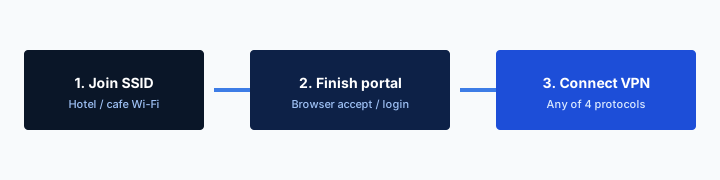
Order, the ugly one that works: join the SSID. If Smart Connect already fired, Disconnect. Pause the switch if traffic is still blocked. Complete the page. Confirm a boring site loads. Connect Klox. WireGuard first. Restore the switch if you still want it. You will be naked on that LAN for a minute. That is the cost of the garden. I will not claim zero exposure. I will claim this is normal.
The VPN on Cafe Wi-Fi: A Habit, Not a Superpower essay is the longer ritual. This section is only the collision: fail-closed and splash pages are not friends. If your travel week is nothing but hotels, leaving the switch off until after the portal is a strategy, not a character flaw. Forgetting the switch at home after the trip is a different mistake.
If there is no splash, you already have a route. Then waiting is how mail fetches on cafe DNS. Connect. Arm the switch if you want the drop to hurt instead of leak. Do not perform a portal ritual that is not there.
Pause is not uninstall
Two minutes of clear for a garden is not a lifestyle. Restore the row. If your client has a pause-for-Wi-Fi-login shortcut, use it. If it does not, the sequence is still the same. Manual is allowed.
Smart Connect can start the fight
If the app shows Smart Connect, it means connect on untrusted Wi-Fi. That can race a portal the same way a kill switch can brick one. Disconnect, pause, splash, connect, restore. If the row is missing, you have a Connect button. Use the button after the page.
Always-on is a cousin, not a twin
Android Always-on VPN is an OS policy: keep this VpnService up. Block connections without VPN is the stricter cousin: if that service is down, nothing else leaves. That second box is fail-closed implemented by Google, not by a Settings string inside Klox. It can deadlock a hotel the same way. It can also hold a device seat overnight because the tunnel never dies. The Android Always-On VPN: When to Use It article is the household version of that lock. This page will not clone it.
Desktop kill switch is usually the VPN app writing firewall rules. Phone Always-on is the OS watching the VPN app. You can have Always-on without the app's own kill-switch row. You can have the app row without Always-on. You can have both and then wonder why a splash page never appears. Count the locks. Do not assume one badge armed all of them.
iOS is ruder about what a third-party VPN may brick. Do not copy an Android lockdown screenshot onto an iPhone and call it the same product. Confirm the rows on the device in your hand. Five devices means five different Settings screens if you are the kind of person who mixes a Pixel, an iPhone, a Windows laptop, and a Mac. The plan is five. The physics are per OS.
I want Always-on on a travel phone whose owner knows the portal dance. I want the app kill switch on a laptop that lives in cafes. I do not want both on a kid tablet that has to join school Wi-Fi before breakfast. That is how dinner becomes a ticket.
OS lock versus app lock
OS lock survives the app crashing, sometimes. App lock dies with the app, sometimes. Neither sentence is a warranty. Read the OS help for Always-on. Read Klox Settings for the app row. Do not mash the help articles.
Five seats still count under a lock
A tablet with Always-on at home is still a connected seat. Fail-closed does not make the seat free. Revoke in the portal if you need the cafe laptop to handshake.
Desktop versus phone
A laptop kill switch is loud. Browsers timeout. Slack sulks. You notice because you were typing. A phone kill switch is quiet. The radio already flakes. You assume the cafe is bad. Background fetch fails and you find out when mail is empty at the gate. Same policy. Different UX. That is why people leave the phone switch off and keep the laptop one on. It is not hypocrisy. It is which failure they can see.
Desktop also has printers, NAS, local SSH, a game on the LAN. Fail-closed can brick those even when the WAN tunnel is fine, depending on how the client wrote the rules. If the app shows split tunneling, you might exclude a local target. If the row is missing, pause the tunnel for the printer job. Do not invent a per-IP bypass because a Features page mentioned split tunneling in the abstract. The glass is the source of truth.
Phone has cellular as a spare path. If Wi-Fi plus fail-closed is a brick, disable Wi-Fi and use the carrier. That is a valid travel move. It is also a second hop your carrier can see. A tunnel on cellular is still a tunnel. Fail-closed on cellular still bricks you if the handshake dies and you have no Wi-Fi left. Think before you arm both radios into a corner.
WireGuard first on both. OpenVPN when the path is rude. Protocol choice does not replace the switch. It changes how often the switch has to fire. A rude AP that kills UDP will fire it a lot. Switch protocol before you disable fail-closed as a personality.
Laptop: you will notice the brick
Good. Notice is the point. If you cannot work, pause, fix the portal or the protocol, restore. Do not live paused because noticing was annoying once.
Phone: you will blame the cafe
Toggle airplane, toggle Wi-Fi, open the Klox app, look at the badge and the switch. If the badge is reconnecting and the switch is on, the cafe might be fine. You asked for a brick.
When leaving it off is the right call
Leave it off for the garden, then put it back. Leave it off on a week of hotels if you cannot be trusted to pause it ten times a day and you would rather a leak window than a brick. Leave it off on a desktop that must talk to a local license server you cannot exclude. Leave it off if the row exists but turning it on breaks every printer and you have already confirmed split tunnel is missing.
Do not leave it off because a ranked list said kill switches cause 'connection issues' as if that were a defect. Fail-closed is the issue. You bought the issue. Do not leave it off because the cafe felt slow once. Slow is protocol, server, or a tiny AP. Try OpenVPN. Move seats. Use cellular. Slowness is not an argument against a gate.
Do not leave it off on a laptop you torrent from, then ask support why an IP showed up. I will not coach torrenting. I will say the window is real. Do not leave it off and then claim the privacy policy failed you. /privacy is files. The switch is packets. Different drawers.
I still want it on for untrusted Wi-Fi after the splash. That is the default I will defend. Skipping the default is allowed when you can name the leftover. Forgetting the default is why Smart Connect exists, and Smart Connect is not a kill switch.
Skip is a named leftover
I paused fail-closed so the hotel page could load. That is a skip. I never turned it on because the toggle was in Settings and I was busy. That is a forget. Only the first one is a strategy.
Printers are a pause, not a philosophy
Print. Restore. If this is daily, look for split tunnel in the app. If the row is missing, live with pause, or live without the tunnel on that machine. Do not demand a dedicated-IP SKU. We do not sell a consumer dedicated IP.
How to test without a lab
You do not need Wireshark. You need a site that shows an IP, a browser, and a way to drop the tunnel without dropping Wi-Fi. Connect Klox. Load the IP page. Note the VPN address. Disconnect in the app, or kill the client process if you are sure you know how. Reload. If you see your real IP and the page loads, fail-open. If the page hangs and nothing else works either, fail-closed, or you also killed the NIC. Reconnect. Confirm the VPN IP returns.
Do this on a network you control first. A home guest SSID is enough. Do not make a hotel lobby your first rehearsal. Do not test by turning Wi-Fi off. That tests whether you have cellular, not whether the switch works. Do not test by rebooting the router unless you like chaos.
If the row was off, turn it on, repeat. If the row is missing, you just measured fail-open. Live with it or write support. I will not paste iptables into a consumer blog so you can roleplay a switch we did not ship.
Leak tests after a healthy connect still matter: DNS, IPv6, WebRTC. Those are Features-page sentences and a different article. They answer 'is this session messy while up.' The kill switch answers 'is this session messy when down.' Run both if you are the kind of person who runs either. Then drink the coffee. Yearly from $2.83 a month does not include a lab technician. Five devices means you may want to test the laptop and the phone separately. They are not the same lock.
Drop the tunnel, not the radio
Wi-Fi off is the wrong experiment. The switch cares about VPN down, LAN still up. That is the cafe drop. Rehearse that.
One change, then stop
Do not toggle protocol, server, switch, and Smart Connect in the same minute. You will not know what you proved. WireGuard, switch on, drop, reload. Write down what happened. Then change one thing.
Key Takeaways
A kill switch is fail-closed. If the tunnel dies, other traffic should stop, if the client actually shipped that row. Connected is a handshake. Protecting is a word you should not trust until Settings agrees. The drop window without a switch is real and HTTPS does not delete it. Cafe portals hate the brick. Pause, splash, restore. Android Always-on is a cousin. Test by dropping the tunnel, not the radio.
Klox is WireGuard, OpenVPN, OpenConnect, and Shadowsocks, five devices, yearly from $2.83 a month, seven-day first-purchase money-back. Smart Connect, if the row exists, is untrusted Wi-Fi. No city count. No SLA. No dedicated-IP SKU. Confirm the kill-switch row on the glass. If it is missing, you have Connect and a window.
If you wanted the scare-and-enable how-to, that URL already exists. If you wanted reconnect paired with a switch, that URL exists too. If you wanted strings for a white-label Settings screen, that is a different chair. If you wanted a client you can actually download, use the button.
Related Resources
Fail-closed lives in the app, not in a badge
KloxVPN is WireGuard, OpenVPN, OpenConnect, and Shadowsocks, five devices, yearly from $2.83 a month, 7-day first-purchase money-back. Confirm kill switch in Settings. Smart Connect, if shown, is connect on untrusted Wi-Fi. Pause both for a splash page.
Download KloxVPNFrequently Asked Questions
KloxVPN Team
Experts in VPN infrastructure, network security, and online privacy. The KloxVPN team has been building and operating VPN services since 2019, providing consumer and white-label VPN solutions to thousands of users worldwide.