Windows VPNSecure your PC
Encrypt Wi-Fi and Ethernet with one click. KloxVPN for Windows includes kill switch, split tunneling, four protocols, and 60+ countries—from the system tray.
Also: Mac VPN, Linux, Chrome extension
Five devices
First purchase
x64 & ARM .exe
WireGuard default
Inside the Windows app
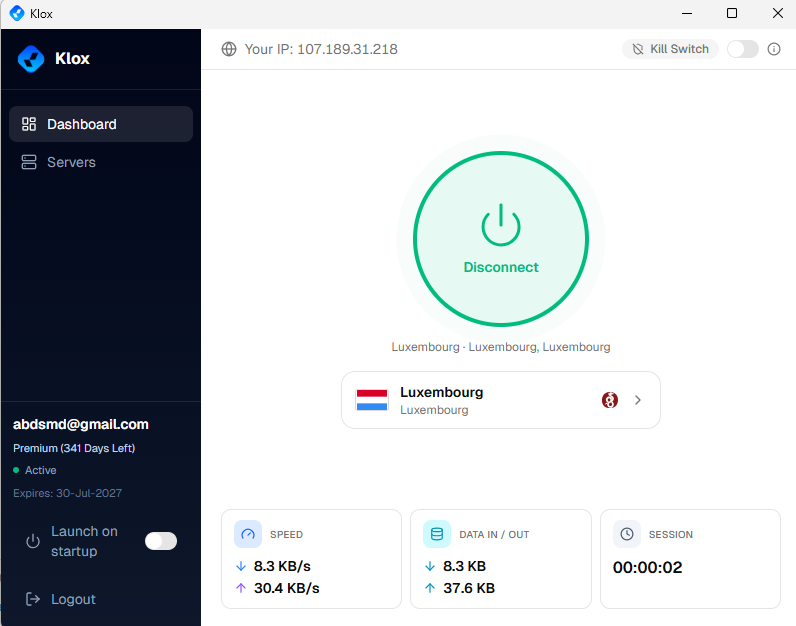
From first launch to connected—native desktop UI built for Windows 10 and 11
Live session stats
When connected, view download and upload speed, data in/out, and session timer—with a green ring around Disconnect.
- Real-time speed and data counters
- Masked IP while tunnel is active
Connected
What is VPN for Windows?
A VPN for Windows encrypts traffic from your PC or laptop before it reaches the internet. On hotel Wi-Fi, campus networks, or your home ISP connection, KloxVPN wraps data in a tunnel to our servers so observers see encrypted packets—not which apps or sites you use.
The Windows app supports WireGuard, OpenVPN, OpenConnect, and Shadowsocks, plus split tunneling and a kill switch. Install the matching x64 or ARM .exe for Windows 10 and 11, then control everything from the system tray.
New to desktop VPN? Follow our Windows VPN setup checklist. Compare with Mac VPN or Windows Firewall notes.
Windows VPN app features
Full desktop protection—not a browser-only workaround
Four protocols
WireGuard, OpenVPN, OpenConnect, and Shadowsocks—switch when a network blocks UDP.
Kill switch
Fail-closed protection if the tunnel drops on public or hotel Wi-Fi.
Split tunneling
Send only chosen apps through the VPN; keep games or LAN tools on direct route.
System tray app
Connect from the tray, auto-start on boot, and quick server switching.
No-logs policy
We do not track, store, or sell your Windows browsing or app usage.
Windows vs Mac VPN
Same Klox account—pick the installer for your OS
| Feature | Windows | macOS |
|---|---|---|
| Installer | .exe (x64 or ARM) | .dmg direct download |
| Protocols | WireGuard, OpenVPN, OpenConnect, Shadowsocks | Same four protocols |
| Split tunneling | Per-app routing | Per-app routing |
| Tray / menu bar | System tray control | Menu bar app |
| Best for | PC gaming, office laptops | MacBook daily driver |
Why you need a VPN on Windows
Your PC handles more sensitive data than your phone
Public Wi-Fi safety
Cafés, airports, and coworking networks expose logins. Encrypt before you open banking or email.
Streaming & geo content
Pick a server region for libraries that geo-check your IP—where platform terms allow.
ISP throttling
Encrypted traffic is harder for providers to shape or throttle by service type.
Remote work PC
Extra layer when your laptop leaves the corporate office network.
Windows VPN use cases
Where the desktop app matters most
Home desktop & laptop
Always-on encryption for the PC that handles bills, shopping, and family accounts.
Gaming & streaming
Split tunnel games locally while the browser uses the VPN—or full tunnel when traveling.
Campus & office guest Wi-Fi
Protect research, SaaS logins, and cloud tools on networks you do not control.
ARM Windows laptops
Native ARM .exe for Snapdragon and ARM PCs—same four protocols as x64.
How to install KloxVPN on Windows
Download, install, connect in under five minutes
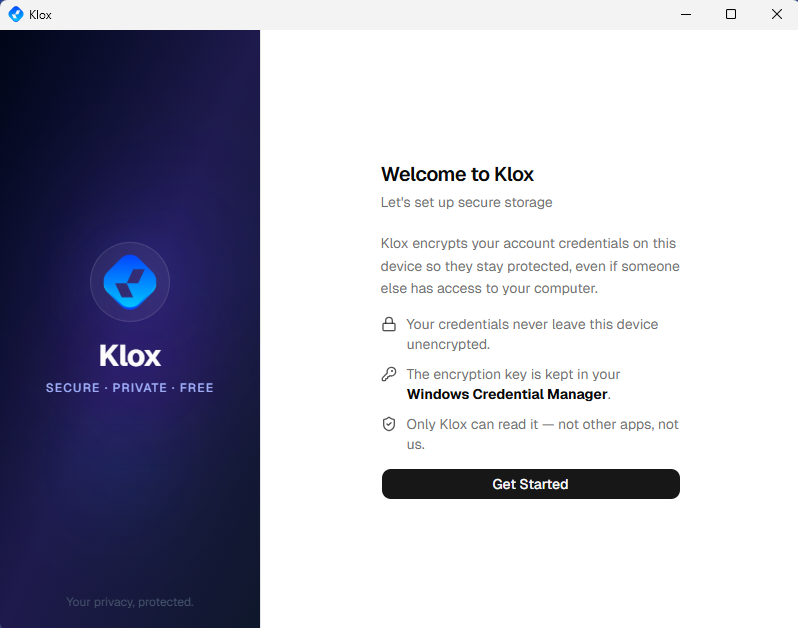
Install, then Get Started
Run the .exe, complete the welcome flow, sign in, and you land on the dashboard ready to connect. Credentials are stored locally with Windows Credential Manager.
Get the Windows installerGet KloxVPN
Subscribe, then open the Windows section on our download page.
Download .exe
Pick x64 or ARM. Run the installer as administrator when prompted.
Sign in & configure
Log in, choose protocol (WireGuard first) and a server country.
Connect
Click Connect. Enable kill switch or split tunnel if you need them.
x64 vs ARM Windows installers
Intel and AMD PCs use the x64 .exe. Snapdragon and ARM-based Windows laptops need the ARM build. Both support the same four protocols and five-device subscription. Pick the matching file on the download page.
VPN server locations for Windows
Switch country from the desktop app
| Location | Best for |
|---|---|
| United States | Streaming, browsing, gaming |
| United Kingdom | BBC iPlayer, UK apps |
| Netherlands | EU privacy, low latency |
| Germany | Streaming, privacy |
| Singapore | Asia, competitive latency |
| Canada | North American content |
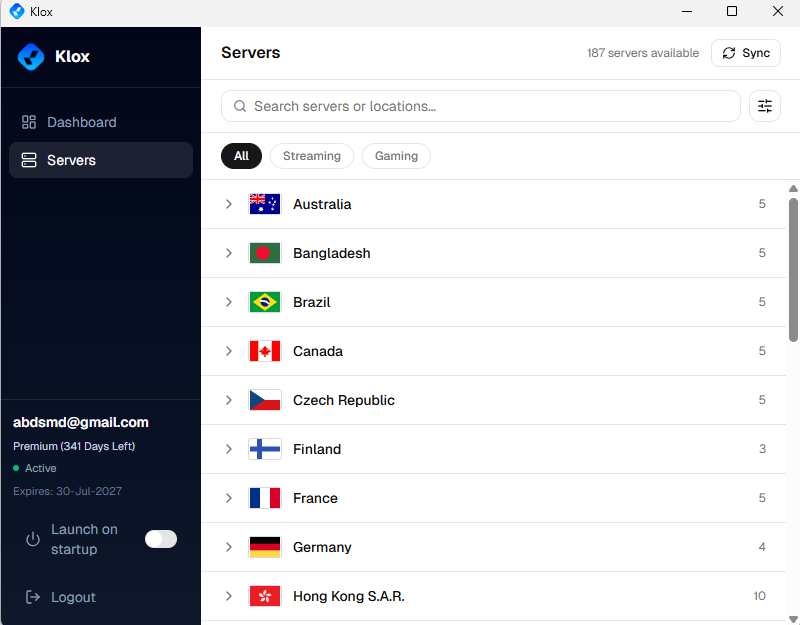
Browse countries in the app—search, filter, and sync from the Servers tab.
Verify with our VPN tools.
Windows VPN FAQ
PC install, protocols, and compatibility
Secure your Windows PC
Yearly from $2.83/mo · 7-day money-back guarantee
Five devices · Four protocols · x64 & ARM .exe
Mac VPN · Linux VPN · iOS · All downloads