iOS VPNiPhone & iPad protection
Encrypt Wi-Fi and 5G with one tap. KloxVPN for iOS includes kill switch, four protocols, and 60+ countries—built for iPhone and iPad on the App Store.
Also: Android, Mac, iOS update notes
Five devices
First purchase
iPhone & iPad
WireGuard default
Inside the iOS app
Connect, sign in, pick servers, and use built-in network tools on iPhone and iPad
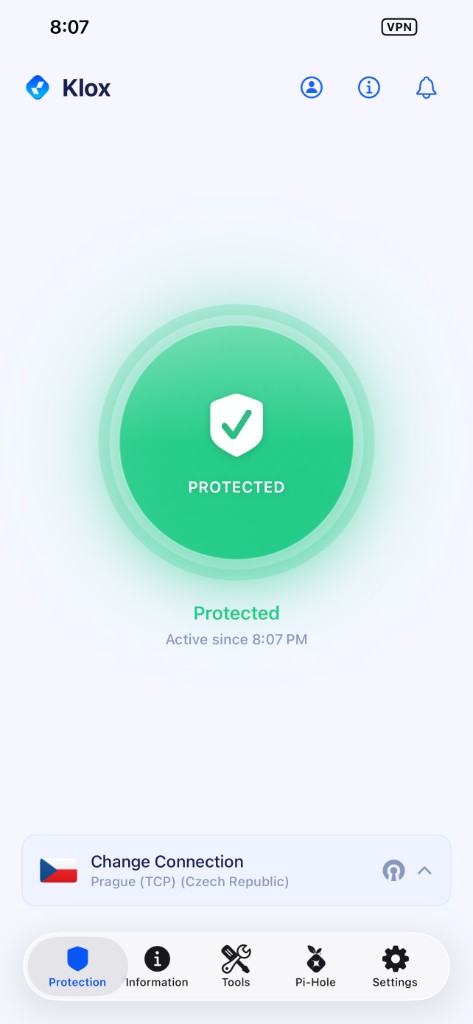
Protected on iPhone and iPad
Green shield when the tunnel is active. See when protection started and tap Change Connection to switch city or protocol.
- Green PROTECTED shield when the tunnel is active
- Session time and quick server change from the bottom bar
Protected
What is VPN for iPhone and iPad?
A VPN for iOS encrypts traffic from your iPhone and iPad before it leaves the device. On public Wi-Fi, hotel networks, or 5G/LTE, KloxVPN wraps data in a tunnel to our servers so observers see encrypted packets—not which apps you open or sites you visit.
KloxVPN uses Apple’s Network Extension APIs for a native VPN experience. The app supports WireGuard, OpenVPN, OpenConnect, and Shadowsocks, plus a kill switch when you want traffic to stop if the tunnel fails.
Need a Mac or Android too? See Mac VPN and Android VPN. For on-demand rules, read iOS VPN on demand.
iOS VPN app features
Native iPhone and iPad security—not a configuration profile workaround
Four protocols
WireGuard, OpenVPN, OpenConnect, and Shadowsocks—pick what works on your network.
Kill switch
Stops traffic if the tunnel drops so your IP stays hidden on public Wi-Fi.
Network Extension
Native iOS VPN integration—stable background connection while you use other apps.
60+ countries
US, UK, Japan, Canada, EU exits, and more for travel and streaming.
No-logs policy
We do not track, store, or sell your iPhone or iPad activity.
iOS vs Android VPN
Same Klox account—platform differences that matter
| Feature | iOS (iPhone / iPad) | Android |
|---|---|---|
| Coverage | All apps when VPN is on | All apps + split tunnel options |
| Install | Apple App Store | Google Play or APK |
| Protocols | WireGuard, OpenVPN, OpenConnect, Shadowsocks | Same four protocols |
| Per-app control | System-wide tunnel | Split tunneling supported |
| Best for | iPhone & iPad users | Phones needing app-level routing |
Why you need a VPN on iOS
Your phone leaves the house every day—protect it on every network
Public Wi-Fi safety
Airports, hotels, and cafés expose logins. Encrypt before you open Mail or banking apps.
Travel & roaming
Mask your home IP abroad and access apps that expect a local connection.
Carrier privacy
Cellular providers see less about which services you use when traffic is encrypted.
Secure payments
Extra protection when shopping or paying on networks you do not control.
iOS VPN use cases
Where the iPhone app matters most
Daily mobile life
Commute Wi-Fi, coffee-shop work, and airport layovers without exposing traffic.
iPad streaming
Encrypt Netflix, sports, and travel apps on the tablet—where platform terms allow.
International travel
Connect to a familiar exit region before using apps that geo-check your IP.
Remote work phone
Protect client email and SaaS when off the corporate device management profile.
How to install KloxVPN on iOS
App Store install in under five minutes
Get KloxVPN
Subscribe, then open the App Store on iPhone or iPad.
Install & sign in
Search Klox, install, then sign in with Apple, Google, or your subscription email.
Allow VPN config
iOS prompts to add VPN configurations—tap Allow.
Connect
Pick a server country. Tap connect. Enable kill switch if you want fail-closed behavior.
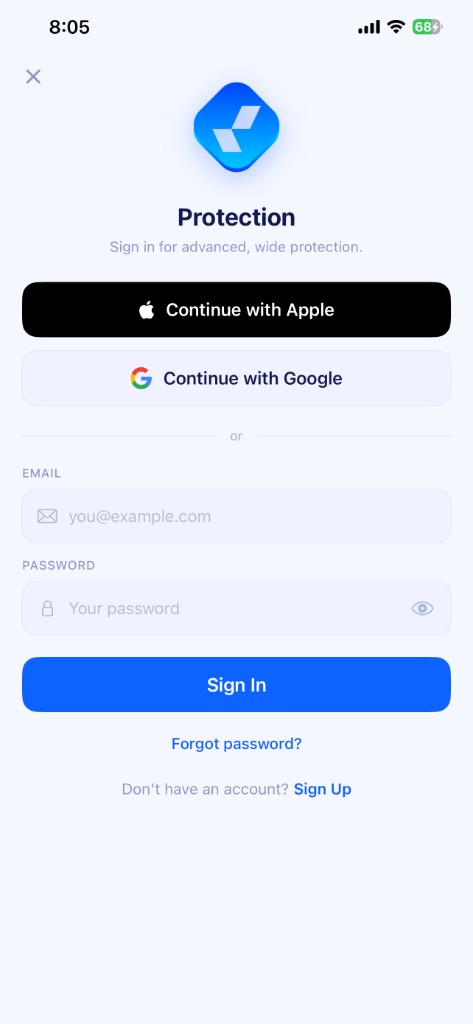
Sign in after install
Open the app, tap Continue with Apple or Google, or enter the email from your KloxVPN subscription. iOS will prompt you to allow VPN configurations—tap Allow so the tunnel can connect.
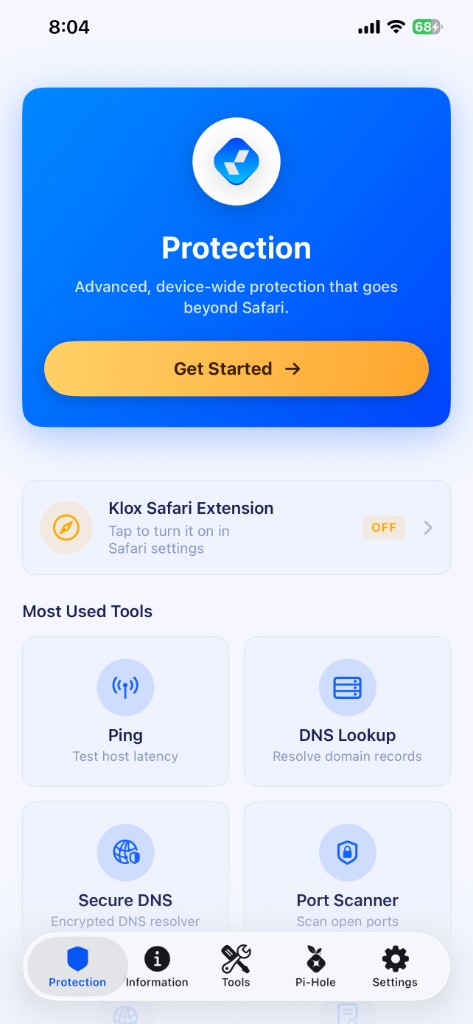
iPhone + iPad, one subscription
Install on both devices with the same account. Each connected device counts toward your five-device limit. The Protection hub adds ping, DNS tools, and Safari extension setup beyond the core VPN tunnel.
Remove old phones from the portal when you upgrade hardware.
VPN server locations for iOS
Switch country from the app
| Location | Best for |
|---|---|
| United States | Streaming, browsing, low latency |
| United Kingdom | BBC iPlayer, UK apps |
| Japan | Asia streaming, gaming |
| Canada | Privacy, North American content |
| Germany | EU privacy, streaming |
| Australia | APAC regional libraries |
Browse countries in the app—search and pick TCP or UDP per city.

Verify with our VPN tools.
iOS VPN FAQ
iPhone, iPad, and App Store questions
Protect your iPhone and iPad
Yearly from $2.83/mo · 7-day money-back guarantee
Five devices · Four protocols · App Store install