A router VPN is one tunnel on a box in a closet. Per-device apps are tunnels on the gadgets people actually carry. Both are a VPN. Wikipedia's VPN page does not pick for you. RFC 8446 is TLS on websites, not a reason to flash firmware.
Klox consumer is five simultaneous devices, WireGuard, OpenVPN, OpenConnect, and Shadowsocks, yearly from $2.83 a month, 7-day money-back. A router client is usually one of those five and then covers everything behind it: phones at home, TVs, bulbs, the guest who asked for the Wi-Fi password. The apps are up to five seats that can leave the building. That is the fork. Not 'which is more secure' in the abstract. Which job you hired.
This is not the VPN on Router: Setup Tips walkthrough. That piece is compatible hardware, config import, OpenWrt, troubleshooting. This is not a white-label firmware essay. That piece is what a brand may promise on CPE. This is not a family seating chart, though five seats will show up. This is not an Android TV store-listing memo. If the TV has no app, I will say so, then send you to a router hop or a stick that can run a client.
I have a bias. Travelers should download the apps. Houses full of IoT should consider one router seat. Most people who ask 'router or apps' want both and will hate the overlap. Pick a primary. Use the other as an exception. Pricing does not change because you chose a closet.
Competitor router pages will sell you a preconfigured box and a feeling of completeness. Completeness at home is not completeness in a cafe. Keep those rooms separate.
Related reading: Family VPN on Five Devices and White-Label VPN and Router Firmware Limits. White-Label VPN and Tv And Android Box and What is a VPN?. Android VPN setup and iOS VPN setup.
Looking for a reliable VPN?
KloxVPN — from $2.83/month. Apps for every device.
One router slot versus five app slots
Count seats, not feelings. An app on a phone is one connected session. An app on a laptop is one. A router that holds a WireGuard or OpenVPN client is one session toward the VPN, then a NAT for the LAN. You did not magically get unlimited Klox devices. You spent one seat on a choke point.
That choke point is the whole point. Five app seats cannot cover thirty IoT addresses. One router seat can, on that LAN, until the CPU cries. Five app seats can cover a phone in an airport. A router seat cannot. If you try to make the router do travel, you will carry a travel router, and that is a third lifestyle I will mention and not romanticize.
Install is still free of the counter. Connect is not. A router that stays up 24/7 occupies the seat 24/7. Apps you disconnect free seats. People forget that and then wonder why the sixth phone errors in a hotel. The router at home is still logged in. Of course it is. You told it to be the house.
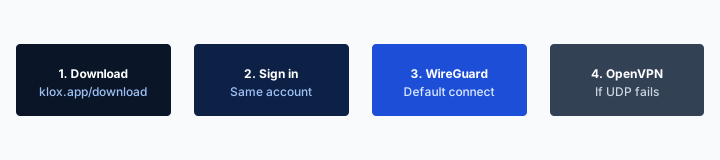
- 1Download the app from klox.app/download — not a random APK site.
- 2Sign in with the account you paid for.
- 3Press WireGuard. Wait for the connected state.
- 4If it fails, try OpenVPN. Still failing: note the network (hotel, campus, home) before you write support.
First successful connect
| Job | Router slot | Per-device apps | Who usually wins |
|---|---|---|---|
| IoT, console, TV with no VPN app | Covers the LAN | Cannot install | Router |
| Phone that leaves the house | Stops at the driveway | Follows the radio | Apps |
| Kill switch on drop | Blunt: house goes dark | Per gadget | Apps, unless you like blunt |
| Guest Wi-Fi for a weekend | They inherit your tunnel | They need an account | Depends if you wanted that |
| Travel week, house empty | Still holds a seat if left up | Take two seats in a bag | Apps; pause the router |
One router seat can cover a house. It cannot follow the phone to the airport.
— KloxVPN consumer notes
Cloudflare Learning: What is a VPN?
Simultaneous is still five
Router up plus four app tunnels is five. Router up plus five apps is overbooked. Disconnect something. Do not open a second account to dodge math you created with a gateway you forgot.
A slot is not a personality
Router people talk like apps are for amateurs. App people talk like flashing is a hobbyist disease. Both can be true on the same invoice. Hire the seat for the job.
Whole house, including gadgets with no app
Smart TVs, many streaming sticks, game consoles, bulbs, speakers, printers: no Klox app, often no VPN client at all. The honest paths are a router hop, a device that can run an app in front of them, or leaving them on the clear LAN. 'Works on Android' is not a Fire Stick. I will not invent a TV APK to win this paragraph.
If the job is 'nothing on this Wi-Fi talks in the clear to the ISP,' you need the choke point. Apps on two phones will not cover the TV. Features mentions OpenVPN and WireGuard configs on a router for whole-network protection. That is a file you import, not a branded firmware image. The setup-tips article is how. Here: that file spends one seat.
IoT talking to vendor clouds through a VPN can break geo assumptions, vendor APIs, and your own remote access to a camera. Test one gadget. Then the rest. A house that 'just works' on day one and dies on day two is usually a camera or a voice assistant that hated the exit IP. Split later if you must. Do not promise grandma the bulbs and the tunnel on the same evening without a rollback.
The toaster does not have a Connect button
If it cannot run an app, the router is the product or the toaster stays off-VPN. There is no third honest option besides another box in front of it.
Vendor clouds will surprise you
A bulb that phones home to a region-locked API will misbehave on a far exit. Put IoT on a LAN that is not tunneled, or pick an exit that does not confuse the vendor. Do not call that a streaming unlock. It is a light.
Phones that leave the house
The phone is why consumer VPNs exist as apps. Cafe Wi-Fi, hotel splash pages, cellular you may or may not want to wrap. A home router does none of that once you walk past the driveway. If your threat model is 'untrusted Wi-Fi I do not run,' you already lost the router argument for that hour.
Smart Connect, on the apps, is connect automatically on untrusted Wi-Fi. A router has no Smart Connect in the Klox Features sense. It is always the house or it is down. Do not mash those nouns. Auto on a phone is a travel habit. Always-on a gateway is a household policy.
You can run both: router for the LAN, apps off at home so you do not double-encrypt, apps on when you leave. Double-encrypt (phone app plus router VPN) is possible and usually pointless. It burns CPU and confuses kill switches. Pick one path per packet.
Five seats means the traveling phones need vacancies. If the router holds seat one all year, you have four left for humans who walk around. That is often enough. It is not enough if you also insist every laptop stays connected at home through an app while the router already covers them. That is how you invent a cap problem.

The driveway is the edge
Inside: router can be the path. Outside: apps. If you only buy one motion, buy the apps. You can add a router later. You cannot add a closet to a cafe.
Do not double-tunnel by accident
Phone app on plus router VPN is two encapsulations for one cat video. Turn the app off on the home SSID, or do not VPN the SSID the phone uses. Choose.
A house-wide kill switch is blunt
On a phone, fail-closed means that phone has no internet until the tunnel returns. Annoying. Recoverable. On a router, fail-closed means the house has no internet: printers, guests, smart locks, the kid's homework, your own admin session to the router if you were sloppy. I have watched people lock themselves out of the only interface that could disable the client. That is not a feature story. That is a Saturday.
Many consumer gateway 'VPN clients' do not even have a real kill switch. They just stop forwarding into the tunnel and leak, or they stall. Do not assume phone-app semantics on a $60 ISP modem. If the firmware does not say what happens on drop, assume leak or stall, then test with a phone while you still have cellular.
I would rather a house leak for ten seconds on a drop than a house that bricks. Phone apps can be stricter. That split is the point of per-device. If you need fail-closed for one laptop, put it on the laptop. Do not punish the thermostat.
Klox app kill switch is a client feature. DNS through the tunnel, IPv6 leak protection, WebRTC leak blocking are also client/Features claims. A stock router may do none of those the way the app does. Importing a config does not magically import the app's leak UI. Test after connect if you care. Do not cite the Features page as if it were LuCI.
Guests and printers
Guests did not ask to share your exit IP. Printers did not ask to die when WireGuard handshake fails. A blunt policy makes you the helpdesk for both.
Admin lockout
Keep a way in that does not depend on the tunnel: local IP, a management VLAN, a backup config. If the only path to disable VPN is through the VPN, you already lost.
Firmware pain, without a flash tutorial
Stock firmware may include a VPN client. It may include OpenVPN and not WireGuard. It may include a client that last got a patch in 2019. ISP CPE may hide the client or forbid it. Custom firmware exists because vendors left the client out. Flashing voids warranties and bricks a percentage of attempts. The setup-tips article is where those steps live. Here the decision is: do you want that hobby.
Preconfigured 'VPN routers' from competitor shops are a product: you pay for someone else's flash and their support line. Fine if you like that SKU. It is still one seat toward Klox if you point it at Klox configs, or it is a different vendor's subscription glued to hardware. Read which. Do not assume a Nord-shaped box speaks Klox.
I will not invent throughput for your unnamed chip. Cheap gateways choke on OpenVPN. WireGuard is lighter and still not free. If your WAN is fast and the router is a free ISP brick, the apps on phones will feel better than the whole house sharing a sad CPU. That is a reason to stay per-device even if you liked the IoT story.
Mesh systems are their own pain. The node that holds the VPN client may not be the node you think. Guest SSID may bypass it. Confirm, or do not sell yourself 'the mesh is covered.'
Stock versus flash versus a bought box
Stock: least drama, fewest protocols. Flash: most control, most ways to regret. Bought box: someone else's drama at a higher price. None of those are a Klox app update from a store.
This is not a flash walkthrough
If you already decided to import a config, use the setup-tips post. If you are still deciding whether to, stay here. Decision first. Wiki second.
Travel: the apps win
Hotels, cafes, airports: splash pages, rude UDP, SSIDs you do not run. That is app territory. Smart Connect if the row exists. Kill switch you can pause. WireGuard, then OpenVPN. Five seats in a backpack if you overpack. A home router does not come with you unless you packed a travel router, which is a second NAT, a second admin UI, and a TSA conversation I do not need.
Leave the house router up while you travel only if you wanted the house tunneled while empty. That still occupies a seat. Pause it if you need five humans on the road. An empty house does not need a tunnel for the bulbs. An occupied house with a sitter might. Say which.
I travel with phone plus laptop. Two seats. Router at home paused or left as one seat if someone is still there. That is the whole policy. It survives contact with a splash page. A flashed Asus in a suitcase does not.
Seven-day money-back still exists if you bought Klox to try a router weekend and hated the firmware. First purchase only. The window is not a reason to skip reading whether your gateway even has a client.
Travel routers are a third lifestyle
A tiny gateway in a hotel can cover a room of gadgets. It is still firmware pain, plus a captive portal on someone else's AP. Apps are simpler for two devices. Bring the box only if the room is a lab.
Pause the house when the seats are on the road
Router holding a session plus five phones is six. Pause the gateway. You can turn it back on when you get home. The bulbs will live.
A TV with no VPN app
If the television cannot run a client, the router hop is the honest consumer path. A laptop hotspot is a hack. A streaming stick that can run an app is another path if you actually have that binary. Klox consumer download lists platforms we ship. Confirm the TV row before you promise the living room. I will not invent Netflix catalogs, 4K guarantees, or a Leanback APK in this paragraph.
Router-for-TV means the whole SSID or a carefully split SSID. If you VPN only the TV VLAN, you are already a person who should read setup-tips and still might regret it. If you VPN the whole house to satisfy the TV, you accepted blunt for everyone. Sometimes that is fine. Sometimes the work laptop should not exit from the same IP as the cartoon app.
White-label TV listing problems are a different building. You are a household. You need a hop or a stick. You do not need a Play Console lecture. If a family seating chart is your real issue, five devices is the other post. Here: no app on the TV pushes the needle toward one router seat, not toward a sixth app you cannot install.
Stick versus gateway
A stick that runs an app spends an app seat and leaves the rest of the house alone. A gateway spends a router seat and may take the house with it. Pick based on how much else you wanted tunneled.
Do not buy a router only because a farm mentioned 4K
A tunnel is a path. The TV app is a license. Those fight for reasons that are not your firmware. I will not print an unlock. If the TV is the only reason, try a stick first.
Split routing without a second career
The dream is: TV and IoT through the VPN, work laptop clear, guests clear, phones on apps when they leave. The reality is VLANs, two SSIDs, policy routing, and a partner who will reset the gateway. Per-device apps already are split routing: this gadget yes, that gadget no. That is the underrated feature. You do not need nftables to leave the printer alone. You leave the printer without an app.
Router split is powerful and operationally expensive for a small household. Do it if you already enjoy it. Do not do it because a blog made it sound like a toggle. If your firmware has 'VPN for this device' based on MAC, test it twice, then still keep a rollback. MAC lists rot when phones randomize addresses.
Work laptops sometimes forbid a VPN that is not the company's. A house router that forces a consumer tunnel onto that laptop is how you get a fight with IT. Put work on a clear SSID. Put the rest wherever you decided. Apps on personal phones do not capture the work NIC. That is another vote for per-device in mixed houses.
Two SSIDs is the cheap split
Tunneled SSID and clear SSID. Join the one you meant. Guests get clear unless you like sharing an exit. No MAC circus. No career.
Work laptops are a veto
If work forbids it, the house router must not force it. Apps on your personal phone do not care. The gateway does. Listen to the veto.
CPU, guests, and who notices
Encryption on a phone is one user's traffic on a chip designed this decade. Encryption on a $40 gateway is everyone's traffic on a chip designed to NAT cheaply. You will notice. Video calls will notice. Large downloads will notice. IoT will not notice because it barely talks. If the humans are the load, apps win on speed. If the load is a TV plus idle gadgets, a decent router might be fine.
Guests inherit whatever you put on that SSID. A router VPN makes your house look like a VPN exit to every visitor. Some guests will not care. Some will fail to reach a bank that hates the exit. Some will blame your Wi-Fi. Have a clear guest SSID if you host humans you are not ready to debug.
I will not quote a percent of line speed. I will not quote a city count as a reason the router is fast. Try your WAN, your box, your protocol. WireGuard first. OpenVPN if you must. If it is sad, you learned something a marketing page would not say.
Battery on phones is an app cost. A router has a wall plug. That is a real point for the gateway if the only goal is 'phones at home should not burn battery on a tunnel.' Then leave apps off at home. You can still turn them on in a cafe. That hybrid is how a lot of sane people actually live.
Who complains first
Video calls and game consoles complain. Bulbs do not. Size the decision to the loudest human, not the IoT brochure.
Guest SSID should be a choice
Defaulting guests onto your tunnel is a policy. Make it on purpose. A clear guest network is hospitality. A surprise exit IP is a ticket you will take at dinner.
How to pick on a five-device plan
If two or three humans travel and the house is mostly phones and laptops: apps. Download them. Mark home trusted if you want. Smart Connect for cafes. Router optional forever.
If the living room is a TV with no client and a pile of gadgets you actually want tunneled: one router seat, then apps only when people leave, and pause double-tunnel. Read setup-tips when you are ready to import a file. Do not flash on a work night.
If you want both completeness at home and discipline on the road: router for the LAN, four seats left for travel, apps off on the home SSID. That is the hybrid I would run if I had IoT I cared about. I do not, so I run apps and leave the ISP router stupid. That is also allowed.
Klox remains five simultaneous, WireGuard, OpenVPN, OpenConnect, and Shadowsocks, from $2.83 a month yearly, seven-day first-purchase money-back. A competitor router storefront is a specimen of the category, not a homework assignment. If the firmware fight is the product, you will hate the year. If the cafe habit is the product, you wanted the other post, and the apps.
DNS through the tunnel is an app promise you can leak-test. On a router, you get whatever that client implements. Check. IPv6 on home LAN plus a v4-only gateway client is a leak waiting for a blog comment. WebRTC is a browser problem on a laptop even behind a router. None of that picks the seat. It tells you what to verify after you pick.
A default I would actually ship
Apps first. Add a router only when a gadget with no client matters enough to spend a seat and a Saturday. Most households never hit that bar. They just liked the sound of 'whole house.'
When the router is the default
No-app TV plus IoT you refuse to leave in the clear, and you already own a gateway that can import WireGuard or OpenVPN without a brick story. Then yes. Still keep the apps for the driveway.
Key Takeaways
One router seat covers a LAN, including gadgets with no Connect button. Five app seats follow people. Kill switch on a house is blunt. Firmware is a hobby or a bought box, not a store update. Travel votes for apps. A TV with no app votes for a gateway or a stick. Split routing on a router is a career. Two SSIDs is a household.
Klox is five simultaneous, WireGuard, OpenVPN, OpenConnect, and Shadowsocks, yearly from $2.83 a month, seven-day money-back. Spend a seat on a choke point only if the choke point has a job. Do not spend it because a router marketing page said completeness. Completeness at home is not a cafe.
Download the apps if humans move. Import a config when you are ready, using the setup-tips post, not this one. Pause the gateway when the seats are on the road. That is the whole decision. Everything else is firmware folklore.
Related Resources
Start with the apps. Add a router only if a gadget forces it.
KloxVPN is WireGuard, OpenVPN, OpenConnect, and Shadowsocks, five simultaneous devices, yearly from $2.83 a month, 7-day first-purchase money-back. Phones that leave the house need the apps. A TV with no client may need a router hop. Download first. Flash later, if ever.
Download KloxVPNFrequently Asked Questions
KloxVPN Team
Experts in VPN infrastructure, network security, and online privacy. The KloxVPN team has been building and operating VPN services since 2019, providing consumer and white-label VPN solutions to thousands of users worldwide.