
Campuses keep writing one sentence that names two products. eduroam. Campus VPN. The slash in the RFP treats them as equals. They are not. eduroam, or a local 802.1X SSID with the same job, is how a laptop proves it belongs and joins Wi-Fi. IEEE 802.1X, EAP, RADIUS. The controller opens the air. That is the first hop. A VPN is a later hop. It wraps packets and sends them to an exit you chose. Wikipedia's eduroam page is the roaming story. Cloudflare's VPN explainer is the tunnel. Wikipedia's VPN page will not join an SSID. RFC 8446 is TLS 1.3 on the web path. None of those documents is a substitute for the other.
The other campus article on this blog is packaging: branded student apps, BYOD piles, ITS versus vendor tickets, and what you must not claim about FERPA. This page is the technical split. When the SSID is the product. When the tunnel is the product. Why a visiting researcher already has a path without your client. Why a full tunnel on residence-hall Wi-Fi makes the copier look dead. Why ITS should not deploy a VPN as a Wi-Fi replacement when RADIUS is sad.
I will not stamp Klox as FERPA-certified. I will not invent SOC 2. I will not mint a city count or an SLA. Klox consumer is WireGuard, OpenVPN, OpenConnect, and Shadowsocks, five devices, yearly from $2.83 a month, 7-day money-back. A campus seat model is a sales conversation. Consumer copy that tells students to run a commercial VPN on school Wi-Fi is a different aisle. I will point at a specimen and then tell you not to paste it onto an ITS FAQ.
I have a bias. Print two hops. Staff two failure modes. Do not sell a tunnel as an SSID.
Related reading: Ingress: Not a VPN Setting and White-Label VPN and Huey. White-Label VPN and Huginn and White-Label VPN and Hugo (CMS installs). What is a VPN? and Download KloxVPN.
Looking for a reliable VPN?
KloxVPN — from $2.83/month. Apps for every device.
Two products, two hops
Hop one is association and authentication on the campus air. The supplicant talks 802.1X to the access point. The authenticator forwards EAP to RADIUS. Someone in that chain says yes. The station gets an IP on a VLAN ITS designed. The LMS is a hostname on a network you already joined.
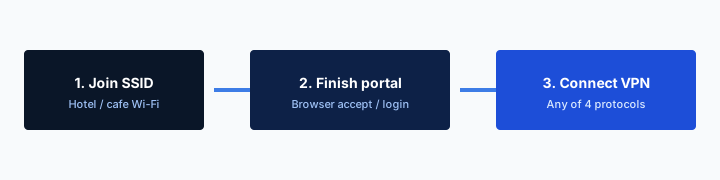
Hop two is optional. A VPN starts after you have a path: campus SSID, cellular, a hotel AP. The client builds WireGuard or OpenVPN to an endpoint. Destinations then see an exit IP, not the dorm NAT. That is useful off-campus, or when a publisher allowlists a known egress. It is useless as a way to join Wi-Fi. If you cannot associate, you cannot start the tunnel unless another interface already works.
An RFP slash that treats campus VPN and eduroam as equals will spend August on a poster that lies. Students install the app before they join the SSID. The app fail-closes. Move-in becomes a RADIUS ticket in a VPN costume. You do not have the staff for that costume.
The branded-campus article is who owns the icon and the desk. Here: get the hop order right or every other decision is noise.

- 1Skim the seating / order diagram.
- 2Do the numbered steps once on your real network.
- 3Use the FAQ if a sentence was too long.
- 4Follow one related article — not ten tabs.
How to read this page
| Hop | What it is | What authenticates | If you treat it as the other product |
|---|---|---|---|
| eduroam / campus 802.1X | Join the SSID | Home IdP via RADIUS / EAP | You sold a VPN and the laptop never associated |
| Guest splash / captive portal | Click-through on open or PSK Wi-Fi | A web form, not EAP | You told them it was WPA-Enterprise |
| Off-campus tunnel | Encrypted path to an exit | VPN account after a path exists | Always-on blocks the hotel splash |
| On-campus full tunnel | Hairpin everything off-net | Same VPN account | Printers, casting, RFC1918 look dead |
| On-campus split tunnel | Selected prefixes through the exit | Same, with a map ITS wrote | You shipped hope instead of a prefix list |
RADIUS gets you on the air. The tunnel starts after you already have a path.
— KloxVPN operator notes
Cloudflare Learning: What is a VPN?
Wikipedia: Virtual private network
NordVPN: Should you use a VPN in school? (consumer specimen)
The freshman laptop test
Join campus SSID or eduroam. Confirm the LMS loads with the tunnel off. Then, if a tunnel is in scope, connect. If the client tries to own the only interface before 802.1X finishes, you scheduled a lobby argument. Order is a product default, not a training slide.
Cellular is a third path, not a philosophy
A phone on LTE can start a VPN without campus Wi-Fi. That does not make the VPN a Wi-Fi product. It makes the phone a device with two radios. Do not write the ITS FAQ as if every endpoint had LTE.
802.1X and RADIUS get you on the SSID
eduroam is not encryption for later websites. It is a roaming service on IEEE 802.1X and a RADIUS hierarchy. Wikipedia's eduroam article and RFC 7593 describe the same machine: the visited campus sees a realm (user@home.edu), proxies EAP toward the home institution, and gets a yes or a no. The home IdP authenticates. The visited network authorizes access. That split is why a postdoc from another university can sit in your library without a guest form.
EAP methods you will meet: PEAP and EAP-TTLS with inner passwords, or EAP-TLS with certificates. Those protect credentials on the way to home RADIUS. They are not your campus VPN. They terminate as part of joining the SSID. After that, the station is on a VLAN ITS already filters.
A local campus SSID that is not named eduroam can still be 802.1X. Same hop. Different roaming. WPA-Enterprise is the join. eduroam is the federation on top of that join.
If RADIUS is down, nobody joins. A VPN app does not create a RADIUS. It creates a second ticket category. Fix the join first.
Realm routing is not an exit node
user@home.edu tells RADIUS where to proxy. It does not tell a journal publisher which IP to expect. Mixing those in a slide is how a library vendor gets an RFC1918 address and a confused email.
Certificates on the SSID are not the VPN profile
EAP-TLS on Wi-Fi is a device identity for association. A WireGuard peer key is a later identity for a tunnel. Two key stores. Two revoke paths. One sentence that says certificates will confuse both desks.
Captive portal is not WPA-Enterprise
A captive portal is a splash page on an open or PSK network. You associate first, often with little or no 802.1X, then a browser is hijacked until you accept terms. Hotels love this. Some campus guest SSIDs still do. It is a web form pretending to be access control.
eduroam documentation is blunt: splash screens break the EAP story. Credentials should not be typed into a hotel-style page on a network that claims to be eduroam. If your guest SSID is a portal, say guest. If your research SSID is WPA-Enterprise, say that. Mixing the words is how a visiting PI pastes a password into a page that is not their IdP.
A VPN client that fail-closes before the splash loads will never complete the portal. That fight is famous on hotels. It is also how a conference SSID during orientation looks like your branded app broke the internet. The White-Label VPN and Kill Switch Copy article is the string on the toggle. This page is the radio: portal versus Enterprise are different join ceremonies.
PSK-only lab SSIDs still exist. A shared passphrase is not eduroam. Do not put that password in a VPN onboarding PDF.
Guest VLAN versus eduroam VLAN
After a portal, the station is usually in a jailed VLAN. After eduroam, it is often in a role ITS mapped from RADIUS attributes. Those are not the same filter. A VPN on top of a guest jail is still in the jail until the tunnel leaves. Know which VLAN you are on before you debug the tunnel.
Do not teach students to skip the portal with a VPN
If the only way onto the conference SSID is the splash, the honest script is complete the splash, then connect if policy allows. Teaching bypass as a campus skill is how you inherit an AUP fight you did not need.
The VPN is a later hop
Once the station has an IP, a tunnel can start. Off-campus that is the usual story: hotel, cafe, cellular, a conference that is hostile in the boring way. On-campus the story is narrower. You already sit on a mutually authenticated SSID. HTTPS already covers most LMS traffic. The tunnel is not what joined you.
Reasons I believe for a VPN after the join: a publisher that allowlists a known egress; staff travel onto a portal SSID; a researcher who needs a path from home to a resource that is not on the public internet. Reasons I do not believe: Wi-Fi feels slow; RADIUS tickets are high; a consumer blog said university Wi-Fi is public so hide.
Library resources are the mash people make. Some journals still key off IP. eduroam does not magically present a library SNAT you registered. The station may NAT out a campus border that is already allowlisted. Or it may not, on a restricted VLAN. A dedicated egress, if you contracted one, is a later hop you register. It is a named IP, not anonymity. Join first. Then tunnel if the vendor needs an egress that is not the dorm NAT.
Do not tell students the VPN is how they get eduroam. That sentence will outlive your job.
Home Wi-Fi is not campus Wi-Fi
The Do You Need a VPN on Home Wi-Fi? piece is a consumer decision. Campus 802.1X is a different threat and a different operator. Do not paste cafe copy onto a WPA-Enterprise SSID ITS already logs by design.
Off-campus does not require a campus SSID
Staff in a hotel need a path, then a tunnel. They do not need eduroam on that AP. If your onboarding PDF starts with join eduroam for travel, you wrote a contradiction.
Visiting researchers already have eduroam
The point of eduroam is the visitor. Home credentials, visited air. If you also issue a branded VPN account to every visiting scholar, you will revoke nobody in June. The PI will swear they will remember. They will not.
When a visitor needs a tunnel, write an exception with an end date. Lab allowlist for a three-day workshop. Staff travel profile for a sabbatical month. Calendar the kill. Do not bind the exception to a Gmail the visitor used at registration. Prefer the home-realm identity you already trust for Wi-Fi, or a time-boxed local account ITS can see.
Visitors who cannot join eduroam have an identity problem or a supplicant problem. Wrong EAP method. Expired password at home. Device that never learned the realm. Those are RADIUS tickets. Handing them a VPN QR in the lobby does not authenticate them to the SSID. It asks them to use cellular or a guest portal you may not have meant to offer.
I would rather a visitor complete eduroam and never hear about your tunnel than collect a pile of leftover peers named workshop-2024.
Conference weeks on your campus
If the event SSID is a portal, staff it like a portal. If it is eduroam, print the realm instructions, not a VPN download. Mixing both on one tent sign is how you get 400 devices half-associated.
Do not clone the guest form into the VPN
A paper guest form plus a VPN seat is two identities. Pick one expiry. The Wi-Fi identity is usually enough. The tunnel is the exception.
Split tunnel versus full tunnel on campus Wi-Fi
Full tunnel is easy to draw. Every packet leaves through the exit. On a cafe that can be the point. On a campus SSID it is often a self-own. Printers, AirPlay, RFC1918 lab benches, and some SSO appliances expect to see you on the campus net. Hairpinning that traffic out an exit, or dropping it, looks like the VPN broke Wi-Fi. Staff will believe that sentence.
Split tunnel is the adult default for a lot of on-net builds: only prefixes ITS listed, or the reverse, only off-net. There is no universal list. There is a list you walked on the real SSIDs. If you do not have that list, you have a hope. Hope is a ticket category in week two.
DNS has to match the split. Force a public resolver on-net and internal names die. Force campus DNS off-net and you leak queries onto a hotel resolver. Document on-net versus off-net. Test dual-stack. A split that forgets IPv6 is a leak with extra steps.
This is routing, not the LMS-versus-copier packaging from the other campus post. If 10.0.0.0/8 should stay local, the client must leave it local. Protocol religion will not save a wrong allowed-IP list.
Always-on full tunnel on residence Wi-Fi
A profile that full-tunnels the moment the SSID is campus-named will fight casting, gaming LAN, and the printer. If you need that lock for a staff laptop, do not default it on the student amenity. One binary can still ship two profiles.
Measure before you argue
Packet capture on a test SSID beats a meeting. If ITS cannot show you the prefixes, you are not ready to ship split. Delay the tunnel. Do not guess the map.
When ITS should not replace Wi-Fi with a VPN
Do not deploy a VPN because 802.1X onboarding is ugly. Fix the onboarding. eduroam CAT, geteduroam, a short OS card: those are join tools. A tunnel is not a join tool.
Do not deploy a VPN because the guest portal is embarrassing. Redesign guest. A tunnel on cellular is not a guest SSID.
Do not deploy a VPN because a building failed RADIUS for a week. That week needs a network incident, not a new product. People who connected via a hurried VPN SKU will still be connected in November.
Do not deploy a VPN as the campus network for devices that cannot run your client. Cameras, badges, TVs, lab instruments need VLANs, not a laptop subset wrapped in WireGuard.
If the RFP says replace Wi-Fi authentication with a campus VPN, rewrite it or walk. You will spend the year explaining why the phone has no internet until an app logs in. That is captive-portal energy on a network that should have been Enterprise.
Zero-trust slideware
Some decks say every session should start with a tunnel. On a campus that already has 802.1X, that sentence is often a vendor who does not want to learn RADIUS. Ask what happens to a device that cannot install the app. Then ask again.
When a tunnel is still right
Off-net staff. A registered egress. A lab that is not on the public internet and should not be. Those are later hops with owners and expiry. They are not a Wi-Fi replacement.
Always-on and fail-closed fight the join
Fail-closed is a privacy mode: no packets unless the tunnel is up. On a cafe, maybe. On move-in, it is a trap. 802.1X needs the radio. A captive portal needs a browser. An always-on client that owns the stack before either ceremony finishes will look like dead Wi-Fi.
Staff travel laptops can tolerate stricter defaults after you tested hotel portals. Student amenity on campus SSIDs should default to stay out of the join. The White-Label VPN and Kill Switch Copy strings have to match that default. If the toggle says block all traffic and the desk card says join eduroam first, you wrote two products on one glass.
Personal consumer clients students already installed will fight yours. The script is: turn that off, join the SSID, then decide. You will not win a theology argument in the lobby. You will get them to the LMS.
I will not claim a campus build is leak-proof because a blog said so. Test the real SSIDs. Test the portal SSID you pretend you do not have.
SSID-based auto-connect
Connecting the tunnel automatically on every SSID named campus is how you full-tunnel a building you meant to leave local. If you use SSID triggers, list them. Review them when ITS renames guest.
OpenVPN as a ceremony versus a fallback
OpenVPN inside the app as TCP fallback is fine when UDP is rude. Importing profiles at the dorm desk is how a stranger's Mac gets the wrong config. Keep the ceremony in the app. Keep the desk on join-versus-tunnel.
Consumer VPN-for-university pages are a different product
NordVPN's school Wi-Fi essay is a consumer pitch: campus air as public hotspot, hide, stream, stay safe. It is a specimen. It is not an ITS architecture. Campus WPA-Enterprise is not a cafe. ITS may already log, filter, and allowlist. Telling students to hide from the house network in the house voice is how legal kills a branded amenity.
If students want a personal tunnel on cellular, that is their consumer purchase. Klox consumer remains five devices, WireGuard, OpenVPN, OpenConnect, and Shadowsocks, from $2.83 a month, 7-day money-back. That SKU is not a campus RADIUS replacement. Do not screenshot it onto a board packet as eduroam-but-better.
AUP still applies. A tunnel that exists to evade lab filters will become an abuse ticket. Write whether personal VPNs are allowed on campus SSIDs. Ambiguity is a Discord rumor by week three.
Dunk the marketing. Do not clone it. Your FAQ has two hops. Their landing page has one mood.
Student discount is not a campus program
A coupon for 18-year-olds is retail. A campus tunnel with IdP-bound seats is operations. If procurement arrived via a student-discount landing page, start the conversation over.
Unblocking journals is not a consumer geo catalog
Library access is licenses and IPs. Consumer streaming copy does not belong on the library FAQ. Say no early.
Two sentences for the ITS FAQ
Sentence one: eduroam or the campus WPA-Enterprise SSID gets you on the air. Sentence two: the VPN app is a later encrypted path, optional, for off-campus or for a resource that needs a known egress.
If you need a third sentence, make it the order: join, confirm the LMS, then connect the tunnel if you were told to. If you need a fourth, make it the negative: the VPN does not replace RADIUS, does not replace a guest portal, and does not make the copier work when you full-tunneled RFC1918.
Put those sentences on the same page as the eduroam instructions. Not in a vendor PDF students will not open. Date the page. When ITS changes VLAN roles, update the split-tunnel note on the same day or you will debug ghosts.
The white-label conversation is still a platform conversation if you want a campus name on the client. This FAQ is true even if you never brand an app. Consumer Klox users can ignore it. ITS cannot.
Desk card, ninety seconds
Are they associated to the campus SSID or eduroam. If no, stop. Is the complaint the join or a tunnel they already started. If they started a tunnel, disconnect, retry the LMS, then decide. Collect device, time, and whether a personal VPN is also running. Then stop.
What the poster must not say
Hide. Anonymous. Compliant. Faster Wi-Fi. Those words belong to other vendors and other lies. The poster can say join this SSID, then optionally this app. Anything louder is a ticket generator.
After you have a path: WireGuard, OpenVPN, OpenConnect, and Shadowsocks
Protocols do not join SSIDs. They run after. Klox consumer is WireGuard, OpenVPN, OpenConnect, and Shadowsocks. UDP gets blocked in rude networks; TCP fallback is why OpenVPN still earns a button. Test both on the real residence SSID before you print WireGuard-only on a faculty travel card.
Five devices is a household SKU. It is not a dorm census and it is not an eduroam policy. If a campus build uses five, print five. Confirm with sales.
Custom domains for a branded portal are a different post. White-Label VPN and Custom Domain DNS is the hostname. This page is the radio versus the tunnel. Mix those tickets and you will restart named for a PEAP failure.
I will not publish API URLs or a city list as a reason the library should trust you. The hop order does not care how many exits you bought. It cares whether the laptop associated.
When UDP dies on campus
Some residence APs are ugly to UDP. Offer the labeled fallback. Do not tell the student to disable eduroam. The join was not the bug.
Revoke is still two systems
Disable 802.1X in the IdP and the station leaves the SSID at next session. Disable the VPN peer and the tunnel dies. Graduation should hit both if you issued both. Forgetting the peer is how a leftover laptop still exits your allowlist.
Key Takeaways
eduroam and campus 802.1X are how you join the air. A VPN is a later tunnel for a path you already have. Visiting researchers are why the RADIUS federation exists. Full tunnel on the house SSID is how printers become a myth. A VPN is not a Wi-Fi replacement, not a guest portal, and not a fix for sad RADIUS.
Print two hops. Test split on the real VLANs. Leave fail-closed off the move-in default. Do not paste consumer school-Wi-Fi marketing onto an ITS FAQ.
Klox can put WireGuard, OpenVPN, OpenConnect, and Shadowsocks under a campus name if that is the package. You still have to respect the join. Confirm seats and defaults with sales. Bring the SSID list, not a slash that treated eduroam as a VPN.
Related Resources
Brand a tunnel. Do not pretend it is the SSID.
White-label puts your name on WireGuard, OpenVPN, OpenConnect, and Shadowsocks. eduroam still owns the join. Confirm campus packaging with sales. This page is not a rate card and not a certification claim.
See white-label VPNFrequently Asked Questions
KloxVPN Team
Experts in VPN infrastructure, network security, and online privacy. The KloxVPN team has been building and operating VPN services since 2019, providing consumer and white-label VPN solutions to thousands of users worldwide.