
You signed out of iCloud on a phone you still own. You tapped Sign Out But Don't Erase. Photos stopped uploading. iCloud Drive stopped. Find My on this handset may have gone with the cloud login. The glass did not leave. The IMEI did not change. You did not wipe the disk because a farm said erase was privacy. You did not type a different Apple ID into Media & Purchases as a new shopper. Ranked listicles will mash that into changing Apple ID, a SIM swap, a factory-reset cape, and a Find My novel about hiding a pin. This page is narrower. Same human. Same glass. Same Apple ID, if you still have it. iCloud left this device.
This is not VPN When Changing Apple ID: Same Phone, Different Store Login. That URL is a different store login. Family Shared a kid's ID onto your glass for a week. You left a partner's ID. You finally stopped using a work Apple ID on a personal handset. You signed out of Media & Purchases and signed into a different store account. Here you signed out of iCloud. You may still be the same shopper in the App Store. The store leftover is a leftover, not a new mailbox you meant to own. This is not VPN After a SIM Swap: Your Number Moved, the Tunnel Did Not Save You. That URL is the number leaving. SMS is burned. Mail and stores get rotated because a code can land on a SIM you do not hold. Here the number may still be yours. iCloud left. This is not VPN After a Factory Reset: Your Wipe, Your Stores, Your Device Slot. A wipe you ran. Stores. Install. Seat. Apple's Sign Out sheet also offers Erase this Device. If you picked erase, that is the wipe article. If you picked Sign Out But Don't Erase, stay here. This is not Linux find_my: Not a VPN Setting. That essay is the account observer versus a hop: Connect does not hide the device from the Apple ID you are still signed into. Here you signed out. Find My on this device may have left with iCloud. That leftover is Apple's sign-out, not a Klox anti-Find-My SKU.
HTTPS already encrypts the page on most of the sites you actually use. The lock in the browser is real. A VPN still wraps the path from a device you still control to a server you picked. Wikipedia's VPN page is the noun. RFC 8446 is TLS 1.3 on the website. It is not iCloud. It is not App Store signed-out. Encrypted Client Hello will not sign you back into Photos. Do not pretend Connect moved iCloud. Do not pretend a hop is a second Apple ID.
KloxVPN is WireGuard, OpenVPN, OpenConnect, and Shadowsocks, five devices, yearly from $2.83 a month, 7-day money-back on first purchase. The phone is still one seat when the tunnel is up. Download is the apps. iPhone: the real listing is Klox on the App Store. Re-download from that URL or from Download after the Apple ID that can see the store is the one you actually use. Android is a different store. This URL is iCloud sign-out on iOS. The Chrome extension is browser-only. It is not a phone install. Pricing is the live number. There is not an iCloud-sign-out SKU. The seven-day window is first purchase, not an iCloud coupon. Cookies on this site live at /cookie. I will not invent a city count as a reason the cloud login is special. I will not invent a portal URL. I will not invent SOC 2. I will not invent a tvOS Apple TV app. I will not invent IAP SKUs.
I have a bias. This checklist is for an iCloud sign-out you ran on glass you still hold. Look at Media & Purchases. Re-download from the real listing if the icon left with a store leftover. Approve the OS sheet again if iOS asks. Find My leftover is Apple's. A VPN is not iCloud. Connect does not prove Photos will upload. Do not sign out of iCloud you do not own. Do not treat this page as a script for taking someone else's cloud.
Related reading: How to Set Up a VPN on iPhone and iPad: Complete Guide and What is a VPN?. Android VPN setup and iOS VPN setup.
Looking for a reliable VPN?
KloxVPN — from $2.83/month. Apps for every device.
Same phone, iCloud signed out: not a new Apple ID, not a wipe, not a SIM swap, not the Find My essay
Changing Apple ID is a different store login on glass you still hold. The purchase library follows the Apple ID that bought. Sign in with Apple leftovers follow the Apple ID that created them. A SIM swap is the number leaving the SIM or the profile you thought still held it. SMS is the leftover. Mail and stores get rotated because a code can land in the wrong pocket. A factory reset is a wipe you ran on hardware you kept. Empty OS. Stores. Install. Seat. Find My versus a hop is an account observer: Apple still locates a device you are signed into. Mixing those in one sentence is how farms sell best VPN after iCloud sign out until the affiliate cookie expires.
The Apple ID habit still helps: the store is a shop. The swap habit still helps: a radio plan is not a tunnel. The wipe habit still helps: the app is gone, the account is not. The Find My habit still helps: a hop does not hide a pin from an account you still use. The iCloud twist is the cloud login on this device. Photos, iCloud Drive, iCloud Keychain sync, and Find My on this handset can leave when you sign out. Local copies can stay. The App Store can still answer to a leftover Apple ID. The VPN profile can still sit because it is an OS configuration, not an iCloud file. Confirm what the live Settings actually show.
I will not walk packet sniffing. The public Wi-Fi how-to already did. I will not pack your chargers. The travel checklist exists for install-before-you-fly. Here the glass is already in your hand. The cloud login is the next job. The listing is the job after that if the icon left. Find My leftover is the job after that if Settings still argues about it.
Klox is a consumer tunnel to an exit you picked. It is not Apple's iCloud. It is not iCloud Keychain. It is not Family Sharing. Apple's Sign out of iCloud on your devices page is the vendor novel. I will stay at overview height. I will not paste a 40-tap path that rots when iOS moves a menu. Farms skip that sentence because the keyword is privacy. Privacy after YOU signed out of iCloud is a store leftover plus a real listing plus Find My leftover, not a screenshot of Fastest server.
Same phone, iCloud signed out is still this URL. Same phone, different Apple ID is the other article. Wipe plus sign-out is two articles if you picked Erase this Device. SIM swap plus sign-out is two articles. Find My still on because you never signed out is the Find My essay. Do not paste one checklist into all five days. Do not treat iCloud sign-out as a new Apple ID. Do not treat iCloud sign-out as a wipe. Nouns matter when the cloud login is the thing that broke.
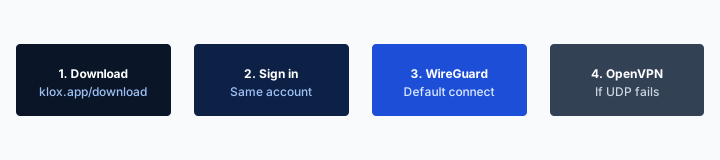
- 1Download the app from klox.app/download — not a random APK site.
- 2Sign in with the account you paid for.
- 3Press WireGuard. Wait for the connected state.
- 4If it fails, try OpenVPN. Still failing: note the network (hotel, campus, home) before you write support.
First successful connect
| Situation | What you think happened | What actually happened | This page? |
|---|---|---|---|
| YOU changed Apple ID on glass you still own | iCloud sign-out is a new mailbox | Store login moved to a different Apple ID; SIWA leftovers follow the old ID | Apple ID change article |
| YOUR number moved | iCloud signed the VPN out | SMS is burned; mail and stores may be reachable by the new SIM | SIM swap article |
| You wiped YOUR device | Sign-out is a wipe | OS gone; account and slot may remain; app is gone | Factory-reset article |
| Find My vs a hop while still signed in | Connect hid the pin from Apple | Account still locates if the service can; Klox does not disable Find My | Find My article |
| YOU signed out of iCloud on glass you still own | VPN saved iCloud because Connect was on | iCloud services left this device; App Store old; Find My old is Apple's | Yes |
| An iCloud you do not own | A blog ranked privacy | Stop | No. Do not sign out. |
| Apple TV under the panel | iCloud sign-out installed Klox on tvOS | No tvOS Klox app. Download does not list one | Apple TV old, plus this page says no |
You still hold the glass. iCloud left this device. That is not a new Apple ID and not a wipe. Re-download from the real listing. Find My old is Apple's. Do not sign out of iCloud you do not own.
— KloxVPN consumer notes
Cloudflare Learning: What is a VPN?
Wikipedia: Virtual private network
The glass stayed. iCloud left this device
Changing Apple ID is a different store login. SIM swap is the number. Wipe is empty OS. Find My versus a hop is an account you are still signed into. This URL is YOUR iCloud sign-out on hardware you still hold. Do not paste one checklist into all five days.
Farms mash every iCloud story
Apple ID change, SIM swap, wipe, Find My pin, iCloud sign-out: one ranking, one cookie. Sign-out drops cloud services on this device. Treat the ranking as a specimen, not a second Apple ID, and not a script for iCloud you do not own.
iCloud signed out is not a VPN logout
Signing out of iCloud signs you out of iCloud services on that device. It does not sign you out of every app that already had a session. Mail can still fetch if the mailbox is not iCloud Mail, or if a local copy is still on disk. Safari can still hold cookies. Klox can still show Connected if the tunnel profile is still on the device. People treat iCloud as the OS. iCloud is a cloud login. The VPN profile is an OS configuration. Those are different drawers.
If you picked Sign Out But Don't Erase, Apple's sheet keeps a pile of personal data on the phone. Photos that already lived locally can stay. Notes that already lived locally can stay. The VPN configuration can stay. If you picked Erase this Device, you left this article. That is a wipe. The factory-reset URL owns stores, install, and the leftover seat. Do not file a Connect bug because you chose erase and then expected the hop to survive. The hop died with the OS. The account did not.
You can have a perfect tunnel and iCloud that will not upload a photo because you signed out. You can have iCloud signed out and still be signed into Klox with the same mailbox you used last month. Those are both true on the same Tuesday. The shopping list that says get a VPN after iCloud sign out as if that were the whole recovery is a false comfort sold by people who rank. Get the hop if you still want one. Get the cloud login honest first. They are cheap compared to losing the only copy of the IPA you trust if a store leftover also dropped the icon.
The How to Set Up a VPN on iPhone and iPad: Complete Guide article already owned App Store, Allow, first handshake. Stay there for taps. Stay here for the day iCloud left this device. I will not reprint the 40 taps so two URLs compete for the same how-to. Say this instead: if the icon left, the Apple ID that can see Klox on the App Store must be the one you actually use. Then install. Then the sheet if iOS asks. Then the Klox login you actually used.
I will not walk the whole privacy-practices layer cake. That guide is a pile: browser, passwords, minimization. Here the cut is narrower. iCloud signed out. Store leftover may have dropped the icon. Re-download. Then the hop. If you already knew iCloud sign-out is not a VPN logout, the table is enough. Most tickets I have seen did not know that. They wanted Connect to restore Photos.
Klox ships WireGuard, OpenVPN, OpenConnect, and Shadowsocks. DNS through the tunnel. IPv6 leak protection and WebRTC leak blocking after you are connected. Smart Connect, if the row exists, is untrusted Wi-Fi. None of that is an iCloud-sign-out feature. None of that is a second Apple ID. Do not file a VPN ticket because Settings signed you out of iCloud. File an Apple ID ticket for the cloud. Then decide whether you still want a hop.
Photos, Keychain, and the App Store are different drawers
iCloud Photos is a cloud. iCloud Keychain sync is a cloud. Media & Purchases is a shop. A VPN profile is an OS configuration. Sign-out can empty the cloud drawers and leave the shop and the hop. Look at Settings. Do not mash them into one Connect tap.
The Klox account is still email unless you used Apple
If you signed into Klox with email and password, iCloud sign-out did not rotate that secret. If you used Sign in with Apple, the leftover follows the Apple ID that created it. Confirm the live app. I will not invent that Klox consumer uses SIWA.
App Store leftover after iCloud sign-out
Apple lets iCloud and Media & Purchases live in related but not identical drawers. You can sign out of iCloud and still see a store Apple ID at the bottom of Settings. You can think you signed out of everything because the name at the top of Settings went blank. The shop can still be signed in. The shop can still be signed out. Look. Do not guess from a ranked screenshot.
If the leftover store Apple ID still owns the App Store purchase of Klox, the icon can stay. Updates can still arrive under that leftover. If you signed out of the store as well, or if a family leftover dropped the library, the icon can disappear. That is the store, not iCloud Photos. Re-download from the real listing under the Apple ID you now use for Media & Purchases. I will not invent that iCloud sign-out always deletes Klox. I will not invent that it never does. The glass you hold is the evidence.
If you billed Klox on the website with email and password, the subscription did not move because iCloud did. The app may still open. The handshake may still work. The thing that broke is the cloud login, and maybe the store's copy of the binary, not the year you paid on the site. Restore Purchases is a receipt check if IAP existed. The leftover store Apple ID is the shopper who can restore. A blank iCloud name at the top of Settings is not a receipt.
Private Relay, if you had it, is Safari-shaped and tied to iCloud. Sign-out can kill that wrap. A system VPN is a different wrap. I will mention the split. I will not clone the Private Relay essay. Do not file a Klox ticket that says Relay died so the hop must be broken. Relay died because iCloud left. The hop is a separate profile. Turn it on if you still want a cafe wrap. Leave it off on home Wi-Fi you run if that is your habit.
I will not walk Apple's 40 taps for signing back into iCloud. The help page exists. I linked it. If you meant to sign back in with the same Apple ID, that is a return, not a new Apple ID. The changing-Apple-ID article is for a different mailbox you meant to use as the shopper. Stay here when the plot is signed out, not swapped.
Nord's iPhone ranking is a specimen of the mash. Use it as a specimen. Do not import their winner. Their iOS farm will not sign you back into iCloud. Our hop will not either.

Media & Purchases can still sit
iCloud signed out is not automatically store signed out. Open Settings and read the store row. If the leftover Apple ID can see the listing, Get is still Get. If it cannot, sign into the store you actually use, then the real listing.
A blank name at the top is not a receipt
The name at the top of Settings is the iCloud identity on this device. Restore Purchases follows the Apple ID that paid. Those can disagree after sign-out. I will not invent SKUs so a blank name looks like a store screenshot.
Re-download from the real listing or from /download
If the icon is still on the home screen after iCloud sign-out, open it. Sign in if it signed you out. Confirm WireGuard comes up on a network you trust. The cloud login leaving did not mint a new protocol. WireGuard first. OpenVPN when a cafe AP is rude. DNS through the tunnel still matters on a live session. None of that is a sign-out-day feature. Sign-out day is the leftover store, the real listing if the icon left, then count the seat.
If the icon left, do not download a random IPA because a search ad said iCloud VPN. Type klox.app/download. Trust the buttons. On the phone, the honest path is Klox on the App Store, listing id 6748876758. Sign into the Apple ID you now use for Media & Purchases. Get. Approve the OS sheet again if iOS asks. Restore did not tap Allow. A store sign-out did not tap Allow. A wipe deleted the profile. An iCloud sign-out can do any of those, or none of them. Look at the VPN row in Settings. If the profile is still there, you do not need a second Allow until iOS asks.
The How to Set Up a VPN on iPhone and iPad: Complete Guide owns the first-run taps. I will not clone it. If you have never approved a VPN configuration on this OS install, go there after the listing lands. This page will not reprint screenshots so two URLs compete. If the store will not install, you have an Apple ID problem, a region problem, or an OS that is too old. iOS 14 is the floor we document. Upgrade or skip the phone. I will not invent a sideload IPA as the consumer path. Sideload is how you get a fake Connect button.
The Chrome extension is on Download as browser-only traffic. It is not the NIC. It is not a phone install. It will not restore an App Store library. It will not sign you into iCloud. I will not invent a fourth Linux file here. This is an iPhone story unless you also signed out of iCloud on a Mac and lost a Mac install. Mac is a different binary on Download. Same five-seat math.
If you billed through Apple, Restore Purchases is a receipt check on the Apple ID that paid. Signing out of iCloud does not move that receipt to a different shopper. If you billed on the site, sign into the same email. An iCloud sign-out does not mint a year. Seven-day first purchase if you are inside the clock and the product was not what you wanted. Live page: /refund. Renewals are not that window. Signing out of iCloud is not extra clock.
Practice Connect on a network you already trust before you take the rebuilt stack to a cafe. Confirm a boring site through the hop. Then pack. A hotel splash plus a first-ever Allow sheet on a phone that just left iCloud is how people decide the cloud hated VPNs. The product did not hate them. The garden raced the tunnel.
id 6748876758 is the real iOS tile
Type it. Open the listing. Do not treat a competitor tile as ours. /download is the grid if you are on a laptop and want the phone link in mail. The Chrome extension is browser-only.
First-run taps live on the iPhone setup URL
App Store, Allow, first handshake: that article already owns the list. Stay on this URL when the plot is iCloud that left this device. Stay on that URL when you have never done the taps on this OS install.
Find My leftovers on a phone you still own
Find My on this device is an iCloud feature. When you sign out of iCloud, Apple's sheet can turn Find My off on that handset as part of leaving the cloud. That is Apple's sign-out, not a Klox toggle. We will not invent an anti-Find-My SKU. We will not invent that Connect disabled Find My. We will not invent that Connect will turn it back on.
The sibling Linux find_my: Not a VPN Setting essay is the other fork. There you are still signed in. The account can still locate the device. A hop does not hide that pin from Apple. Cafe Wi-Fi is a third chair. Do not mash that essay into this one. Here you signed out. The leftover is the opposite wish: people think they need a VPN because Find My left, or they think a green badge will re-enroll the locator, or they file a ticket because Settings still nags about Find My after a half-finished sign-out. Finish Apple's sheet. Then decide whether you still want a hop on cafes.
If Find My is still on after you thought you signed out, you did not finish the sign-out. Apple asks for a passcode or an Apple Account password for a reason. I will not paste the taps. The help page exists. If you cannot sign out because Find My is stuck, that is an Apple ID problem. A hop will not unstick it. I will not walk a workaround that pretends WireGuard is Activation Lock.
Activation Lock is Apple's. If this phone is yours and you still want Find My after you meant only to pause Photos, sign back into the same Apple ID. That is a return. It is not a new Apple ID. It is not a wipe. If this phone is not yours, stop. I will not coach turning Find My off on glass you do not own. I will not coach a VPN as a cloak for that. The Find My essay already refused stalking and refused hiding a stolen-phone lock. I will refuse it here too.
I will not invent a portal URL that pretends to re-bind Find My. I will not invent a support path that pretends I published a secret console. Apple's Settings is where you manage iCloud and Find My. The live Klox app is where you sign into a tunnel. Keep those desks apart so you do not file a Connect bug for a locator you turned off on purpose.
If you signed out because you were selling the phone, you are in the wrong article. Selling day is outbound. Disconnect the hop, then Apple's sell-or-trade sheet, then a buyer. You said you still own this glass. Stay here. If you signed out because IT told you to on a work handset, IT owns the Apple ID. I will not walk Settings on an employer iCloud.
This is not the Find My vs VPN essay
That URL is an account still signed in. A hop does not hide the pin. This URL is iCloud that left this device. Find My on this handset may have left with it. Do not paste one sentence into both days.
Activation Lock is Apple's, not a Klox SKU
We will not disable it. We will not re-enroll it. Sign back into the same Apple ID if you still want Find My on glass you own. Do not sign out of iCloud you do not own. Do not treat Connect as a locator.
Five seats, leftover slot, same IMEI
After YOU signed out of iCloud, this phone is one seat when the tunnel is up. The IMEI did not change. You did not mint a second radio. If the app was deleted with a store leftover and you reinstalled, the old slot may still sit until you remove it in the live app. That is two names for one radio until you remove the corpse. A tablet at home is another seat if it is tunneled. Five is the cap. You can install in more places. Only five can be connected at once.
A travel spare you kept is still the second-travel-phone article. Do not call an iCloud sign-out a spare. Do not call a spare an iCloud sign-out. Nouns matter when the account only counts handshakes. A laptop you also use is another install. Count before you tap Connect on all of them at once. Count on the Family VPN on Five Devices if a tablet is also holding a peer.
Klox ships WireGuard, OpenVPN, OpenConnect, and Shadowsocks. WireGuard first on the phone you still hold. OpenVPN when a cafe AP is rude. DNS through the tunnel still matters on a live session. None of that adds a sixth seat because iCloud left. I will not invent an iCloud-sign-out SKU that adds a seat. I will not invent a family-ID SKU. Yearly from $2.83 a month is the consumer price if you will keep using the tunnel. It is not extra seats. It is not an iCloud coupon.
If a work laptop is in the backpack, count before you sit. Two full tunnels on one NIC fight. Off means off. Do not share a login with a family member because iCloud signed out and you panicked. Seats are devices on one plan, not a household pass for a cloud incident. Family Sharing is Apple's product. It is not five extra Klox seats. It is not a reason the year transfers to a child's Apple ID.
Remove retired devices in the live app. Do not assume iCloud is why you hit five. The cap is often a tablet on the couch. I will not invent a portal URL for that tap. The live app is the place. If you cannot find a device row, you cannot find a device row. Do not invent a support path that pretends I published a secret console.
Sleep is not disconnect. A phone in a drawer that still has Klox up is still a peer. Signing out of iCloud does not kill that peer. Look. Disconnect what you do not need. Then connect the glass you will actually carry. The old Apple ID on a spare iPad is still a seat if that iPad is tunneled. The cloud login is not the counter. The handshake is.
Look in the live app
Old row plus new handshake is a leftover, not extra hardware. Remove the old name if a reinstall also happened. Then this phone is one seat. I will not invent a portal URL.
Five is not extra because iCloud signed out
A cloud sign-out does not mint a sixth seat. Phone plus tablet plus laptop is still the household math. Yearly from $2.83 a month is not extra seats. Seven days is not an iCloud coupon.
Billing, Restore Purchases, and seven days is not an iCloud coupon
If you billed on the site, the year follows the email that paid. Signing out of iCloud does not move that year to a different mailbox. Sign into the same email in the app. If you billed through Apple, the receipt follows the Apple ID that paid. Restore Purchases on a leftover store login will find it if that leftover is still the shopper. Restore Purchases on a blank iCloud name will not invent a receipt. That is Apple's receipt, not a Klox defect. I will not write a chargeback script because you signed out of iCloud. I will not invent IAP SKUs so this article looks like a store screenshot.
Restore Purchases is a store row if IAP existed. That is a White-Label VPN and Restore Purchases for operators. I will mention it. I will not clone it. Consumer version: the Apple ID that bought is the Apple ID that restores. Signing out of iCloud is not a new shopper unless you also changed Media & Purchases. If you also changed the store login, you left this article for the Apple ID change URL. Family Sharing, if Apple still shares that app, is Apple's toggle. Confirm on the glass. I will not invent that Klox is always shareable. I will not invent that it is never shareable. Look at the listing under the Apple ID you now use.
Seven-day money-back is first purchase. See /refund. Signing out of iCloud is not extra clock. It is not a coupon. Renewals are not eligible. If you bought a year last month because a ranking said you needed a VPN to sign out of iCloud, you did not. You needed Apple's help page and, if the icon left, the real listing. If you are inside the first-purchase window and the product was not what you wanted, use the window instead of a chargeback. Store purchases follow the store.
There is not a tvOS Apple TV app. Signing out of iCloud on the iPhone does not install Klox on the set under the panel. Download does not list tvOS. AirPlay from a tunneled iPhone is a hop on the phone. A router covers the LAN. Stay here when the plot is the phone's cloud login.
I will not invent SOC 2 as a reason the receipt is special. I will not invent a city count. I will not invent a catalog that plays because iCloud signed out in a different country. Region is Apple's store. A hop is a hop. Smart Connect, if the row exists, is untrusted Wi-Fi. It is not a billing switch. It is not On Demand. Finish the cafe page. Then the button. Then the App Store, if you have not already.
Cookies remain at /cookie. A receipt is not a cookie. An iCloud login is not a cookie. Do not file a cookie ticket because Restore Purchases was empty after sign-out. That emptiness is this article, or it is the Apple ID change article if the shopper also moved.
Store receipt versus site receipt
Apple ID that paid restores Apple IAP. Site email that paid signs into the app. Signing out of iCloud does not convert one into the other. I will not invent SKUs. I will not invent a portal URL.
No tvOS app and no invented portal URL
Download does not list Apple TV. Signing out of iCloud on the phone does not mint a tvOS client. Restore Purchases is a receipt check, not a SKU list I will fabricate. There is not a secret console.
When a tunnel is the wrong comfort
Skip the hop if you thought Connect would sign you back into iCloud. It will not. Skip the hop if the only problem is Photos that stopped uploading and you are sitting on home Wi-Fi you run. The LAN is yours. The cloud is the problem. Sign into iCloud if you still want it. Re-download from the real listing if the icon left. Then decide whether you still want a tunnel on cafes next week.
Connect after the portal when you do join a network you do not run. WireGuard first. OpenVPN when UDP is rude. If both fail, skip. That is what the seven days are for if you bought a year because a ranking said VPN after iCloud sign out was the whole recovery. No speed promise. No city count. If you wanted a different store login, that is changing Apple ID. If you wanted a number that moved, that is SIM swap. If you wanted a wipe, that is factory reset. If you wanted the account observer versus a hop, that is the Find My essay. If you wanted first-run taps, that is the iPhone setup guide.
Skip installing on a phone you do not own. Skip signing out of iCloud you do not own. Work iCloud. Partner's iCloud. A child's iCloud you do not have permission to leave. An iCloud you found on a phone in a drawer. Stop. I will not walk Settings on an Apple ID that is not yours. I will not walk a VPN as a cloak for that. If you found a phone, use the vendor lost-and-found path, or hand it to the desk, or leave it. If it is employer property, IT owns the iCloud. If it is not yours, it is not yours.
Skip treating a weekend cloud incident as a reason the seven-day window should reopen on a renewal. First purchase is the window. An incident that started on day one is still inside the clock if you want the window. An incident that ended last month is not. See /refund. Store purchases follow the store. I will not write a chargeback script because Settings signed you out of iCloud.
Yearly from $2.83 a month is the consumer price if you will repeat the hop across hotels and cafes. It is not an iCloud discount. It is not extra seats. Five devices. DNS through the tunnel. IPv6 leak protection and WebRTC leak blocking after you are connected. Smart Connect, if the row exists, is untrusted Wi-Fi. Finish the page. Then the button. Then the listing, if the icon is gone.
I will not end this with a ranking. I will not tell you the account is safe if the lock icon is on. The lock icon encrypts the page. It does not sign you into iCloud. It does not re-enroll Find My. Tunnel after you have a route if you still want a hop. Leave other people's iCloud as cloud you never touch.
Connect does not sign you back into iCloud
A hop hides a path. A cloud login is Apple's event. Do not mash them. Re-download from the real listing if the icon left. Then Connect on networks you do not run, same as any other week.
Do not sign out of iCloud you do not own
Not this checklist. Found: vendor or desk. Work: IT. Someone else's iCloud: stop. Do not install Klox on a stolen phone as a workaround. Do not treat a ranked privacy article as permission to sign out a stranger.
Key Takeaways
After YOU signed out of iCloud on a phone you still own, the cloud login left this device. That is not a new Apple ID and not a wipe. Re-download from /download or the real App Store listing if the icon left with a store leftover. Approve the sheet again if iOS asks. Find My leftover is Apple's, not a Klox SKU. A VPN is not iCloud. Connect does not restore Photos. Remove a leftover slot in the live app if a reinstall also happened.
This is not changing Apple ID, not a SIM swap, not a wipe you ran, not the Find My essay about hiding a pin. Do not sign out of iCloud you do not own. Do not treat iCloud sign-out as a VPN logout. Phone you still hold plus tablet is still the household math. Five means five. No tvOS Apple TV app. No invented IAP SKUs. No portal URL.
Yearly from $2.83 a month on the seats that remain. Seven-day first purchase if you are inside the clock. That window is not an iCloud coupon. No city count. Cookie policy at /cookie. If you wanted first-run taps, the iPhone setup article is next door. If you wanted a hop on the glass you still hold, download the apps, use the real listing, and stop expecting Connect to move Apple's cloud.
Related Resources
A tunnel does not move iCloud
KloxVPN is WireGuard, OpenVPN, OpenConnect, and Shadowsocks, five devices, yearly from $2.83 a month, 7-day first-purchase money-back. After YOU signed out of iCloud on a phone you still own, re-download from the real listing. Find My leftover is Apple's. A VPN is not iCloud.
Download KloxVPNFrequently Asked Questions
KloxVPN Team
Experts in VPN infrastructure, network security, and online privacy. The KloxVPN team has been building and operating VPN services since 2019, providing consumer and white-label VPN solutions to thousands of users worldwide.