
WireGuard is a modern VPN protocol that has fundamentally changed what users expect from VPN performance. Released as stable in 2020 after years of development and auditing, it delivers speeds approaching those of unencrypted connections while using state-of-the-art cryptography.
Its design philosophy is radical simplicity: a codebase of roughly 4,000 lines compared to OpenVPN's hundreds of thousands. Fewer lines of code means a smaller attack surface, faster auditing, and fewer places for vulnerabilities to hide. This guide explains how WireGuard achieves its performance, what cryptography it uses, and why most VPN providers — including KloxVPN — have adopted it as their primary protocol. Whether you are choosing a VPN or configuring WireGuard manually, understanding its design helps you use it effectively.
WireGuard was created by Jason Donenfeld and merged into the Linux kernel in 5.6. Its adoption has been rapid: major VPN providers, cloud platforms, and enterprise networks now support it. The protocol's performance gains are measurable — users report 2-4x faster speeds compared to OpenVPN, with lower latency and faster reconnection when switching networks. For mobile users who move between WiFi and cellular, WireGuard's roaming-friendly design eliminates the connection drops that plagued older protocols.
Related reading: What Is a VPN and How Does It Work? and How to Set Up a VPN on Android: Step-by-Step Guide. How to Use a VPN on Corduroy Tie Wi-Fi and How to Use a VPN on Corinthian Helmet Armour Wi-Fi. What is a VPN? and Download KloxVPN.
Looking for a reliable VPN?
KloxVPN — from $2.83/month. Apps for every device.
What Makes WireGuard Different
Traditional VPN protocols like OpenVPN were designed in an era when cryptographic best practices and hardware capabilities were different. They accumulated complexity over decades of patches and additions. WireGuard started from a clean slate, incorporating only modern cryptographic primitives proven by years of academic scrutiny.

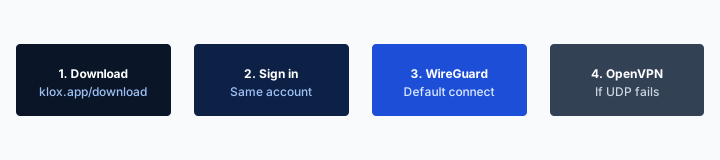
- 1Download the app from klox.app/download — not a random APK site.
- 2Sign in with the account you paid for.
- 3Press WireGuard. Wait for the connected state.
- 4If it fails, try OpenVPN. Still failing: note the network (hotel, campus, home) before you write support.
First successful connect
Minimal Codebase
WireGuard's core is approximately 4,000 lines of code. OpenVPN is over 100,000 lines. IKEv2/IPSec is larger still. The practical consequence: WireGuard can be fully audited by a single researcher in a reasonable timeframe. The same is not true of OpenVPN. Smaller codebases have fewer bugs, fewer edge cases, and are easier to maintain securely. Security researchers prefer auditable code; WireGuard's size makes it a realistic target for thorough review. This has contributed to its rapid adoption in security-conscious environments.
Modern Cryptography
WireGuard uses a fixed, modern cryptographic stack: Curve25519 for key exchange, ChaCha20 for encryption, Poly1305 for message authentication, BLAKE2s for hashing, and SipHash24 for hash table keys. This is not configurable — there are no weak cipher options to accidentally enable. The entire stack was designed together for performance and security.
UDP-Based with Stateless Design
WireGuard runs over UDP and is designed to be roaming-friendly. If your IP address changes (switching from WiFi to cellular, for example), WireGuard re-establishes the tunnel automatically and silently without dropping the connection. TCP-based protocols like OpenVPN must complete a full handshake when IP addresses change, causing noticeable interruptions.
WireGuard vs OpenVPN: Performance and Security
Both protocols are secure and widely deployed. The choice depends on your specific requirements.
| Fact | KloxVPN | Not on this page |
|---|---|---|
| Protocols | WireGuard, OpenVPN, OpenConnect, and Shadowsocks | A third invented protocol |
| Devices | Five simultaneous | Unlimited seats |
| Yearly | From $2.83/month | A fake city count |
| Refund | 7-day, first purchase | An On Demand toggle |
Speed Comparison
WireGuard typically achieves 2-4x higher throughput than OpenVPN on the same hardware. On mobile devices where CPU is constrained, the performance difference is even more significant. A connection that shows 40 Mbps over OpenVPN may show 120+ Mbps over WireGuard. Latency is also lower — WireGuard's handshake completes faster, and its kernel-level implementation processes packets more efficiently. Benchmarks across multiple VPN providers consistently show WireGuard as the fastest protocol. The gap is largest on low-power devices (phones, tablets) where OpenVPN's heavier cryptography creates a bottleneck.
Security Comparison
Both are secure when correctly configured. OpenVPN's flexibility is also its risk: it supports many cipher options, some of which are weak. WireGuard's fixed cryptographic stack eliminates this risk at the cost of flexibility. For the vast majority of users, WireGuard's security model is superior in practice precisely because there is less to misconfigure.
Compatibility
OpenVPN has been available since 2001 and is supported on virtually every platform and device. WireGuard is newer — it became part of the Linux kernel in 2020. Today it is supported on all major platforms: Linux, Windows, macOS, Android, iOS. The compatibility gap has largely closed.
When to Use WireGuard vs Other Protocols
Protocol selection should be based on your network environment and requirements.
HTTPS can hide a page body and still leave a destination visible. That is not a VPN.
— KloxVPN operator notes
Use WireGuard when
You want maximum speed. You move between WiFi and cellular frequently. You are on a modern device with Android 8+ or iOS 14+. Battery efficiency matters. WireGuard is the recommended default for most users in most situations.
Use OpenVPN when
You need TCP mode for networks that block UDP. You need the widest possible compatibility with older devices or routers. You are configuring a corporate or organizational VPN with specific compatibility requirements.
Use Shadowsocks when
You are in a country that uses deep packet inspection to block VPN protocols. Shadowsocks obfuscates traffic in a way that makes it difficult for censorship systems to identify as VPN traffic. It is the protocol of choice for users in China, UAE, Iran, and similar environments.
WireGuard Technical Deep Dive
For users who want to understand the technical foundations, WireGuard's architecture explains its performance and security properties.
Cryptographic Primitives
WireGuard uses Curve25519 for key exchange (X25519), ChaCha20 for symmetric encryption, Poly1305 for authentication, BLAKE2s for hashing, and SipHash for hash-table keys. All are modern, well-audited algorithms. There are no configurable cipher suites — the protocol has one secure configuration, eliminating the risk of weak options. ChaCha20 is particularly well-suited to mobile and embedded devices where AES hardware acceleration may not be available; it performs well in software on any CPU.
Kernel vs Userspace
WireGuard runs in the kernel on Linux, which means packet processing happens at the lowest level of the network stack. This reduces context switches and copies, improving throughput. On Windows and macOS, WireGuard uses a userspace implementation that is still highly optimized. The Linux kernel implementation is the reference for performance.
Connection Establishment
WireGuard uses a 1-RTT handshake — one round trip to establish the tunnel. OpenVPN typically requires multiple round trips. For mobile users who switch networks frequently, this means faster reconnection and less interruption.
WireGuard Limitations and When to Use Alternatives
WireGuard is excellent for most use cases but has specific limitations that may require a different protocol.
UDP Blocking
WireGuard uses UDP only. Some corporate firewalls, schools, and restrictive networks block UDP traffic. If WireGuard cannot connect, try OpenVPN in TCP mode — TCP port 443 is rarely blocked because it is used for HTTPS.
Perfect Forward Secrecy
WireGuard uses long-lived keys. If an attacker captures traffic and later obtains the private key, they could decrypt past sessions. OpenVPN with ephemeral keys provides perfect forward secrecy. For most users, this is an academic concern; for high-threat scenarios, consider the tradeoff.
Older Device Support
WireGuard requires relatively modern hardware for optimal performance. Very old devices may run OpenVPN more efficiently due to hardware acceleration for older ciphers. For devices from 2015 onward, WireGuard is typically faster.
WireGuard Setup and Configuration
Most users access WireGuard through a VPN app. Advanced users can configure WireGuard manually using configuration files.
Using WireGuard in VPN Apps
VPN apps like KloxVPN handle WireGuard configuration automatically. Select WireGuard in the protocol settings, choose a server, and connect. No manual configuration is required. The app manages keys, endpoints, and routing. This is the recommended approach for 99% of users.
Manual WireGuard Configuration
For router setup or custom deployments, download .conf files from your VPN provider. The config contains your public key, the server's public key, endpoint address, and allowed IPs. Import into the WireGuard app or use the command-line wg tool. Each peer needs a unique key pair.
WireGuard on Routers
Routers running OpenWrt, pfSense, or similar firmware support WireGuard. Configure the tunnel on the router to protect all connected devices. This is useful for smart homes, gaming consoles, and devices that cannot run VPN apps. Performance depends on router CPU — high-end routers handle WireGuard well.
WireGuard Performance Optimization
A few settings can improve WireGuard performance in specific scenarios.
MTU and Packet Size
WireGuard uses a default MTU of 1420. On some networks, lowering to 1280 or 1400 can resolve fragmentation issues that cause slow speeds or packet loss. Most users never need to change this — try it only if you experience unexplained slowdowns.
Server Selection
Choose the geographically closest server for lowest latency. For streaming or downloading, a nearby server with good bandwidth matters more than protocol choice. WireGuard's efficiency means you get more usable throughput from the same server compared to OpenVPN.
Mobile Roaming
WireGuard handles IP changes natively. When your phone switches from WiFi to cellular, the tunnel re-establishes without user intervention. Ensure the kill switch is enabled so no traffic leaks during the brief reconnection window.
WireGuard Security Considerations
WireGuard's design has security implications worth understanding.
Key Management
WireGuard uses static keys by default — your key pair does not rotate. If your private key is compromised, past traffic could theoretically be decrypted if an attacker also captured it. For most users this is acceptable; for high-threat scenarios, consider OpenVPN with ephemeral keys.
No Built-in Obfuscation
WireGuard traffic is identifiable as WireGuard. Censorship systems that use deep packet inspection can detect and block it. In restricted regions, Shadowsocks or obfuscated OpenVPN are better choices. WireGuard excels in open networks.
Audit and Transparency
WireGuard has been audited by multiple security firms. The codebase is small enough for thorough review. No major vulnerabilities have been found in production use. The Linux kernel inclusion required extensive scrutiny. This transparency is a strength.
WireGuard vs IKEv2 and L2TP
Older protocols still appear in enterprise and legacy configurations. Understanding how WireGuard compares helps when evaluating mixed environments.
IKEv2/IPSec
IKEv2 is built into iOS and Windows and handles network switching (roaming) well. It is faster than OpenVPN but slower than WireGuard. IKEv2 uses more complex key exchange and has a larger codebase. For new deployments, WireGuard is preferred. IKEv2 remains relevant for legacy enterprise integrations.
L2TP/IPSec
L2TP is an older protocol, often used when IKEv2 or OpenVPN are not available. It is slower and less efficient than WireGuard. Avoid L2TP for new setups. It exists primarily for backward compatibility with old devices and network equipment.
Migration from Legacy Protocols
If you are currently using OpenVPN or IKEv2, migrating to WireGuard is straightforward. Export your config or use the VPN app's protocol selector. No account changes are needed. Test on a single device first, then roll out. Performance and battery improvements are usually immediate.
WireGuard Use Cases: Streaming, Gaming, and Remote Work
WireGuard's performance characteristics make it ideal for specific use cases.
Streaming and Video
WireGuard's high throughput and low latency suit streaming. Connect to a server in the region whose content you want. Buffering is minimal compared to OpenVPN. Some streaming services block VPN IPs — if content does not load, try a different server or protocol. WireGuard's efficiency means you get more usable bandwidth from the same connection.
Gaming
For gaming, latency matters more than throughput. Choose the closest VPN server to the game's region. WireGuard adds typically 5-15ms overhead; OpenVPN can add 20-50ms. For competitive gaming where every millisecond counts, test both and use the one that performs better on your network. Some games restrict VPN use — check terms of service.
Remote Work and Video Calls
WireGuard handles video calls (Zoom, Teams, Meet) well. The 1-RTT handshake and efficient encryption mean minimal impact on call quality. When switching from home WiFi to mobile hotspot, WireGuard reconnects quickly without dropping the call. Enable the kill switch so no traffic leaks during brief reconnections.
WireGuard Implementation and Ecosystem
WireGuard's adoption has created a robust ecosystem of tools and integrations.
Official and Third-Party Clients
The official WireGuard project provides clients for all major platforms. VPN providers like KloxVPN integrate WireGuard into their apps — you get the protocol benefits without manual configuration. Third-party clients (e.g., WireGuard for Android by the official team) exist for users who prefer standalone apps with config files.
Cloud and Infrastructure
Major cloud providers (AWS, GCP, Azure) support WireGuard for site-to-site and client-to-site VPN. Tailscale and similar mesh VPNs use WireGuard under the hood. The protocol's simplicity makes it attractive for infrastructure deployments beyond consumer VPN.
Future Development
WireGuard is actively maintained. Post-quantum cryptography research may influence future versions. The protocol's small codebase makes such updates feasible without massive rewrites. For now, WireGuard's current cryptography is considered secure against known attacks.
Troubleshooting WireGuard Connection Issues
When WireGuard fails to connect, systematic troubleshooting resolves most issues.
Connection Timeout
If WireGuard times out, the network may block UDP. Try OpenVPN TCP mode instead — it uses port 443 which is rarely blocked. Some corporate and school networks block all VPN traffic; in those cases, you may need to use the network without VPN or find an alternative connection.
Slow Speeds Despite WireGuard
Try a different server — the one you selected may be congested. Choose a geographically closer server. Verify your base connection speed without VPN; if that is slow, VPN cannot fix it. Check for DNS issues; some VPNs have DNS settings that affect performance.
Intermittent Disconnections
Enable the kill switch so no traffic leaks during reconnection. Check if the issue occurs when switching networks (WiFi to cellular) — WireGuard should handle this, but some networks may drop UDP connections aggressively. Try a different protocol if WireGuard is unstable on your network.
WireGuard and Privacy: What It Does and Does Not Do
WireGuard protects your traffic in transit. Understanding its scope helps set expectations.
What WireGuard Encrypts
All traffic between your device and the VPN server is encrypted. Your ISP, the network you are on, and anyone in between cannot read the contents. DNS queries, HTTP requests, and app data are all protected. The encryption is strong — ChaCha20-Poly1305 and Curve25519 have no known practical attacks.
What WireGuard Does Not Do
WireGuard does not anonymize you from the VPN provider — they can see your traffic unless they have a no-logs policy. It does not protect against malware or phishing. It does not hide your activity from websites you log into. It does not prevent browser fingerprinting. Use WireGuard as one layer of a broader privacy strategy.
Combining WireGuard with Other Tools
WireGuard + uBlock Origin + password manager is a strong baseline. Add Privacy Badger, email aliases, or Tor for specific needs. Each tool addresses different threats. WireGuard excels at network-level protection; combine it with application-level tools for comprehensive coverage.
When to Verify WireGuard Is Active
Run an IP check (whatismyip.com) and DNS leak test (ipleak.net) after connecting. Your IP should match the VPN server's. DNS results should show your VPN provider's servers. If your real IP or ISP DNS appears, you have a leak. Enable the kill switch and DNS leak protection in your VPN app. Verify periodically — configuration changes or updates can introduce leaks.
How a tunnel applies to WireGuard VPN Explained: Why It's the Fastest Modern Protocol
WireGuard VPN Explained: Why It's the Fastest Modern Protocol is a convenient name for a shared hop. It is not a VPN profile and not a city. Cookies at /cookie do not open the portal. The portal opens in a browser. Then the app. Once Klox is up, inner DNS and inner sites go through the tunnel. The LAN still sees a blob to a node you chose. That is success, not a bug. Portal first. Handshake second. Leak test third. That is the whole checklist.
I treat WireGuard VPN Explained: Why It's the Fastest Modern Protocol Wi-Fi like any hotel or cafe: land, sign in, then wrap. Skip a step and the garden loops or destinations stay visible. Shared kitchens and coworking APs still NAT you. WireGuard VPN Explained: Why It's the Fastest Modern Protocol is just the label on this URL. When the AP filters UDP, OpenVPN often still lands. When both fail, the WAN is the problem, not a missing WireGuard VPN Explained: Why It's the Fastest Modern Protocol mode. Treat WireGuard VPN Explained: Why It's the Fastest Modern Protocol like a hotel SSID even when the branding looks official.
The SSID string is marketing on the AP. The tunnel is WireGuard, OpenVPN, OpenConnect, and Shadowsocks. Keep those sentences in different rooms. TLS on klox.app is the website. The hop wrap is the app. Mixing those two explanations on WireGuard VPN Explained: Why It's the Fastest Modern Protocol Wi-Fi confuses tickets. Keep the ritual small. Join WireGuard VPN Explained: Why It's the Fastest Modern Protocol Wi-Fi. Finish the page. Connect. Work. That is the complete consumer flow. Send this slug when someone asks for a special WireGuard VPN Explained: Why It's the Fastest Modern Protocol profile. There is not one.
The hop wrap here
You do not need a special build because the SSID says WireGuard VPN Explained: Why It's the Fastest Modern Protocol. You need the same Klox app you would use at a cafe. Guest VLANs can isolate you and still see destinations until the tunnel is up. Isolation is not a wrap. HTTPS on the website is not a hop wrap. RFC 8446 is TLS. Different job from Connect on WireGuard VPN Explained: Why It's the Fastest Modern Protocol Wi-Fi. Apps at /download. Plans at /pricing. Garden in the browser. Tunnel in the app.
If the page loops, you probably raced the tunnel. Drop it. Finish the garden. Connect again. That is the WireGuard VPN Explained: Why It's the Fastest Modern Protocol recovery. A QR code next to the kettle is still HTTP to a portal. It is not Connect. Finish it. I will not claim SOC 2 or a server map here. I will claim WireGuard, OpenVPN, OpenConnect, and Shadowsocks and the portal-then-Connect order. The SSID label does not change the physics. Wrap after sign-in.
If you came here looking for a WireGuard VPN Explained: Why It's the Fastest Modern Protocol mode in Settings: there is not one. Same apps. Same WireGuard, OpenVPN, OpenConnect, and Shadowsocks. Confirm you have a WAN before you blame the protocol. A captive garden with no accept button is not a WireGuard bug. If WireGuard hangs for a minute on WireGuard VPN Explained: Why It's the Fastest Modern Protocol Wi-Fi, wait out the portal, confirm you have a WAN, then try OpenVPN once. You are done when Connect is up and the portal is in the past. Not when you renamed a sysctl.
What not to invent
The front desk can print a QR. The kettle can sit next to a portal. Neither object wraps a hop. WireGuard VPN Explained: Why It's the Fastest Modern Protocol Wi-Fi still needs Connect after sign-in. If someone asks for a WireGuard VPN Explained: Why It's the Fastest Modern Protocol mode, send this slug. Same apps. same four protocols. Klox is five devices, yearly from $2.83/mo on yearly, 7-day money-back on first purchase. There is no WireGuard VPN Explained: Why It's the Fastest Modern Protocol SKU and no city count on this page. Land, sign in, wrap. Repeat it until it is boring. Boring is the goal.
WireGuard VPN Explained: Why It's the Fastest Modern Protocol Wi-Fi is still a LAN you do not run. {place} is a location, not a protocol. A minute of waiting after join is normal while DHCP and the garden load. Do not mash Connect ten times. Five devices means five. It does not mean a WireGuard VPN Explained: Why It's the Fastest Modern Protocol site license. Share the account inside that cap. If UDP dies on WireGuard VPN Explained: Why It's the Fastest Modern Protocol APs, one protocol swap. Then stop tinkering.
I will not invent a dashboard row named WireGuard VPN Explained: Why It's the Fastest Modern Protocol. Consumer facts stay boring: five devices, WireGuard, OpenVPN, OpenConnect, and Shadowsocks, 7-day money-back on first purchase. Hotel, airport, campus, WireGuard VPN Explained: Why It's the Fastest Modern Protocol: same NAT story. You are a guest. Guests get wrapped after sign-in. See Cloudflare's VPN explainer if you need the noun. The SSID can say WireGuard VPN Explained: Why It's the Fastest Modern Protocol or Coffee. The noun does not change. WireGuard VPN Explained: Why It's the Fastest Modern Protocol Wi-Fi is shared. Finish the portal. Then WireGuard, OpenVPN, OpenConnect, and Shadowsocks.
Key Takeaways
WireGuard represents the current state of the art in VPN protocol design. It is faster, simpler, and in many ways more secure than the protocols it is replacing. For most users — particularly on mobile — it should be the default choice. OpenVPN remains the compatibility champion for edge cases and corporate environments, and Shadowsocks remains essential for censored regions. KloxVPN includes all three, allowing you to switch based on your current environment. When in doubt, start with WireGuard — it delivers the best experience for the majority of users. Switch to OpenVPN or Shadowsocks only when your network or threat model requires it.
WireGuard's adoption will continue to grow as more devices and networks support it. The protocol's simplicity is its strength: fewer moving parts mean fewer failure modes. For streaming, browsing, gaming, and general use, WireGuard provides the best balance of speed, security, and reliability. Configure it once, enable the kill switch, and let it run in the background. The protocol has earned its place as the default for modern VPN deployments — use it unless you have a specific reason not to. If you experience connection issues, try OpenVPN first; if you are in a censored region, try Shadowsocks.
Related Resources
Use KloxVPN with WireGuard
KloxVPN supports WireGuard, OpenVPN, OpenConnect, and Shadowsocks. Switch protocols instantly in the app.
See KloxVPN FeaturesFrequently Asked Questions
KloxVPN Team
Experts in VPN infrastructure, network security, and online privacy. The KloxVPN team has been building and operating VPN services since 2019, providing consumer and white-label VPN solutions to thousands of users worldwide.