
Airport lounge Wi-Fi is a shared LAN with better coffee, not a private office and not a cabin at altitude. You sit in a room you do not run. You join an SSID the lounge or the airport runs. Either a tunnel is up on a laptop you brought, after their splash, or you are browsing in the clear on a floor that also serves strangers, gate agents, and someone else's standup on a delay. Ranked listicles will tell you a VPN makes the lounge safe. It does not. It changes what that access point can read about your next hop. HTTPS is the page. The hop is still theirs until a tunnel.
This is not VPN on Airplane Wi-Fi: After the Airline Page, Not Before. Inflight is satellite or air-to-ground and an airline page after you board. Different chair, different altitude. This is not the VPN on Cafe Wi-Fi: A Habit, Not a Superpower. Shops, menus, skip-on-purpose. A lounge has a membership desk and a posted network name. This is not VPN on Coworking Wi-Fi: Member Portal First, Not a Cafe Habit. Hot desks, printers, member dues. This is not Captive Portal in Plain English: The Garden Before the Tunnel. That URL is the garden physics. This is not the VPN Travel Checklist: Before You Go. Install the apps before you leave. This page assumes you already have them. Here the plot is the terminal: lounge SSID versus gate SSID, splash, shoulder surfing, five seats, HTTPS leftover.
HTTPS already encrypts the page on most of the sites you actually use. The lock in the browser is real. A VPN still wraps the path from your device to a server you picked. Wikipedia's VPN page is the noun. RFC 8446 is TLS 1.3 on the website. It is not a tunnel. The lounge can still see an IP you hop to if you skip the VPN. It can often see a server name if SNI is in the clear. Encrypted Client Hello exists in the industry and is uneven. Do not pretend the lock hid the graph. The remainder is the hop. That remainder is why people open a VPN on lounge Wi-Fi. It is not a streaming unlock. I will not sell you a catalog I did not promise.
KloxVPN is WireGuard, OpenVPN, OpenConnect, and Shadowsocks, five devices, yearly from $2.83 a month, 7-day money-back on first purchase. Phone plus laptop is two seats. Download is the apps. Pricing is the live number. Smart Connect, if the app shows the row, means connect on untrusted Wi-Fi. Lounge SSIDs are untrusted even if you paid for the chair. The row can race the splash. If the row is missing, you have a Connect button. Use the button after the page. I will not invent an On Demand toggle. I will not invent a city count as a reason the lounge is special. I will not invent airline legal advice. If the portal or the lounge terms forbid a VPN, that is their page. Read it. I will not walk around that sentence. I will not coach you to steal paid-lounge credentials or share a password from a stranger's boarding pass. Cookies on this site live at /cookie. Their portal cookies are theirs.
I have a bias. Finish their page first. WireGuard next. OpenVPN when UDP dies on a rude AP. Pause the kill switch until you have a route. Sit so the screen is not a billboard. Two seats in a row, not five. Seven days if you bought only for this trip. Do not leave fail-closed fighting a splash at the gate and then blame the product.
Related reading: What is a VPN? and WireGuard vs OpenVPN.
Looking for a reliable VPN?
KloxVPN — from $2.83/month. Apps for every device.
Lounge Wi-Fi is still a shared LAN
A lounge is a nicer waiting room. It is not your office VLAN. The SSID is still a shared access point. Printers are rare. Shoulders are not. People sit closer than a cafe because the chairs face a window. Mixing lounge with inflight in one sentence is how farms sell best VPN for travel until the affiliate cookie expires.
The cafe habit still helps: get a real route, then start the tunnel, then open mail. The airplane habit still helps: do not confuse this URL with the cabin. The coworking habit still helps: membership LAN, posted AUP. The lounge twist is a paid chair that still shares a radio with everyone who scanned a boarding pass, plus a terminal SSID one hallway away that looks almost the same in the picker.
I will not walk packet sniffing again. The public Wi-Fi how-to already did. I will not sell this lounge a branded amenity. You are a passenger with a backpack. Ask staff the SSID if two names appear on the tent. Do not pick Guest because it sorted first in a corridor full of phones. Do not treat a neighbor's hotspot named after the airline as the lounge.
Klox is a consumer tunnel to an exit you picked. It is not the lounge operator's LAN. It will not make you a floor admin. It will not replace their captive portal. Farms mash lounge next to cafes because the keyword is public. Public is not one product. A paid chair has a splash and a shared hop. That is the whole point of this URL.
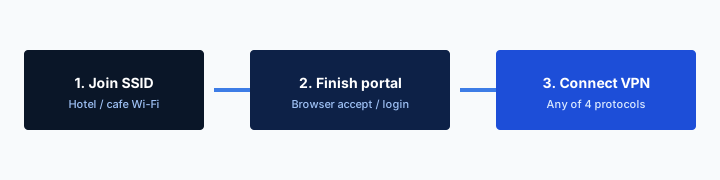
- 1Join the SSID. Do not start the VPN yet.
- 2Open a browser and finish the captive portal.
- 3Open Klox. Connect WireGuard.
- 4If the handshake dies, switch to OpenVPN. Then work.
Do this in order
| Setting | Who runs the LAN | Chair | Consumer VPN habit |
|---|---|---|---|
| Cafe / shop | A stranger AP | You can leave | Splash, then cafe article; skip the menu if that is all you needed |
| Gate / terminal SSID | The airport or a concession | A seat at the gate | Portal first, then tunnel; still a shared LAN |
| Paid lounge SSID | The lounge operator | A pass you paid for or earned | Their splash, then tunnel if the AUP allows it |
| Airplane cabin | The airline | A seat at altitude | Read the inflight article; this page is still on the ground |
| Coworking hot desk | The space | Dues and a printer | Member page; coworking article owns printers |
Klox is a hop you chose. It is not the lounge network and not a waiver for their AUP.
— KloxVPN consumer notes
Cloudflare Learning: What is a VPN?
What this post is not
Not cabin splash at altitude. Not cafe skip-the-menu. Not coworking printers. Not the garden physics essay. Not a packing list. I will not help you join a lounge SSID you did not pay for.
Farms mash every airport SSID
Lounge, gate, inflight: one ranking, one cookie. The ground LAN and the cabin radio are different chairs. Treat the ranking as a specimen, not a waiver.
Paid lounge SSID versus gate SSID
Airports often advertise two names. A terminal or gate SSID that anyone can join after a splash. A lounge SSID that wants a membership, a QR, a boarding pass check at the desk, or a voucher on a card. Those are two LANs. They may share a backhaul. They may not. Do not assume the lounge radio is cleaner because the coffee is better. Shared is shared.
Pick the SSID staff named. Ask if two look alike. An evil twin in a terminal is still an evil twin. Encryption is not authentication of the lounge. A tunnel on a twin is still a tunnel to a stranger. I will not tell you to scan for hidden SSIDs. I will not tell you to use a password you overheard at the desk. If you are not a member, you are not on that SSID. Gate Wi-Fi exists. Cellular exists. That is the honest fork.
Paid lounge Wi-Fi can still have a cap, a session timer, or a device limit the operator wrote. That limit is theirs. Klox's five seats are ours. Do not mash them. If the lounge allows two devices and you brought a phone and a laptop, you are at their cap and at two of our seats. If they allow one, pick. I will not coach a MAC shuffle so a third gadget looks like the first.
Some lounges roam you onto the terminal SSID when you walk to the gate. The tunnel may drop. Reconnect after a boring site loads. If a new splash appears, you are in a new garden. Pause kill switch. Finish the page. Then the tunnel. Smart Connect, if the row exists, may race that roam. If it bricks the splash, use the button.
Ask staff the printed name
The tent on the counter is the source. The loudest open network in the hallway is not. Do not join a neighbor hotspot that borrowed the airline's name.
A pass is not a password to steal
If you did not pay, did not earn, and were not invited, you do not get the lounge SSID. I will not write a second paragraph about sharing codes. Gate Wi-Fi or cellular.
Splash first, tunnel second
Lounge and terminal Wi-Fi often want an I agree, an email, a voucher, or a boarding-pass field before you have a real route. Same garden as a cafe, ruder paperwork, sometimes a captive page that only appears on HTTP. If Smart Connect or a kill switch fires before the splash, you get no internet and no page. Disconnect. Pause fail-closed if traffic is bricked. Complete the garden. Confirm a boring site. Then connect Klox. WireGuard first. You will be naked on that LAN for a minute. That is the cost of the splash. I will not claim zero exposure.
Some lounges keep a cookie so you skip the splash until the session ends. Some do not. Some re-auth every time you walk back from the gate. If you already have a route, waiting is how mail fetches on their DNS. Connect. Do not perform a portal ritual that is not there. If you are not sure, load a plain site. If it hangs on a login, you are still in the garden.
The splash is also where the AUP usually lives. Read it before you tap Connect on a consumer VPN. If the text forbids proxies, personal VPNs, or circumvention, treat Klox as a maybe-not on that SSID. I will not write a second paragraph that walks around that sentence. Cellular exists. Another terminal exists. The seven-day window exists if you bought a year for a layover that does not want the hop.
Staff can reset a session. They cannot reset Klox. Do not ask the attendant to fix WireGuard. They do not have that screen. Our app authenticates you to a hop we run. Their page authenticates you to their LAN.

Portal first, tunnel second
Same order as cafe Wi-Fi. The splash may want the email you already used for the lounge program. Still finish it in the clear. A tunnel that races the portal looks like a broken VPN. It is a garden.
The splash is not a setup wizard for Klox
Their page is theirs. Our Connect button is ours. Do not file a lounge complaint that the VPN is down when the garden never loaded. Sequence: page, boring site, then tunnel.
Shoulder surfing in the lounge
A tunnel hides the hop from the AP. It does not hide the screen from the person in the next chair. Lounges pack seats toward a window. Laptops face the room. Phone unlocks happen at the buffet. That is a physical problem. Sit differently. Angle the lid. Use the OS privacy screen if you have one. I will not sell you a filter SKU we do not ship.
People mash shoulder surfing with Wi-Fi sniffing because both happen in airports. Split them. Sniffing is the LAN. Shoulders are the room. A VPN does nothing for the room. HTTPS does nothing for the room. If your threat is a person reading mail over your shoulder, the habit is posture, not WireGuard.
I still connect on lounge SSIDs I do not run. I still sit so the screen is mine. Those are two habits. Farms sell one cape for both. The cape is a ranking. The chair is real.
Do not photograph other people's screens. Do not coach a neighbor to join your hotspot so they skip the lounge splash. That is still their AUP and still their pass. Offer cellular tethering only if it is your SIM and your data, and you know you just became their ISP for an hour. The phone-hotspot essay exists. This page will not turn the lounge into a cafe you host.
The tunnel is not a privacy screen
WireGuard wraps the hop. It does not dim the lid. If the person behind you can read the ticket, they can read the ticket. Sit, then tunnel.
Do not become the lounge AP
Tethering a stranger onto your phone is a different product and a different threat model. I will not turn that into a lounge hack. Gate Wi-Fi exists for people who are not members.
Five seats across phone and laptop
A lounge table is usually one laptop. Sometimes a phone on the same SSID. That is one seat, or two if both tunnels are up. Klox is five. You can install in more places. Only five can be connected at once.
The tablet you left at home on auto-connect still counts if it is holding a session. Ghost phones count. A router at home holding a tunnel counts as one seat and then covers a house, which is a different article. For the layover: disconnect what is not in the bag, or live with an error when the sixth handshake tries.
I work with a laptop. That is the kit. I do not need a family seating chart to know one is one. If a phone also joins the lounge SSID, you are at two. Still fine. If a work laptop is a second machine in the same bag, count before you sit down. The work laptop may not be allowed to run Klox at all. That is the BYOD page, not a sixth seat.
Remove retired devices in the portal. Sleep is not disconnect. A laptop lid can keep a peer. Open the app and look. Do not assume the lounge device limit is why you hit five. The cap is often a tablet on the couch. Yearly from $2.83 a month is the consumer price if you will repeat the habit. It is not extra seats.
Do not leave the tablet holding a seat
Auto-connect on a tablet at home is how you discover the cap at the gate. Disconnect it before you leave, or take it off untrusted-only so home Wi-Fi does not keep a tunnel you forgot.
Phone on cellular is one less seat
If the phone stays on cellular, only the laptop uses a seat on lounge Wi-Fi. That is the usual pattern. Do not tunnel the phone on their SSID just because the laptop did, unless you meant to spend the second seat.
Kill switch deadlock in the terminal
A kill switch is fail-closed: if the tunnel dies, nothing else leaves. On a laptop at home that is often what you want. On lounge and gate Wi-Fi it collides with the splash, with a roam to a new AP as you walk, and with a radio that drops when the boarding group fills the band.
Deadlock looks like this. Auto-connect starts WireGuard. Handshake fails because the portal has not blessed you. Kill switch blocks the HTTP the portal needs. You toggle random settings. You tell the attendant the Wi-Fi is down. The product did what you asked. You asked for a brick until the tunnel exists. The tunnel cannot exist until the brick is lifted.
Pause the switch for the garden. Restore it after the tunnel is up if you still want fail-closed on a radio that will drop. If you cannot live with a pause, skip kill switch on travel days and accept a leak window on drop. That is an adult trade. Pretending fail-closed and captive portals are friends is how tickets get written.
Terminal APs are shared. They roam. They rate-limit. A delay announcement on the PA is not a VPN bug. Fail-closed will cut you more often than at home. That is not a defect in WireGuard. It is a concourse with two thousand phones. Smart Connect, if the row exists, is untrusted Wi-Fi. Lounge and gate SSIDs qualify. The row can still race the splash. If it does, the button after the page is the habit.
Fail-closed versus the login page
If nothing loads and the OS never shows the portal, assume the switch. Disconnect Klox. Allow traffic. Load a plain HTTP site if the OS is shy. Then the tunnel. Then the switch, if you still want it.
Pause, splash, then restore
Two minutes of clear is not a lifestyle. It is the garden. If your client has a pause for Wi-Fi login shortcut, use it. If it does not, the sequence is still the same. Manual is allowed.
What the lounge hop still sees
The farm copy still talks as if 2012 HTTP is the default web. It is not. Your bank, your mail web UI, your work chat: TLS. RFC 8446 is how a lot of that encryption works. Contents of the page are not a gift to the person at the next chair running Wireshark for fun.
What the lounge still gets, without a VPN, is the fact of a hop. Destination IP. Often the name in SNI. DNS if your queries are not inside some other encryption. That is a map of who you talked to, not the password you typed into the form. People mash those together because both sound like they can see me. Split them.
A VPN hides that map from the lounge LAN by making the interesting hop a VPN server. The operator sees encrypted traffic to that server. Badge readers, cameras over the buffet, the desk that scanned your pass: those are not VPN problems. If your threat is a person in the room, sit differently. If your threat is the LAN, tunnel. If your threat is the site, that is the site.
Klox routes DNS through the tunnel. Features also lists IPv6 leak protection and WebRTC leak blocking. Those matter after you are connected. They are not a reason to skip the splash sequence. They are why a connected session is more than HTTPS was on anyway. A tunnel does not hide that you were in the lounge. The pass already did that.
What the operator still sees
Without a tunnel: that you used their AP, roughly how much you transferred, IPs you hop to, often names. With a tunnel: that you used their AP, roughly how much, and a VPN endpoint. They do not get your mail body from that.
SNI and the IP hop
SNI is a name sent while TLS starts. Encrypted Client Hello is rolling out and is not universal. The IP hop remains even when the name is hidden. A tunnel moves both of those to talk to the VPN. That is the honest remainder after you admit HTTPS exists.
When skipping is the right call
Skip if you do not join their Wi-Fi. Use cellular. Use a phone hotspot you run. That is the clean skip. Skip on the AP if the session is throwaway and you know it: one search for the gate number, a PDF they posted, a site you would show a stranger anyway. I still connect for mail and work. I do not connect to argue about the physics of a skip.
Skip is also the honest answer when the AUP forbids a personal VPN. I will not write a workaround. I will not tell you to obfuscate, hop protocols to hide the fingerprint from their filter, or dual-home so the logs look clean. If the posted rules say no, stay off the hop on that SSID. Cellular. Another network. Or accept their LAN and keep the session boring.
Skip is not I am good at security. Skip is this packet is boring, or this network does not want the product. If you cannot tell those apart, do not skip for vanity. Connect after the portal, or leave. The habit is cheaper than a story about how careful you are.
Do not skip because the app felt slow once. Switch protocol. Move seat. Use cellular. Slowness is not a moral argument against a tunnel, and it is not a reason to bypass a rule. WireGuard first. OpenVPN when UDP is rude. If both fail and the AUP forbids the hop, you are done. That is what the seven days are for if you bought a year for this layover alone. Do not skip by joining a lounge you did not pay for. That is still their network and still not yours.
AUP is not a ranking site
A farm list is not permission. If the lounge or airport terms forbid personal VPNs, I will not help you ignore that. Cellular remains a valid terminal strategy.
One layover and seven days
If you bought Klox only for a week of terminals, the consumer window is seven days on first purchase. See /refund. Renewals are not that window. Store purchases follow the store. Yearly from $2.83 a month if you will repeat the habit.
Key Takeaways
Airport lounge Wi-Fi needs a splash, then a tunnel, not an inflight cape and not a cafe cape. Finish the page. Read the AUP. Then connect if you are allowed to. HTTPS already locked the page. The lounge still sees the hop unless that hop is a VPN. Lounge SSID and gate SSID are two names. Shoulders are a chair problem. Two full tunnels on one NIC fight. Klox is not their network.
Laptop is one of five. Phone plus laptop is two. Smart Connect, if the row exists, is untrusted Wi-Fi. Pause kill switch for the garden. WireGuard first. OpenVPN when the AP is rude. Seven days if you bought only for one trip. Yearly from $2.83 a month. No city count. No AUP cookbook. No stolen lounge codes.
If you wanted the cabin, that URL is next door. If you wanted a latte, that is cafe. If you wanted a hot desk, that is coworking. If you wanted the garden physics, that is the portal essay. If you wanted a tunnel you will actually use in a lounge you are allowed to join, download the apps, practice the splash once, and leave their pass as a chair, not a credential to lift.
Related Resources
A lounge SSID is a LAN you do not run
KloxVPN is WireGuard, OpenVPN, OpenConnect, and Shadowsocks, five devices, yearly from $2.83 a month, 7-day first-purchase money-back. Splash first. Then the tunnel, if the AUP allows it. Download the apps on the ground, before you confuse this habit with inflight.
Download KloxVPNFrequently Asked Questions
KloxVPN Team
Experts in VPN infrastructure, network security, and online privacy. The KloxVPN team has been building and operating VPN services since 2019, providing consumer and white-label VPN solutions to thousands of users worldwide.