
A captive portal is a garden, not a vibe. You associate with an SSID. The access point has not given you a real route to the internet yet. It intercepts the first boring HTTP hop and shows a login, an 'I agree,' a voucher, a room number. Until that page completes, the rest of the net is fake or dead. A VPN that starts on association steals the hop the garden wanted. A kill switch that fails closed bricks even that hop. Then you have Wi-Fi that says connected, a browser that spins, and a product you want to uninstall.
This is not the VPN on Cafe Wi-Fi: A Habit, Not a Superpower. Latte, skip-on-purpose, two seats at a table. This is not VPN on Hotel Wi-Fi: Room Number First, Then the Tunnel. Room number, paid hour, TV as a seat. This is not VPN on Airplane Wi-Fi: After the Airline Page, Not Before. Thin pipe, airline page, seatback. Those URLs are when and where. This URL is what the garden is. Wikipedia's captive portal page is the noun for the splash. The When Not to Use a VPN: Skips You Choose on Purpose essay already listed the portal as a skip you pause on purpose. Here we unpack the hop.
A VPN wraps a path once you have a path. Wikipedia's VPN page is that other noun. RFC 8446 is TLS 1.3 on the website. It is not a tunnel and it is not the splash. HTTPS to a random site often will not summon the garden, because the browser refuses to be intercepted on a name it already trusts. That is why the OS probes a known HTTP URL instead. I will not invent an OS API name so this paragraph looks like a developer blog. The probe is a fetch. The garden answers with a login. Your VPN must not eat that fetch.
KloxVPN is WireGuard, OpenVPN, OpenConnect, and Shadowsocks, five devices, yearly from $2.83 a month, 7-day money-back on first purchase. Smart Connect, if the app shows the row, means connect on untrusted Wi-Fi. That row can race the splash. Kill switch, if the row exists, is fail-closed. Pause it for the garden. WireGuard after you have a route. OpenVPN if UDP dies after. Download is the apps. Cookies: /cookie. I will not invent a captive-portal bypass toggle. If your build lacks a pause shortcut, disconnect is the pause.
I have a bias. Complete the page in the clear. Confirm a boring site loads. Then tunnel. That minute is the cost of the garden. Pretending fail-closed and splash pages are friends is how tickets get written.
Related reading: AI Traffic Analysis Is Why a VPN Network Still Matters and VPN After Changing Default Browser: Extensions, DoH, Leftover Proxy. Linux use_tempaddr: Not a VPN Setting and Userfaultfd: Not a VPN Setting. What is a VPN? and VPN kill switch.
Looking for a reliable VPN?
KloxVPN — from $2.83/month. Apps for every device.
A garden, not a cafe essay
Walled garden, captive portal, splash page, Wi-Fi login: same physics. The AP (or a controller behind it) admits your radio and withholds a useful default route, or grants a route that still intercepts. You are on the LAN. You are not on the internet. The page is the gate. Hotels, airports, some cafes, some campuses, some airplanes all use a version of this. The chair does not change the intercept. The chair changes the habit article you read next.
Farms will still rank 'best VPN for hotel Wi-Fi' as if the garden were a brand problem. It is a first-hop problem. Mullvad's captive-portal help is a competitor specimen of a vendor telling you to disconnect, finish the page, reconnect. That sequence is the physics. Their product names are theirs. Ours are whatever rows your Klox Settings screen actually prints.
I will not walk 'sit down, order, skip the menu' again. Cafe owns that. I will not walk folio and paid hour. Hotel owns that. I will not walk altitude and a 10 MB allotment. Airplane owns that. If you opened this tab because nothing loads in a shop, finish this page's sequence, then go to the cafe URL for the habit around it.
The garden is also not a malware lecture. An evil twin can show a portal. Ask staff the SSID. Completing a fake garden still gives that AP a minute of clear traffic. Encryption after that minute does not authenticate the shop. The public-Wi-Fi how-to already did sniffing. Here the plot is: intercept, detect, deadlock, race, leftover hop, then pointers.

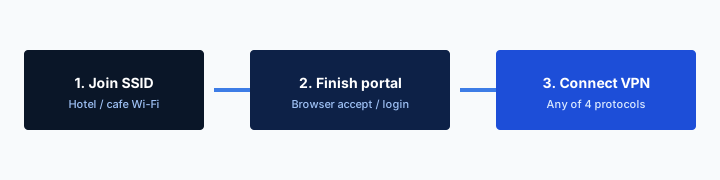
- 1Join the SSID. Do not start the VPN yet.
- 2Open a browser and finish the captive portal.
- 3Open Klox. Connect WireGuard.
- 4If the handshake dies, switch to OpenVPN. Then work.
Do this in order
| What you see | Likely physics | Tunnel? | Kill switch |
|---|---|---|---|
| Wi-Fi connected, no page, nothing loads | Portal plus tunnel or fail-closed eating the probe | Disconnect | Pause if traffic is bricked |
| Login / voucher / room number visible | Garden is doing its job | After the page | Off until a real site loads |
| Page completed, sites load, then you connect | You have a route | Yes, WireGuard first | On after handshake if you still want fail-closed |
| Handshake hangs after a good page | UDP may be rude, or the garden expired | OpenVPN if UDP dies | Do not fail-closed through a retry loop |
| HTTPS site errors, no splash | HSTS will not be intercepted; OS probe never ran | Still pause the tunnel; try a plain HTTP hop | Pause |
The garden wants a clear hop. The tunnel comes after the page, not instead of it.
— KloxVPN consumer notes
Cloudflare Learning: What is a VPN?
Wikipedia: Virtual private network
Mullvad: problems with captive portals (competitor specimen)
Same intercept, different chairs
Cafe, hotel, airplane, campus guest: the AP still wants HTTP it can rewrite. Your job at the packet layer does not change. Your job at the habit layer does. That is why those essays exist as separate URLs.
A vendor how-to is not our toggle
Some clients advertise a splash bypass. If Klox shows that row, use it. If it does not, disconnect is the bypass. I will not document a hidden API. Hidden is how articles rot.
How the AP intercepts
Association is radio. DHCP may hand you an address. DNS may point at the controller. None of that is 'the internet.' The controller still wants you to see a page. The classic trick: you request a plain HTTP site. The AP or a middlebox answers with a redirect to the login host, or with the login HTML itself. Your browser thinks it reached example.com. It reached the garden. That only works when the request is interceptable.
HTTPS breaks the old trick. RFC 8446 is how a lot of the web starts a TLS session. The AP cannot quietly rewrite that into a login without a certificate the browser will hate. HSTS makes the browser refuse to drop to HTTP on names it already knows. So you open Gmail, get an error, and never see the splash. People then say Wi-Fi is broken. Wi-Fi is waiting for a hop it can still kidnap.
DNS can be part of the garden. Some controllers resolve every name to themselves until you sign in. Some let DNS out and still intercept TCP 80. Some whitelist the OS detection URLs and nothing else. I will not publish a port matrix as if every hotel vendor used the same box. If HTTP never leaves, the splash never paints. If the tunnel grabs the first packets, HTTP never leaves as the AP expected.
IPv6 can skip a v4-only garden. The AP gates 192.0.2.0-style v4 and forgets your v6 default. Then leak pages show a real address while the splash still thinks you are jailed. Klox lists IPv6 leak protection. That matters after you have a route and a tunnel. During the garden, a v6 leak is a different mess: you might already be on the internet while the portal page hangs. If that happens, you still complete the page if the venue requires it, then connect. Do not treat a leak as a reason to skip the sequence the AP demanded.
You will be naked on that LAN for the minute the page takes. Mail should not fetch in that minute. Close the lid's auto-join apps if you can. Then do the garden. Then WireGuard. I will not claim zero exposure. I will claim this is normal.
HTTP is the bait, TLS is not
A deliberately unencrypted test hop is how humans summon a shy portal. A bank URL is a bad summon. The bank will error. The garden wanted port 80, or the OS probe, not a TLS name with HSTS.
DHCP is not a route to the world
An IP on the interface means you joined the LAN. It does not mean the controller blessed the next hop. Blessed is the page, a session cookie the AP understands, sometimes a MAC allow. Your VPN session is none of those.
OS detection
Phones and laptops probe. They fetch a known HTTP URL that is supposed to return a known tiny body. If they get that body, they assume the internet is real. If they get HTML for a login, they show a mini-browser or a 'Sign in to network' sheet. That sheet is the garden, drawn by the OS, not by Klox. I will not name the vendor URLs as if they were stable contracts. They change. The idea does not: a clear HTTP fetch with a predictable answer.
If a VPN is already up, the probe may go through the tunnel, fail, or return a VPN-side success that is not the AP's success. Then the OS thinks you are online, or thinks you are offline, and never paints the sheet. If a kill switch is up, the probe may not leave at all. Then there is no sheet, no tunnel handshake, and a human toggling Airplane mode as a personality.
Do not hunt Settings for a Klox 'captive portal API.' We are not documenting a private OS hook. If the OS shows the sheet, use the sheet. If it does not, open a browser and try a plain HTTP site. If the sheet appears under the VPN, the VPN already lost the race; disconnect and try again.
Android Always-on and similar OS locks are cousins of a kill switch. They can jail the NIC before the probe. If your phone uses an OS-level always-on VPN, pause that for the garden the same way you pause the app switch. The always-on essay is a different URL if you needed the Android row. Here: any fail-closed layer can hide the splash. Pause the layer you actually have.
Windows and macOS will retry the probe when the route changes. Connecting Klox immediately after the sheet can be fine. Connecting Klox during the sheet is how the sheet dies mid-password. Wait until a normal site loads. Then Connect.
The sheet is the OS, not the app
If Sign in to network appears, complete it there. Do not also paste the voucher into three browsers. One completion. Then a real site. Then the tunnel.
Success through a tunnel is the wrong success
A probe that returns the expected body via a VPN endpoint has not logged you into the hotel controller. The AP still wants its page. Disconnect until that page has happened.
Kill switch deadlock
Fail-closed means: no tunnel, no other traffic. The garden needs other traffic. Those two sentences are the deadlock. Auto-connect starts WireGuard. Handshake fails because the controller has not blessed you. Kill switch blocks the HTTP the portal needs. You reboot. You blame the app. The app did what you asked.
Pause the switch. Disconnect Klox. Allow the probe. Complete the page. Confirm a boring site. Connect WireGuard. Restore the switch if you still want fail-closed on a radio that will drop. If you cannot live with a pause, leave the switch off on travel days and accept a leak window on drop. That is an adult leftover. The When Not to Use a VPN: Skips You Choose on Purpose page already called this a skip you name. Forgetting the pause is not a skip. It is a brick.
Cafe radios drop when someone walks in front of the AP. Hotel radios roam between floors. Airplane radios are toys. Fail-closed will cut you more often on those radios than at home. That is not a WireGuard defect. It is a small AP plus a closed door. Habit essays cover how often to restore the door. Physics: the door must be open for the garden.
If your build has no kill-switch row, you do not have this deadlock from Klox. You may still have an OS always-on lock. You may still have Smart Connect racing. Do not invent Network Lock because a competitor screenshot had one. Confirm the row. The kill-switch plain-English article is the vocabulary. This page is why the garden hates that vocabulary.
Pause is not uninstall
Two minutes of clear is the garden, not a lifestyle. If the client has a pause-for-Wi-Fi-login control, use it. If it does not, Disconnect is the same physics. Manual is allowed.
Restore after a real site, not after the badge
A green Connected on Klox during a half-finished splash is a lie you told yourself. Load a site that is not the login host. Then fail-closed, if you still want it.
Auto-connect races the splash
Smart Connect, if the row exists, is connect on untrusted Wi-Fi. Captive SSIDs are untrusted. The row will fire on association, which is before the page. That is the race. Symptom: Wi-Fi connected, no internet, no sheet. Disconnect, finish the garden, connect, leave auto on if you still want it for the next cafe that has no splash.
If this happens every hotel, turn auto off for travel weeks and use the button after the page. Ugly. Works. The cafe habit article says the same sentence in a shop. The hotel article says it with a room number. Here it is the race itself: association timestamp versus splash timestamp. Auto wins the first. The AP needed the second.
Connect on launch is a different row if you have it. It does nothing until you open the app. It does not save you when the laptop lid opens and the radio joins in a bag. Do not confuse launch with untrusted Wi-Fi. Read the label on the glass.
I will not invent an 'allow captive portals' checkbox. If sales later ships one, the Settings screen will say so. Until then, the sequence is pause, page, WireGuard. OpenVPN if the handshake still dies after a route exists. UDP through some gardens is filtered even after login. That is not the splash hiding. That is a rude path. Spare tire.
Five devices still count. A phone that auto-connected into a brick and a laptop doing the same is two bricked seats, not a clever kit. Sequence one device. Then the other. The habit URLs care about counting TVs. Physics cares that each NIC needs its own garden completion.
Association is too early
The radio said joined. The controller said not yet. Auto-connect believes the radio. Believe the controller until a normal site loads.
One device through the garden at a time
Some venues bind a voucher to a MAC. Two gadgets racing can confuse a cheap controller. Finish the phone, then the laptop, or the other way around. Do not dual-wield Connect.
After you have a route
A route means a site that is not the login host loads. Then the old advice holds: tunnel before mail, before the password manager, before the work chat that auto-joins. Background sync does not wait for you to feel ready. That window is why people use a VPN on public Wi-Fi at all. The garden was the exception. The exception ended.
WireGuard first. Fast handshake, light on battery, enough encryption for a LAN you do not run. If the handshake hangs now, the garden is probably done and the path hates UDP. Switch to OpenVPN. If the client labels TCP, try that. One change, test a site, stop. Protocol-hopping as a personality is fidgeting.
DNS through the tunnel matters after connect. IPv6 leak protection matters if the AP handed you a v6 address. WebRTC in the browser can still embarrass you to a page you open. Those are Features-page sentences. They are not a reason to skip the splash sequence. They are why a connected session is more than 'HTTPS was on anyway.'
If the garden expires mid-session, the splash comes back. Paid hotel hours do this. Some cafes do this. You will deadlock again if fail-closed is on. Pause, re-complete, reconnect. The hotel habit essay owns the voucher clock. Physics: expiry returns you to intercept.
Leak-test after connect if you like, on a crop that is not a full desktop, after the tunnel is up. Do not leak-test during the garden. The result will be the AP or your home IP and a wasted PNG.
The exception ended when the site loaded
Waiting extra minutes 'to be sure' is how mail fetches on the venue DNS. Sure is a page load. Then Connect.
Expiry is the garden again
A second splash is not a new product. Same pause. Same page. Same WireGuard. Do not assume the old handshake survived the controller's logout.
HTTPS leftover
The farm copy still talks as if 2012 HTTP were the default web. It is not. Your bank, your mail web UI, your work chat: TLS. RFC 8446 is how a lot of that encryption works. Contents of the page are not a gift to the person at the next table. The garden did not change that. Completing a splash does not decrypt Gmail.
What the AP still gets, without a VPN, is the fact of a hop. Destination IP. Often the name in SNI. DNS if your queries are not inside some other encryption. That is a map of who you talked to, not the password you typed into the form. People mash those together because both sound like 'they can see me.' Split them.
A VPN hides that map from the venue by making the interesting hop 'a VPN server.' The AP sees encrypted traffic to that server, plus the fact you used their radio. Cloudflare's explainer is the generic picture. Encrypted Client Hello exists in the industry and is uneven. Do not pretend the lock hid the graph. Do not pretend the garden hid it either. The garden only delayed the graph until you signed their page.
Phishing still works after a portal. Malware still works. A fake bank still works. The tunnel is a path. The site is the site. I will not sell a cape because you typed a room number. I will sell a hop you chose, five devices, two protocols, yearly from $2.83 a month, seven days if you bought only for one trip's worth of gardens.
The splash is not TLS
Agreeing to terms does not turn on HTTPS. HTTPS was already on for most sites. The splash bought you a route. The VPN, after that, hides the route's next hop from the AP.
SNI and the IP remain without a tunnel
After the garden, without Klox, the venue still sees IPs you hop to and often names. After Klox, they see a VPN endpoint. That remainder is the whole consumer product on public Wi-Fi.
Where the habit articles live
If you wanted a shop, skip-on-purpose, two seats, Smart Connect as a cafe ritual: VPN on Cafe Wi-Fi: A Habit, Not a Superpower. If you wanted a room number, paid hour, a TV that counts as a seat: VPN on Hotel Wi-Fi: Room Number First, Then the Tunnel. If you wanted a cabin pipe and an airline page: VPN on Airplane Wi-Fi: After the Airline Page, Not Before. If you wanted a list of skips you choose, including this pause: When Not to Use a VPN: Skips You Choose on Purpose.
This page was the garden: intercept, OS probe, deadlock, race, leftover hop. Re-read it when a new chair shows the same brick. Do not re-learn physics from a ranked list every time the SSID changes. The chair essays exist so the physics can stay boring.
White-label operators who want macros for portal tickets can talk to sales. This is the consumer sequence. I will not invent a branded captive-portal ticket SKU on this URL.
Price stays on /pricing. Apps on /download. Cookies on /cookie. WireGuard first. OpenVPN when UDP dies after you already have a route. Five devices. Seven days on first purchase if the trip was the whole point. No city count as a reason the splash is special. The splash is special because it is a first hop that is not the internet yet.
If both protocols fail after a completed page, it is the network, the radio, or a venue that does not want a tunnel. Cellular is still a valid garden strategy: skip their AP. Skipping the AP is the cleanest skip in the when-not-to-use list. You cannot deadlock a splash you never joined.
Do not clone this into a cafe post
If you are writing notes for yourself: physics here, habit there. Mixing them is how every travel article becomes the same 4,000 words. We already split the URLs. Use them.
Cellular skips the garden
No association, no intercept, no sheet. Use it when the AP is a toy or when you refuse the minute of clear. The phone still has a seat if you tunnel on cellular. That is allowed. It is also how you avoid this whole page.
Key Takeaways
A captive portal is a garden. The AP intercepts a clear HTTP hop until you complete a page. OS detection is a probe that wants that hop. A tunnel or a kill switch can hide the probe, which looks like no internet. Pause, finish, confirm a real site, then WireGuard. OpenVPN if UDP dies after you have a route. Smart Connect, if the row exists, can race the splash. HTTPS already locked page bodies. The venue still sees the next hop unless that hop is a VPN.
Cafe, hotel, and airplane habits live on their own URLs. When not to use a VPN already listed this pause. Klox is WireGuard, OpenVPN, OpenConnect, and Shadowsocks, five devices, yearly from $2.83 a month, 7-day first-purchase money-back. No invented bypass API. Disconnect is the pause if the row is missing.
Download the apps. Practice the sequence once on a guest SSID at home if you can. The next airport should not be your first rehearsal.
Related Resources
Finish the garden, then start the hop
KloxVPN is WireGuard, OpenVPN, OpenConnect, and Shadowsocks, five devices, yearly from $2.83 a month, 7-day first-purchase money-back. Smart Connect, if your app shows it, is untrusted Wi-Fi. Pause it for the splash page. Then connect.
Download KloxVPNFrequently Asked Questions
KloxVPN Team
Experts in VPN infrastructure, network security, and online privacy. The KloxVPN team has been building and operating VPN services since 2019, providing consumer and white-label VPN solutions to thousands of users worldwide.