
Hotel Wi-Fi is a voucher problem, not a latte. You type a room number, a last name, sometimes a paid hour. Either a tunnel is up after that page, or you sit on the property LAN in the clear while mail fetches. Ranked listicles will tell you a VPN makes the hotel safe. It does not. It changes what that access point, and whoever operates the property network, can read about your next hop.
This is not the VPN on Cafe Wi-Fi: A Habit, Not a Superpower. Shops, menus, skip-on-purpose. Different chair. This is not VPN on Airplane Wi-Fi: After the Airline Page, Not Before. The cabin is a thin pipe and an airline page. This is not Hotel-Branded VPN: Guest Wi-Fi Without a Front-Desk Meltdown. That piece sells an amenity to a GM. You are a guest with a laptop. This is not the VPN Travel Checklist: Before You Go. Install the apps before you leave. This page assumes you already have them. This is not the How to Use a VPN on Public WiFi Safely. That one is sniffing and evil twins as a checklist. Here the plot is the room: portal, paid hour, TV as a seat, UDP, deadlock.
A VPN still wraps the path from your device to a server you picked. Wikipedia's VPN page is the noun. RFC 8446 is TLS 1.3 on the website. It is not a tunnel. The hotel can still see an IP you hop to if you skip the VPN. It can often see a server name if SNI is in the clear. Encrypted Client Hello exists in the industry and is uneven. Do not pretend the lock hid the graph. HTTPS already encrypted the page on most sites you actually use. The remainder is the hop. That remainder is why people open a VPN on hotel Wi-Fi. It is not a streaming unlock. I will not sell you a catalog I did not promise.
KloxVPN is WireGuard, OpenVPN, OpenConnect, and Shadowsocks, five devices, yearly from $2.83 a month, 7-day money-back on first purchase. Phone plus laptop is two seats. A room TV that can run the app is a third. Pricing is the live number. Download is the apps. Smart Connect, if the app shows the row, means connect on untrusted Wi-Fi. Hotel SSIDs are untrusted. The row can race the room-number page. If the row is missing, you have a Connect button. Use the button after the page. I will not invent a city count as a reason the lobby is special. I will not invent a dedicated-IP consumer SKU. We do not sell that as a Klox consumer line item. Cookies on this site live at /cookie. The hotel portal's cookies are theirs.
I have a bias. Finish the room-number page first. WireGuard next. OpenVPN when UDP dies. Pause the kill switch until you have a route. Count the TV if you connect it. Seven days if you bought only for this stay. Do not leave fail-closed fighting a splash in a room you paid for and then blame the product.
Related reading: What is a VPN? and WireGuard vs OpenVPN.
Looking for a reliable VPN?
KloxVPN — from $2.83/month. Apps for every device.
Hotel is a voucher, not a latte
A cafe is join, maybe a splash, then coffee. A hotel is a voucher tied to a folio. Room number. Last name. Arrival date. A code on a card sleeve. Sometimes a paid hour that is not the same as the stay. You are not skipping a posted menu. You are authenticating to a property network that already knows which bed you rented.
The habit is still: get a real route, then start the tunnel, then open mail. The physics of the garden are ruder than a shop. Portals time out. Radios roam between lobby and floor APs. A conference on Tuesday eats the band. Paid Wi-Fi expires at 14:00 and the splash comes back while you are on a call. That is the hotel plot. Cafe advice still helps. Hotel advice adds the voucher and the TV.
I will not walk packet sniffing again. The public Wi-Fi how-to already did. I will not sell this property a branded amenity. That is a different buyer. I will not pack your toiletries. The travel checklist exists for install-before-you-fly. Here you are already in the room. The SSID is on the TV card or the desk tent. Ask the desk if two SSIDs appear. Do not pick 'Hotel_Free' because it sorted first.
Farms will rank best VPN for hotel Wi-Fi until the affiliate cookie expires. I am not competing on city counts. I am competing on whether you get a handshake after the room number without deadlocking the kill switch. That is a smaller claim. It is also the one that matches the product.
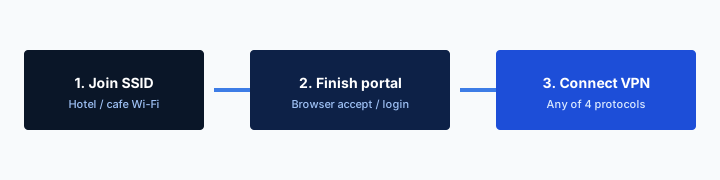
- 1Join the SSID. Do not start the VPN yet.
- 2Open a browser and finish the captive portal.
- 3Open Klox. Connect WireGuard.
- 4If the handshake dies, switch to OpenVPN. Then work.
Do this in order
| Situation | Have a real route yet? | Start the tunnel? | Kill switch |
|---|---|---|---|
| Room number / last name / voucher splash | Not until the page finishes | After the page, then yes | Off or paused until a boring site loads |
| Paid hour, already authenticated this stay | Usually yes, until the hour dies | Yes, WireGuard first | On if you accept hard cuts on drop |
| All-stay SSID, cookie still valid | Usually yes | Yes | On if the floor AP is flaky |
| Room TV running a Klox app | The TV is its own device | Only if you meant to spend a seat | Per device, not 'the room' |
| Phone plus laptop both on the SSID | Each device separately | Each device is a habit | Per device, two of five seats |
The room number opens the garden. The tunnel comes after the page.
— KloxVPN consumer notes
Cloudflare Learning: What is a VPN?
Wikipedia: Virtual private network
SafetyDetectives: best VPNs for travel (competitor specimen)
Do not treat the desk tent as a cafe menu
The tent is a voucher. Read the SSID. Read whether Wi-Fi is in the rate or a paid add-on. A cafe skip is 'I will not join.' A hotel skip is cellular in the room, which is allowed, and is a different radio. If you join, you owe the portal a clear hop.
This is not the hotel selling a VPN
A branded guest tunnel is an operator product. You did not buy that. You bought a consumer plan and a night in a building. Do not ask the night auditor to reset your Klox password. They do not have that screen.
Room number portal
Captive portals want a clear hop. The hotel AP intercepts HTTP, shows room number, last name, a checkbox, sometimes a paid SKU. Your phone's OS tries to detect that garden. A VPN that starts the instant the radio associates can steal the first hop the portal wanted. Then you have no internet, no splash, and a ticket you will write from the bedspread.
If Smart Connect or a kill switch already fired, disconnect. Pause the switch if traffic is still blocked. Complete the page. Confirm a boring site loads. Then connect Klox. WireGuard first. You will be naked on that LAN for a minute. That is the cost of the splash. I will not claim zero exposure. I will claim this is normal, and that leaving the tunnel up during the splash is why people think the app is broken in hotels.
If the portal never appears, you probably already have fail-closed eating the detection traffic. Turn Klox off. Open a plain HTTP site if the OS is shy. Some phones need that. Then the tunnel. Cafe Wi-Fi has the same deadlock. The hotel version adds a folio field that rejects typos and a 'this room is already online' error when the previous guest's laptop is still associated. Call the desk for the second problem. Do not protocol-hop as a debug for a room that is already claimed.
Room number plus last name is not a secret. The housekeeper has it. The portal vendor has it. Treat it as a voucher, not as a password you would reuse. Do not type your Klox password into the hotel page. Those are different forms. I have watched people mash them because both said login.
When the portal needs a clear hop
Symptom: Wi-Fi says connected, nothing loads, no room-number page. Tunnel and fail-closed are the usual culprits. Turn them down, finish the garden, bring them back. Do not reboot the laptop as the first move. You will lose the captive dance and start over.
Smart Connect races the splash
If the row exists, it will treat hotel Wi-Fi as untrusted and try to connect. That is correct after you have a route. It is wrong during the garden. Pause it for the page. Restore it if you still want auto on the next network. If the row is missing, you already live on the button. Use the button late, not early.
Paid hour versus all-stay SSID
Hotels split the product. Some include Wi-Fi in the rate for the whole stay. Some sell an hour, a day, or a device count. The paid hour is not the same as the folio. It dies while you still have the room. Then the splash returns. If Klox is fail-closed when the hour dies, you get a brick and a story about the VPN eating the internet. The hour died. The switch did what you asked.
All-stay SSIDs still captive-portal you on the first join, and sometimes again after a floor roam. A cookie on their portal is their website. Our cookie page is Klox's site, not the property vendor. Rejecting analytics on klox.app does nothing to the splash on the desk. Completing their portal may set a device cookie so you stay authenticated. If you clear cookies at 2am you may buy the hour twice. That is their funnel. It is not a leak test.
I will not quote a price for hotel Wi-Fi. I will not name a chain's SKU. Those change. The split does not: garden, then maybe a real route, then maybe a VPN. A paid hour that cannot reach a VPN server is a whitelist toy. Handshake timeouts are the usual result. Buy the fuller pass if you wanted a tunnel, or use cellular. That is a purchase decision, not a protocol decision.
If the property sold 'two devices' as their Wi-Fi SKU, that is their NAT table, not Klox's five seats. You can still hit their device cap with phone plus laptop plus TV before you hit ours. The desk can reset their table. We cannot. Do not open a Klox ticket because the hotel sold a two-device hour.

When the hour dies mid-call
Pause the kill switch. Reload the portal. Pay or re-auth. Confirm a site. Then the tunnel. Do not assume WireGuard failed. Assume the voucher expired. The call drop is the hour, then the switch, in that order.
All-stay still means splash, then test, then tunnel
A folio is not a route. Load a site. Then WireGuard. If you skip the test, you will not know whether the VPN failed or the room number never took. Two minutes of clear after the page is the garden, not a lifestyle.
Kill switch deadlock on hotel Wi-Fi
A kill switch is fail-closed: if the tunnel dies, nothing else leaves. On a laptop at home that is often what you want. On hotel Wi-Fi it collides with the room-number page and with floor APs that drop every time the elevator opens. Deadlock looks like this. Auto-connect starts WireGuard. Handshake fails because the portal has not blessed you. Kill switch blocks the HTTP the portal needs. You toggle random settings. You tell the desk the Wi-Fi is malware. The product did what you asked. You asked for a brick until the tunnel exists. The tunnel cannot exist until the brick is lifted.
Pause the switch for the garden. Restore it after the tunnel is up if you still want fail-closed on a radio that will drop. Restoring it means you will get cut every roam. That can be the right call if you care about a leak window. It can be the wrong call if you are trying to keep a work chat alive across a conference floor. Adult trade. Pretending fail-closed and captive portals are friends is how support tickets get written from a bedspread.
Cafe radios are rude. Hotel radios are ruder in a different way. They roam, they rate-limit, they reboot a controller at 3am. Fail-closed will cut you more often than at home. That is not a defect in WireGuard. It is a property network with two hundred phones and a ballroom.
If you cannot live with a pause, skip kill switch on stay days and accept a leak window on drop. Use the Connect button. Smart Connect can wait until you check out. I would rather you have a splash and a tunnel than a perfect fail-closed story and no email.
Fail-closed versus the login page
If nothing loads and the OS never shows the portal, assume the switch. Disconnect Klox. Allow traffic. Load a plain HTTP site if the OS is shy. Then the tunnel. Then the switch, if you still want it. The sequence is ugly. It works. Rebooting the laptop is slower.
Roams will look like drops
You walk to the lobby. The tunnel dies. The switch cuts you. You think the paid hour expired. Wait. Reconnect WireGuard. If the hotel wants the splash again, pause, garden, restore. Do not buy a second hour as the first debug step.
UDP dies, OpenVPN next
Klox ships WireGuard, OpenVPN, OpenConnect, and Shadowsocks. WireGuard is the default I want on a normal network: fast handshake, light on a phone battery, enough encryption for a LAN you do not run. Hotel Wi-Fi is often not a normal network. UDP gets dropped. Handshake hangs. Or it connects and dies. Then OpenVPN, often TCP, is the spare tire. You will feel it. The pipe was already shared with a wedding. TCP over a congested controller is not pretty. You will also get a route, which is the actual job.
Do not protocol-hop as a personality. One change, test a site, stop. If both fail, it is the portal, the kill switch, the paid-hour whitelist, or a network that does not want a VPN. Cellular in the room is still a valid hotel strategy. I use it when the property Wi-Fi is a toy. I will not invent a city you should pick so the wedding gets quieter. Pick a server that connects. If the app has a default, use it. Fidgeting through a list on a saturated AP is how you spend the evening in the server picker.
DNS through the tunnel still matters on whichever protocol actually connected. IPv6 leak protection still matters if the hotel hands you a v6 address and your tunnel is v4-only without a block. WebRTC in the browser can still embarrass you to a page you opened. Those are Features-page sentences. They are not a reason to skip WireGuard on the first try. They are a reason to connect, then optionally leak-test if you are bored, then close the laptop.
I will not publish a speed SLA for hotel plus OpenVPN. I will not publish a city count. I will not invent SOC 2 as a reason the handshake failed. The handshake failed because of the portal, UDP, or the hour. The travel checklist can nag you to test protocols on home Wi-Fi before you leave. This article says: WireGuard, then OpenVPN, then stop.
Hotel APs that hate UDP
Handshake hangs, or connects and dies, and you already finished the room number. Switch to OpenVPN. If the client labels TCP, try that. Do not sit there fixing Wi-Fi for forty minutes. The controller does not care. The person waiting for the ice machine cares.
Do not collect protocols as a hobby
WireGuard until it is rude. OpenVPN when it is. Back to WireGuard on the next normal network, which is probably after you check out. Collecting protocols at 1am is fidgeting. Fidgeting burns the hour.
Laptop versus the room TV
A hotel desk is usually two gadgets. Phone already on cellular or already joining the SSID. Laptop on the desk. That is two simultaneous seats if both tunnels are up. Klox is five. You can install in more places. Only five can be connected at once.
The room TV is a third seat if it can run a Klox app and you connect it. Most hotel TVs cannot. They are the property's computer. You do not install WireGuard on a Samsung that is bolted to the wall and managed by the vendor. You watch their app. You use your own gadgets for mail. If the TV browser is the only network they sold you, you do not have a tunnel product on that screen. Say it and sit still.
If you brought a stick that can run the app, that stick is a seat. If you put Klox on a travel router in the room, that router is one seat and then covers whatever joins it, which is a different article. For this stay: phone plus laptop is the kit. The TV is furniture unless you actually connected an app you control.
The tablet you left at home on auto-connect still counts if it is holding a session. Ghost phones count. A router at home holding a tunnel counts as one seat and then covers a house. For the hotel: disconnect what is not in the bag, or live with an error when the sixth handshake tries. I travel with phone plus laptop. That is two. If a partner's phone also joins, you are at three. Still fine. Count before you connect the stick 'just to try Netflix.' I did not promise a catalog. The stick still spends a seat even if the show fails.
Remove retired devices in the portal. Sleep is not disconnect. A laptop lid can keep a peer. Look at the list. Do not assume the hotel is why you hit the cap. The cap is often a tablet on the couch.
The bolted TV is not a Klox device
You cannot put WireGuard on the property's IFE-in-a-room. Watch the movie. Use your laptop for mail. If their TV app store has no Klox row, there is no row. I will not invent a Leanback binary for a hotel brand.
A stick you brought is a seat
You own it. You installed it. It connects, it counts. Phone plus laptop plus stick is three of five. Fine. Do not add the home tablet on Smart Connect and then act surprised. The family seating chart is a different URL. This is travel kit versus furniture versus a stick in the suitcase.
What the hotel path still sees
The farm copy still talks as if 2012 HTTP is the default web. It is not. Your bank, your mail web UI, your work chat: TLS. RFC 8446 is how a lot of that encryption works. Contents of the page are not a gift to the person in the next room running Wireshark for fun, if they even could on a client-isolated hotel LAN. Isolation varies. Do not bet your password on it.
What the property operator still gets, without a VPN, is the fact of a hop. Destination IP. Often the name in SNI. DNS if your queries are not inside some other encryption. That is a map of who you talked to, not the password you typed into the form. People mash those together because both sound like they can see me. Split them.
A VPN hides that map from the hotel by making the interesting hop a VPN server. The AP sees encrypted traffic to that server. Your ISP at home sees a similar blob if you tunnel at home. Different chair, same idea. Cloudflare's explainer is the generic picture if you want it in someone else's words. Klox routes DNS through the tunnel. Features also lists IPv6 leak protection and WebRTC leak blocking. Those matter after you are connected. They are not a reason to skip the splash sequence. They are why a connected session is more than HTTPS was on anyway.
The hotel still sees that you used their SSID, roughly how much you transferred, and that you spoke to a VPN. Encryption is not authentication of the property. A VPN cannot make their AP honest. It cannot unlock a streaming catalog I did not promise. Hotel Wi-Fi plus a VPN is not a Netflix product. If a farm said otherwise, they were selling a cookie. Klox is a tunnel, five devices, two protocols. Use it as that. It cannot hide that you are in that room. Folio, cameras, the key card: those are not VPN problems.
HTTPS already locked the page
The remainder is the hop. Without a tunnel: IPs, often names, DNS. With a tunnel: a VPN endpoint. They do not get your Gmail body from that. They also do not lose the fact that you bought an hour. The hour is their business.
The next room is not the only observer
The portal vendor, the property IT, sometimes a conference sponsor on the same controller: those are the interesting logs. A VPN moves your destinations off that map. It does not move you off the folio. Do not confuse those.
Seven days if the stay was the product
If you bought Klox only for one week of hotels and the room Wi-Fi was the whole point, the consumer window is seven days on first purchase. Live page: /refund. Renewals are not that window. Processing is typically several business days to the original method. Store purchases follow the store.
I would rather you keep the year if you will sit in cafes and airports after you check out. Yearly from $2.83 a month is not a minibar. If you will not, refund inside the clock instead of leaving a subscription you resent. Resentment is how chargebacks happen. Chargebacks are a different mess.
Do not buy a month of a farm brand because a best VPN for hotel Wi-Fi list told you to, then also buy Klox, then refund neither. Pick one tunnel. Five devices is enough for a trip kit. WireGuard, OpenVPN, OpenConnect, and Shadowsocks are enough protocols. You do not need a city count to send mail from a desk. You do not need a dedicated-IP consumer SKU. We do not sell that as a Klox consumer line item. Do not invent IAP SKUs as a reason the handshake failed. The handshake failed because of the portal, UDP, or the hour.
If the apps will not handshake even after the room number, try OpenVPN. If they still will not, that is what the seven days are for. Document the property SSID in the ticket if you write in. Do not invent a story about SOC 2. Nobody at the desk asked. Do not invent an SLA percentage for hotel Wi-Fi. We do not publish one. The packing list can still save the next trip. This stay was a voucher. Treat it that way.
First purchase, not a free week forever
The window is so you can try the apps, including on rude hotel Wi-Fi. It is not a coupon for every stay. If you already used a first purchase, you already used the window.
If you only needed the room
Refund inside seven days if that was the whole product for you. Keep it if cafes and airports are a habit you will repeat after you leave. Habits are why a year exists. Capes are why farms exist. This page was the hotel habit: voucher, room number, paid hour, deadlock, UDP, TV as a seat, remainder, seven days.
Key Takeaways
Hotel Wi-Fi needs a habit, not a cape. Finish the room-number page. Then tunnel. WireGuard first. OpenVPN when UDP dies. HTTPS already locked the page. The hotel still sees the hop unless that hop is a VPN. A paid hour is not the folio. The bolted TV is not a device. Pause fail-closed through the garden.
Phone plus laptop is two of five. A stick you brought is a third. Smart Connect, if the row exists, is untrusted Wi-Fi and will race the splash. Seven days if you bought only for the stay. Yearly from $2.83 a month. No city count. No streaming fairy tale. No branded amenity pitch from this URL. Cookies for this site: /cookie.
If you wanted a cafe, that habit is next door. If you wanted a cabin, that is altitude. If you wanted to sell a tunnel to a GM, that is the branded hotel piece. If you wanted a tunnel you will actually use at the desk, download the apps, practice the splash sequence once at home with a guest SSID, and do not discover OpenVPN for the first time at 1am.
Related Resources
Install before the stay. Connect after the room number.
KloxVPN is WireGuard, OpenVPN, OpenConnect, and Shadowsocks, five devices, yearly from $2.83 a month, 7-day first-purchase money-back. Smart Connect, if your app shows it, is connect on untrusted Wi-Fi. Use it after the hotel page, not as a cape.
Download KloxVPNFrequently Asked Questions
KloxVPN Team
Experts in VPN infrastructure, network security, and online privacy. The KloxVPN team has been building and operating VPN services since 2019, providing consumer and white-label VPN solutions to thousands of users worldwide.