Airbnb Wi-Fi is a short-stay LAN, not a hotel voucher and not the guest SSID you named at home. You type a password off a fridge card. You sit on a consumer router the host left plugged in. Either a tunnel is up on a laptop you brought, or you are browsing in the clear on a floor that may also hold last week's guest Chromecast, a camera the listing forgot to mention, and whoever is sleeping in the next bedroom. Ranked listicles will tell you a VPN makes the Airbnb safe. It does not. It changes what that access point can read about your next hop.
This is not the VPN on Hotel Wi-Fi: Room Number First, Then the Tunnel. Hotels have a room-number splash, a folio, a paid hour. Different garden. This is not VPN on a Home Guest SSID: A Cafe You Happen to Run. That SSID is isolation you configured. This one is usually the host's main LAN with a sticky note. This is not Do You Need a VPN on Home Wi-Fi?. That page is your ISP on a network you pay for. This is not the VPN on Cafe Wi-Fi: A Habit, Not a Superpower. Shops, menus, skip-on-purpose. Different chair. This is not Router VPN vs Per-Device Apps. I will not sell you a flashed box on a rental you leave on Sunday.
HTTPS already encrypts the page on most of the sites you actually use. The lock in the browser is real. A VPN still wraps the path from your device to a server you picked. Wikipedia's VPN page is the noun. RFC 8446 is TLS 1.3 on the website. It is not a tunnel. The rental can still see an IP you hop to if you skip the VPN. It can often see a server name if SNI is in the clear. Encrypted Client Hello exists in the industry and is uneven. Do not pretend the lock hid the graph.
KloxVPN is WireGuard, OpenVPN, OpenConnect, and Shadowsocks, five devices, yearly from $2.83 a month, 7-day money-back on first purchase. The laptop is one seat. Phone plus laptop is two. Download is the apps. Pricing is the live number. Smart Connect, if the app shows the row, means connect on untrusted Wi-Fi. Short-stay SSIDs are untrusted even if the listing said high-speed wifi included. If a splash exists, the row can race it. If the row is missing, you have a Connect button. Split tunnel, if the app shows the row, is how a printer or a Chromecast on the LAN might still answer. If the row is missing, pause, print or cast, restore. I will not invent a per-app picker so this article matches a competitor screenshot. Cookies on this site live at /cookie. The host's router cookies are theirs. I will not invent a city count as a reason the sofa is special.
I have a bias. Per-device app. Finish any splash if there is one. Then tunnel. Do not log into their router. Do not change their DNS. Do not flash a rental. If a local printer matters and the split row is missing, pause, print, restore. Klox is not the listing's network. It is a consumer hop you chose.
Related reading: What is a VPN? and WireGuard vs OpenVPN.
Looking for a reliable VPN?
KloxVPN — from $2.83/month. Apps for every device.
Not a hotel splash, not your guest SSID
A hotel is a voucher tied to a folio. Room number. Last name. A splash that wants a clear hop. Your home guest SSID is isolation you turned on so a cousin cannot see the printer. A cafe is a stranger AP and a skip you can name. An Airbnb copies the password-on-a-card from a hotel, then drops you onto a consumer box the host bought at a supermarket. Mixing those four in one sentence is how farms sell best VPN for Airbnb until the affiliate cookie expires.
The hotel habit still helps when a splash actually appears. Some short-stay buildings use a property portal. Most do not. Most are NETGEAR, TP-Link, or whatever the last renovation left in the cupboard, with a password on the fridge. The cafe habit still helps: get a real route, then start the tunnel, then open mail. The guest-SSID habit does not apply. You did not configure this isolation. You are a guest on someone else's main LAN.
I will not walk packet sniffing again. The public Wi-Fi how-to already did. I will not sell this listing a branded amenity. You are a guest with a backpack. Ask the host the SSID if two names appear. Do not pick Guest because it sorted first in a hallway full of phones. Do not treat a neighbor's hotspot named after the building as the listing.
Klox is a consumer tunnel to an exit you picked. It is not the host's LAN. It will not make you the floor admin. It will not replace a captive portal if the building has one. Farms mash Airbnb next to hotels because the keyword is travel. Travel is not one product. A short-stay LAN has leftover devices and a router you must not touch. That is the whole point of this URL.
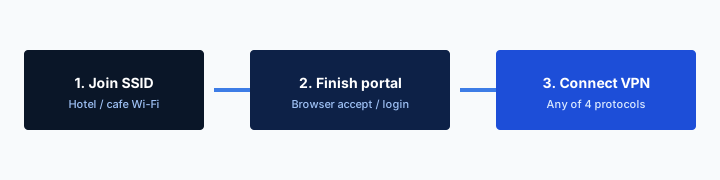
- 1Join the SSID. Do not start the VPN yet.
- 2Open a browser and finish the captive portal.
- 3Open Klox. Connect WireGuard.
- 4If the handshake dies, switch to OpenVPN. Then work.
Do this in order
| Setting | Who runs the LAN | Typical splash | Consumer VPN habit |
|---|---|---|---|
| Hotel | The property | Room number, last name, paid hour | Hotel article: page first, then tunnel |
| Home guest SSID you named | You | Usually none | Isolation first; guest-SSID article owns that |
| Cafe / shop | A stranger AP | Menu or I agree | Cafe article; skip if that is all you needed |
| Airbnb / holiday rental | The host | Often none; sometimes a building portal | Password, then tunnel; do not touch the router |
| Your own home Wi-Fi | You, maybe | None | Different URL; this page is the listing |
Klox is a hop you chose. It is not the listing's network and not a license to log into the host router.
— KloxVPN consumer notes
Cloudflare Learning: What is a VPN?
What this post is not
Not hotel room-number timing. Not a cookbook for logging into the host admin page. Not home-ISP math. Not cafe skip-the-menu. If you wanted a flashed box, that is a different URL and a different building, not a Sunday checkout.
Farms mash every travel SSID
Airport, hotel, Airbnb, cafe: one ranking, one cookie. A short-stay LAN has leftover devices and a router you do not own. Treat the ranking as a specimen, not a waiver.
You do not know who else is on the LAN
A hotel LAN is still shared, but the operator is a property with a vendor. An Airbnb LAN is often a consumer router in a cupboard. Other guests in a multi-room listing. The host, if they left a laptop or a phone on the same SSID. Last week's guest, if nobody rebooted the box. A smart TV that never left. A camera the photos did not show. You cannot inventory that. I will not tell you to scan their subnet, map their printers, or poke at a VLAN you were not invited to.
What you can do is assume the LAN is shared and treat it like a cafe you happen to sleep in. HTTPS already locked most page bodies. The leftover is the hop. Destination IP. Often the name in SNI. DNS if your queries are not inside some other encryption. That is a map of who you talked to, not the password you typed into the form. People mash those together because both sound like they can see me. Split them.
A VPN hides that map from the rental LAN by making the interesting hop a VPN server. The LAN sees encrypted traffic to that server. Host logs, doorbell cameras, a tablet on the kitchen counter: those are not VPN problems. If your threat is a person in the room, sit differently. If your threat is the LAN, tunnel. If your threat is the site, that is the site.
I will not claim the listing is empty because the calendar said so. Calendars lie. Neighbors exist. A dual-key lockbox does not isolate Wi-Fi. Encryption is not authentication of the floor. A tunnel on a twin SSID is still a tunnel to a stranger. Ask the host the name printed on the card. Do not pick the loudest open network in the stairwell.
Assume shared until proven otherwise
Multi-room, duplex, building-wide mesh: you are not the only client. Even a studio can still hold the host's leftover gear. Tunnel after you have a route. Do not wait for a feeling that the LAN is empty.
Do not scan the listing
No nmap. No Fing as a personality. No 'just checking who is here.' Print or cast the thing you came to print or cast. A consumer tunnel is not a floor audit.
Printers, Chromecast, the living-room stick
A full-tunnel VPN sends LAN traffic toward the VPN too, unless the client punches a hole. The listing printer lives on their subnet. The Chromecast lives on their subnet. After you connect Klox, cast jobs and print jobs can vanish into a hop that has no idea what 192.168.x.x meant in that kitchen. That is expected. It is not a defect in WireGuard. You hid the LAN on purpose.
If the app shows split tunnel, bypass VPN, allow LAN, or a cousin of those words, that is the row. You can exclude the print or cast path so the gadget still answers while the browser stays in the tunnel. The exclusion is a scheduled leak. The LAN can see that hop. HTTPS on a website you print from is a different lock. Split tunnel is the hole. Confirm the glass. I will not write click-here steps that assume a Windows radio button we did not confirm in your build. The VPN Split Tunnel in Plain English: An Exception, Not a Second VPN page owns the vocabulary.
If the row is missing, pause the whole tunnel, send the job, restore the tunnel. Two minutes of clear for a PDF or a slideshow is ugly. It is also honest. Do not hunt for a hidden lab mode because a farm screenshot had three toggles. Do not install a second VPN just for Chromecast. That is how you get two default routes and a Tuesday on split brains.
I will not tell you to factory-reset their TV stick. I will not tell you to unpair the host's Google account. Cast the document you came to cast. Use the TV they posted. If casting is broken even with Klox off, that is their LAN, not our handshake. Ask the host. A consumer tunnel is not a media server.

Split tunnel if the row exists
Exception list, not a second VPN. Printer IPs or the cast app outside the tunnel. That traffic is visible on the rental LAN. If you cannot name the leftover, leave the list empty and pause instead.
If the row is missing, pause, print, restore
Full tunnel, no hole. Disconnect or pause Klox. Send the job. Connect again. Do not invent inverse split from a competitor help page. Do not factory-reset their stick to 'fix' a tunnel.
Default admin is not an invitation
A lot of short-stay routers still wear the sticker password on the admin page. Farms and forum threads will tell you to log in, change DNS, disable UPnP, or 'harden the Airbnb.' That is not a consumer VPN habit. That is touching equipment you do not own. I will not coach it. I will not give you the default URL. I will not walk 192.168.1.1 as if the listing were your lab.
The host's box is theirs. Changing DNS on it changes DNS for every device that stays after you leave. Changing Wi-Fi settings can lock the next guest out. Flashing firmware on a rental is how you become a support ticket in someone else's week. Per-device Klox does not require their admin page. That is the point.
If the Wi-Fi is broken, message the host. If the password on the card does not match, message the host. If you wanted a network you control, you wanted a travel hotspot or cellular, not a screwdriver in a cupboard. I am not a lawyer. This is not legal advice. It is product hygiene. Do not treat a ranking site as permission to administer a stranger's router.
Klox will not become their DHCP. It will not replace their DNS for the whole apartment. Features also lists IPv6 leak protection and WebRTC leak blocking on our apps. Those matter after you are connected on a device you own. They are not a reason to rewrite their router config. A tunnel on your laptop is the honest remainder.
Do not change their DNS
Your app can route DNS through the tunnel. That is your hop. Their router DNS is the house. Leave the house. If a farm said 'set 1.1.1.1 on the Airbnb,' that farm was not staying for checkout.
Broken Wi-Fi is a host message
Wrong password, dead radio, a box that reboots every hour: that is the listing. Message them. A consumer VPN will not resurrect a cupboard router. Seven days exist if you bought a year only for this sofa.
Per-device app, not a flashed rental
Router VPN versus per-device is a real fork when you own the closet. You do not own this closet. A flashed rental is how people try to cover a tablet that cannot run an app, then forget the flash, then leave a tunnel running for the next guest on your account. That is a seat you donated and a mess you do not get to clean up from the airport.
Install Klox on the devices in the bag. Laptop. Phone. Tablet if it came. Each is a seat when the tunnel is up. The listing TV is not your seat unless you meant to spend one, and most short-stay TVs should stay off your account. The VPN for Smart TV: App, Router, or Leave It Alone article is a different fork. Fire Stick is /firestick-vpn. I will not walk sideload onto a host's stick.
The router-versus-app essay still exists for a house you run. Bookmark it for later. This URL is the rental: apps on glass you brought, nothing written to their flash. If a gadget in the listing cannot run Klox, it stays on their LAN. That is allowed. Not every bulb needs a hop. Not every streaming app on their TV needs your login.
I will not sell you a travel router as the only grown-up move. A travel router you own and pack is a different product and a different seat. If you brought one, you already know. If you did not, the phone and the laptop are enough. Do not buy a travel router at 23:00 because a farm said the Airbnb is unsafe until you flash something.
Pack the apps, not a firmware file
Download before you fly if you can. First handshake on a network you already trust. The rental should not be your first rehearsal. The travel checklist is the packing list. This page is the LAN judgment.
Their TV is not automatically a seat
Do not sign the listing Chromecast into your Klox account. Do not sideload onto their stick. If you needed a tunnel for a show, use the tablet you brought. If you needed their TV, pause, cast, restore, or skip.
Splash if it exists, then tunnel
Some short-stay buildings still want a portal: a voucher, an I agree, a building login. Same garden as a hotel, ruder paperwork, less signage. If Smart Connect or a kill switch fires before the splash, you get no internet and no page. Disconnect. Pause fail-closed if traffic is bricked. Complete the garden. Confirm a boring site. Then connect Klox. WireGuard first. You will be naked on that LAN for a minute. That is the cost of the splash. I will not claim zero exposure.
Most Airbnbs do not have that page. They have a password. If you already have a route, waiting is how mail fetches on their DNS. Connect. Do not perform a portal ritual that is not there. If you are not sure, load a plain site. If it hangs on a login, you are still in the garden. If it loads, you had a route. Tunnel.
A kill switch is fail-closed: if the tunnel dies, nothing else leaves. On a laptop at home that is often what you want. On a rental it collides with a portal if one exists, with printers you paused for, and with a radio that drops when the mesh in the hallway fills the band. Deadlock looks like this. Auto-connect starts WireGuard. Handshake fails because the portal has not blessed you. Kill switch blocks the HTTP the portal needs. You toggle random settings. You message the host that Wi-Fi is down. The product did what you asked.
Pause the switch for the garden. Restore it after the tunnel is up if you still want fail-closed on a radio that will drop. If you cannot live with a pause, skip kill switch on short-stay days and accept a leak window on drop. That is an adult trade. Pretending fail-closed and captive portals are friends is how tickets get written.
Password-only listings
Card on the fridge, no splash. Confirm a boring site. Then Connect. Smart Connect, if the row exists, is untrusted Wi-Fi. Short-stay SSIDs qualify. If the row is missing, the button is the habit.
Portal buildings still need a clear hop
If nothing loads and the OS never shows the portal, assume the switch. Disconnect Klox. Allow traffic. Load a plain HTTP site if the OS is shy. Then the tunnel. Then the switch, if you still want it.
The laptop is one of five
A short-stay table is usually one laptop. Sometimes a phone on the same SSID. That is one seat, or two if both tunnels are up. Klox is five. You can install in more places. Only five can be connected at once.
The tablet you left at home on auto-connect still counts if it is holding a session. Ghost phones count. A router at home holding a tunnel counts as one seat and then covers a house, which is a different article. For the listing: disconnect what is not in the bag, or live with an error when the sixth handshake tries.
I work with a laptop. That is the kit. I do not need a family seating chart to know one is one. If a phone also joins the rental SSID, you are at two. Still fine. If a partner's tablet also joins, you are at three. Still fine. If you signed the listing TV into your account, you spent a seat on furniture you do not take home. Do not do that.
Remove retired devices in the portal. Sleep is not disconnect. A laptop lid can keep a peer. Open the app and look. Do not assume the Airbnb cap is why you hit five. The cap is often a tablet on the couch at home. The Family VPN on Five Devices page is household math. This page is: the travel laptop is one slot.
Do not leave the home tablet holding a seat
Auto-connect on a tablet at home is how you discover the cap at a listing. Disconnect it before you leave, or take it off untrusted-only so home Wi-Fi does not keep a tunnel you forgot.
Phone on cellular is one less seat
If the phone stays on cellular, only the laptop uses a seat on their Wi-Fi. That is the usual pattern. Do not tunnel the phone on their SSID just because the laptop did, unless you meant to spend the second seat.
When skipping is the right call
Skip if you do not join their Wi-Fi. Use cellular. Use a phone hotspot you run. That is the clean skip. Skip on the AP if the session is throwaway and you know it: one search for the house manual, a PDF they posted, a site you would show a stranger anyway. I still connect for mail and work. I do not connect to argue about the physics of a skip.
Skip is also the honest answer when you will only be on the LAN for twenty minutes and everything you needed is already downloaded. Skip is not I am good at security. Skip is this packet is boring, or this network is not worth the seat. If you cannot tell those apart, do not skip for vanity. Connect after any portal, or leave.
Do not skip because you wanted to log into their router instead. That is not a skip. That is a different bad idea. Do not skip because the app felt slow once. Switch protocol. Move rooms. Use cellular. Slowness is not a moral argument against a tunnel. WireGuard first. OpenVPN when UDP is rude. If both fail, the radio is the listing's problem. Message the host. Cellular remains a valid short-stay strategy.
If you bought Klox only for a week of rentals, the consumer window is seven days on first purchase. See /refund. Renewals are not that window. Store purchases follow the store. Yearly from $2.83 a month if you will repeat the habit. Do not skip because a farm said the Airbnb is already safe. Shared LAN is still shared. HTTPS locked the page. The hop is the remainder.
Cellular is a valid listing strategy
Maps, mail, a doc: cellular on a phone with a data plan skips their LAN. You still decide whether the carrier hop needs a tunnel. The rental AP is no longer in the story if you never joined it.
One sofa and seven days
If you bought Klox only for a week of short stays, the consumer window is seven days on first purchase. See /refund. Renewals are not that window. Yearly from $2.83 a month if you will repeat the habit.
Key Takeaways
Airbnb Wi-Fi needs a per-device tunnel, not a hotel cape and not a screwdriver in the cupboard. Type the password. Finish any splash. Then connect. HTTPS already locked the page. The LAN still sees the hop unless that hop is a VPN. Printers and Chromecast may need a split-tunnel row, or a pause. Do not log into their router. Do not change their DNS. Do not flash a rental. Klox is not their network.
Laptop is one of five. Phone plus laptop is two. Smart Connect, if the row exists, is untrusted Wi-Fi. Pause kill switch for a garden if one exists. WireGuard first. OpenVPN when the AP is rude. Seven days if you bought only for one sofa. Yearly from $2.83 a month. No city count. No admin cookbook.
If you wanted hotel splash timing, that URL is next door. If you wanted a guest SSID you run, that is a different page. If you wanted home-ISP math, that essay exists. If you wanted a flashed closet, that fork is for a house you own. If you wanted a tunnel you will actually use in a listing you leave on Sunday, download the apps, leave their router alone, and treat the fridge card as a password, not a private LAN.
Related Resources
A short-stay LAN is not yours
KloxVPN is WireGuard, OpenVPN, OpenConnect, and Shadowsocks, five devices, yearly from $2.83 a month, 7-day first-purchase money-back. Per-device app. Then the tunnel. Do not touch the host router. Download the apps on a laptop you own.
Download KloxVPNFrequently Asked Questions
KloxVPN Team
Experts in VPN infrastructure, network security, and online privacy. The KloxVPN team has been building and operating VPN services since 2019, providing consumer and white-label VPN solutions to thousands of users worldwide.