A smart TV on the home Wi-Fi is a computer that sits ten feet from the couch. Sometimes you want a tunnel on it. Sometimes you want the tunnel on the router so the TV never learns a password. Sometimes you should leave the TV alone and put Klox on the laptop you actually type on. Ranked farms will tell you a VPN on the television unlocks every catalog. It does not. It encrypts a hop and uses one of five seats. The What a VPN Can and Cannot Do for Streaming article is the library lecture. This page is whether the set should hold a session at all.
A VPN is a tunnel to an exit. Wikipedia's VPN page is the noun. RFC 8446 is TLS 1.3, which the streaming apps already use for HTTPS. The padlock on Netflix is not Klox. The extra hop is Klox, if you install it. I will not promise BBC or Netflix libraries. I will not treat the Download page's Smart DNS marketing chip as a consumer DNS picker SKU you configure like a desktop. I will tell you what Download actually says for Android TV: open Google Play on the TV, search Klox, install. Android TV 5.0+. Remote-friendly UI. No results means that model may not support the app yet.
This is not the White-Label VPN and Tv And Android Box post. That is who submits a branded Play listing. This is not a VPN for Kodi: Secure Streaming Setup how-to. This is not the Android TV landing. That page exists. Link it. Do not clone it. Fire Stick sideload is /firestick-vpn. Different hardware, different store, different support sentence.
KloxVPN is WireGuard, OpenVPN, OpenConnect, and Shadowsocks, five devices, yearly from $2.83 a month, 7-day money-back. A TV that stays connected is one of those five. Ghost TVs eat the cap. The Family VPN on Five Devices chart is the household math. Here the plot is the living room: app versus router versus skip, what Download printed, streaming without a fairy tale, dumb TVs, Fire Stick next door, the remote, and when leaving the set off the tunnel is the adult call.
I have a bias. If the TV runs Google TV or Android TV and Play finds Klox, the app is the simple path. If Play finds nothing, do not sideload a phone APK onto a panel and call it done. Router or skip. I will not coach a pirate stack. I will not rank a farm list.
Related reading: What is a VPN? and WireGuard vs OpenVPN. VPN pricing.
Looking for a reliable VPN?
KloxVPN — from $2.83/month. Apps for every device.
TV app, router hop, or leave the set alone
Three honest jobs. Put Klox on the TV so only that set uses the exit. Put Klox on a router so the TV, the stick, and the bulbs share one seat. Leave the TV on the home ISP path and tunnel the laptop and phone instead. Those are different products. Farms mash them into 'best VPN for Smart TV' until the affiliate cookie expires.
The TV app is right when the set is Google TV or Android TV, Play shows Klox, you can sign in with a remote, and you accept that this session is one of five. The router hop is right when the set has no Play, or you refuse to type a password on a D-pad, or you want the whole living room covered without teaching grandma Connect. Skip is right when you do not care what the ISP sees of the TV, you already have the titles you pay for, and you would rather keep seats for things that leave the house.
A tunnel does not make the TV's apps trustworthy. Phishing still exists on a big screen. A fake 'update your payment' tile is still a fake. HTTPS on the streaming app is still TLS. RFC 8446 still is not a catalog. Encrypting the hop to a VPN server hides that hop from the ISP. It does not audit the icon you clicked.
I will not pick for every household. I will pick a default: if Play finds Klox and you wanted a tunnel on that set, use the app. If Play does not, read the router article and the skip section. Do not buy a second subscription because a ranking said Samsung Tizen needs Express. Klox is one plan, five seats. Count before you add furniture.
- 1Skim the seating / order diagram.
- 2Do the numbered steps once on your real network.
- 3Use the FAQ if a sentence was too long.
- 4Follow one related article — not ten tabs.
How to read this page
| Living-room motion | Who holds the session | When it fits | When it does not |
|---|---|---|---|
| Klox on Google TV / Android TV | The TV, one of five seats | Play finds Klox, remote UI works | Play has no results; you need seats for travel |
| Klox on a router | The router, one seat, covers the LAN | No TV app; whole room should hop | You wanted only the TV, not the bulbs |
| Leave the TV off the VPN | Nobody on the set | You pay for the local catalog; seats are scarce | You needed the TV hop for a reason you can name |
| Fire Stick | The stick, different landing | You actually own a Stick | You have a Sony Google TV and landed here |
| Kodi on a box | Different article | You already run Kodi | You wanted a Play install on the TV |
Play search is Klox. A TV session is one seat. A catalog is not a promise.
— KloxVPN consumer notes
Cloudflare Learning: What is a VPN?
What this post is not
Not a branded TV packaging guide. Not a Kodi add-on walkthrough. Not the Android TV marketing landing. Not a Fire Stick sideload. Those URLs exist. Use them. This page is the consumer choice: TV, router, or skip.
Farms sell catalogs. We sell a hop.
A ranked 'best VPN for Smart TV' page is an affiliate clock. I will point at a specimen. I will not replace it with a quieter Netflix sentence. The honest streaming post is next door if that is the itch.
What Download actually says about the TV
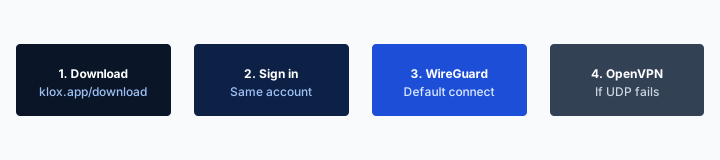
The live instructions live on /download in the Android TV block. On the TV, open Google Play. Search Klox. Install. If there are no results, that model may not support the app yet. Minimum: Android TV 5.0+. The marketing row on that card also lists Optimized for TV, Remote-friendly UI, Streaming apps, and Smart DNS. Read those as marketing chips on a download card, not as a second product you buy.
I will not treat Smart DNS on that row as a consumer DNS picker SKU. Desktop custom DNS is a different conversation. There is no 'pick a streaming DNS' console I will invent here so a farm comparison table has a column. Streaming apps on that row means the TV is a place people watch video. It is not a partnership with Netflix. If you came for a library unlock, stop. Read What a VPN Can and Cannot Do for Streaming. Then decide if you still want a hop on the set.
Search Klox, not a long legal name you guessed. Store listings get renamed. The Download page's current instruction is Klox. If Play still shows nothing, you are in the no-results sentence. That is not a cue to sideload the phone APK from the Android section onto the TV. Phone layouts on a ten-foot UI are how support gets a photo of a coffee table and a cursor nobody can see.
Sign in with the same account you use on the phone. The TV is not a second subscription. It is another install. Connected is the seat. Installed and idle is not a seat until the tunnel is up. Auto-connect on a set that never sleeps is how you discover the cap at the airport. We will get there.
The dedicated Android TV landing is a marketing page for that device class. This article will not clone its hero. If you already know you have Google TV and you only wanted a button, that landing and Download are enough. Stay here if you still need the router-versus-skip fork.
Search Klox on the TV's Play Store
The TV has its own Play. Searching on the phone does not install on the set. Stand in front of the panel. Use the remote. If the app is missing, believe the no-results line.
Smart DNS is not a picker SKU
The chip exists on the Download card. I will not document a consumer DNS marketplace that is not the product. Do not write support as if you can type 1.1.1.1 into the TV app because a farm said Smart DNS.
The TV is one of five seats
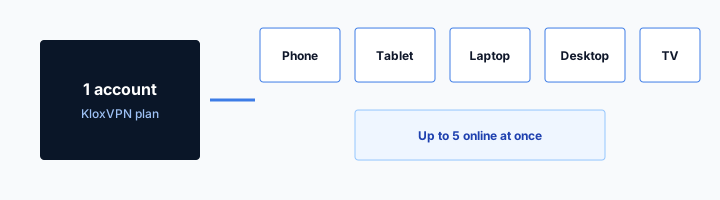
Klox consumer is five devices connected at once. You can install in more places. Only five can hold a tunnel. A Google TV that sits on Connect all evening is one of those five. The laptop in the bag, the phone, the tablet on the couch, a second TV: count them. The family article is the household spreadsheet. Here the living-room failure is specific. You left the set tunneled. You hit the cap on a trip. You thought the TV was furniture. Furniture with a session is a peer.
Ghost TVs are real. Auto-connect plus a set that never fully sleeps equals a seat you forgot. Open the device list. Disconnect the panel you are not watching. Sleep on a TV is not the same as disconnect. The HDMI-CEC dance can wake the box. Look at the app, not at the power LED.
A router VPN is also one seat, then it covers everything behind it. That can be the cheaper seating chart if the living room is the whole point and nobody travels. It can be the wrong chart if you needed the travel seats and you just spent the only honest always-on slot on a television. Router VPN vs Per-Device Apps is the fork. VPN on Router: Setup Tips is the hardware. Do not flash firmware because a ranking told you Samsung cannot install apps. Flash firmware because you picked the router job on purpose.
I travel with phone plus laptop. That is two. A TV at home on auto is three. A partner phone is four. The fifth disappears when a tablet wakes. This is not a city count. This is arithmetic. Remove retired devices in the portal. Do not assume the cap is a TV bug. The cap is often the TV you forgot.
Installed is not connected
The APK on the set does not spend a seat by existing. The handshake does. If you want the TV as a rainy-day hop, leave it disconnected until you need it. Auto-connect is a choice with a cost.
Two TVs are two seats
Bedroom panel plus living room panel, both tunneled, is two. If that is the household, say so and keep travel off auto, or move the living room to a router hop and free the apps.
Streaming without a fairy tale
The TV is where people watch. That does not make Klox a streaming product. A VPN changes the address the app talks from. The app still checks the account, the payment, the device, and a guess about territory. The guess often starts with IP. CDNs block famous exits. Shared IPs collect captchas. Libraries differ by license. We will not promise Netflix. We will not promise BBC iPlayer. The honest limits post is the long version. This paragraph exists so a smart-TV article cannot be quoted as a catalog SKU.
If a title you already pay for buffers, try WireGuard first, then another exit, then OpenVPN if the path is rude. If the title is locked to another country's library, a tunnel might appear to help until the CDN notices. That is not a feature I will sell. If you bought Klox only for that lock, use the seven-day window on first purchase. See /refund. Do not leave a year running out of spite. Spite is how chargebacks happen.
ISP throttling stories are mixed. Encryption can hide the fact of a stream from a naive classifier. It cannot create last-mile bandwidth the house does not have. A 4K fight on a 20 Mbps line is not a VPN ticket. Sit closer to the AP. Use ethernet to the TV if you have it. Then talk about tunnels.
Cookies on klox.app are a website problem. The consumer page is /cookie. The TV app is not that banner. Do not mash CMP consent with a Play install. Different objects.
Encrypt the hop. Do not expect the library.
If the artwork has a lock after Connect is green, that is often a catalog or a block, not a handshake. Read the streaming article before you open a support ticket that names a show.
Seven days if the show was the whole product
First purchase, seven days, original method, typical processing of several business days. Renewals are not that window. Store purchases follow the store. Live page: /refund.
Dumb TVs still need a hop somewhere else
A panel that only does HDMI input is not a smart TV. It has no Play. It has no Klox. The computer is the stick, the disc player, the laptop HDMI, or the router. If you wanted a tunnel in that room, tunnel the device that actually talks IP, or tunnel the router. Do not hunt a Klox app on a set that cannot install apps. That hunt is how people buy Fire Sticks they did not need, then land on the wrong how-to.
Samsung Tizen and LG webOS are smart, and they still often have no Klox in their stores. I will not invent a Tizen package. I will not invent a webOS store listing. For those sets, the honest motions are router, a stick you actually support, or skip. A phone hotspot with Klox on the phone can feed the TV for a night. It is a seat on the phone plus heat in your pocket. Fine for a hotel. Ugly as a living-room lifestyle.
Roku is its own store. Do not assume Play. Do not assume sideload. If we do not list Roku on Download, we do not have a Roku SKU I will document here. Router or skip. I would rather you skip than jailbreak a Roku because a farm said so.
Dumb is not an insult. Dumb is fewer apps harvesting the living room. A tunnel on the router still covers a dumb panel that streams through a stick. Know which box holds IP. That box is the candidate for Klox, not the glass.
No Play, no TV app
Believe Download's no-results line. Believe a store that is not Play. Router, supported stick, or skip. Phone APK on a panel is not a third option I will staff.
HDMI is not a network interface
The cable carries picture. The stick or the TV OS carries packets. Install Klox where packets exist.
Fire Stick is next door, not this page
Amazon Fire TV Stick is a different store and a different landing: /firestick-vpn. Sideload, Amazon Appstore, remote on a stick, the way people actually get a client onto that hardware. This article will not clone that ritual. If you are holding a Stick, go there. If you are holding a Sony or TCL Google TV, stay here and use Play search Klox.
People mash Stick and Android TV because both sit under a panel and both have a remote. The stores differ. The support sentence differs. A Stick how-to on a Google TV is wasted evening. A Play how-to on a Stick that has no Play is the same waste. Pick the URL that matches the logo on the plastic.
White-label TV packaging is yet another building. If you wanted your logo on a TV client, that is a sales conversation and the operator article. Consumer Klox on a Stick is still Klox. Do not write to support as if a Stick session is a sixth seat. It is one of five, same as the Google TV.
I will not print sideload steps here so this post can rank for Fire Stick. That is how you fork a procedure and let one copy rot. One landing. One ritual. Link it.
Google TV is Play. Stick is the other URL.
If the home row says Google Play, search Klox. If the plastic says Fire, open /firestick-vpn. Do not mix the comments.
Sideload is not the Android TV story
Download's TV block is a store search. Sideload belongs on the Stick page if that page says so. Pasting APKs onto every panel is how you skip update paths.
Remote-friendly UI is the product on a ten-foot screen
Download says remote-friendly UI. That means a focus ring you can see from the couch, Connect on a D-pad, a sign-in path that does not require a mouse. If you cannot tab to Connect, you do not have a TV app. You have a phone layout on a panel. I will not invent Leanback activity names. I will say: if the highlight is a one-pixel border, sit closer or use the phone app and skip the TV hop.
Typing a password with a remote is misery. Use a pairing code if the client shows one. Use the same account you already created on the phone. Do not invent a fourth email because the on-screen keyboard ate a character. Caps lock on a D-pad is a support genre I would like to retire.
Protocol pickers on a TV should stay short. WireGuard. OpenVPN. That is the Klox pair. Do not hide them behind a 'advanced streaming engine' label. Grandma should hit Connect. You should only open protocol when the handshake dies. Same rule as a laptop. Larger consequences because nobody in the room wants to debug HDMI.
If the UI is hostile, skip the TV app. Router hop or laptop HDMI. A tunnel you cannot operate is a night light that spends a seat. I would rather you leave the set on the ISP than keep a session you cannot turn off without pulling power.
Sign in on the phone first
Create the account where a keyboard exists. Then sign in on the TV. The set is a Connect surface, not an onboarding surface, if you can avoid it.
If you cannot find Disconnect, pull the session in the portal
The device list is how you free a seat when the remote cannot find the toggle. Learn that once. The family article covers the list. Use it when the panel is stuck green.
When skipping the TV is the right call
Skip if Play has no Klox and you do not want a router project. Skip if five seats are already travel and work. Skip if the only reason you wanted a TV VPN was a farm's Netflix sentence. Skip if the set is a guest screen and you do not want guests holding a tunnel. Skip if you cannot operate the UI from the couch. Skipping is a product decision. It is not a failure of privacy character.
Keep the tunnel on the laptop and phone. Those leave the house. The TV stays on a network you run. Home Wi-Fi is a different yes-or-no article. A TV on home Wi-Fi without a VPN still uses HTTPS to the streamer. The ISP can see you talked to a video network. Many people accept that at home and still tunnel in cafes. That split is allowed. Say it out loud so you do not buy a living-room SKU you will resent.
If you skip, do not leave a forgotten auto-connect from last month's experiment. Disconnect. Remove the device if you will not use it. Ghost seats are how skip fails in practice. The app is still installed. The session is still up. You skipped in your head only.
Price stays on /pricing. Apps on /download. Android TV landing if you already knew the device. Fire Stick landing if you are holding that plastic. Streaming honesty if the itch was a catalog. Family seating if the cap is the actual pain. White-label TV if you are a brand. Kodi if you already run Kodi. This page was the fork: TV, router, or leave it, with Download's real sentences and no fairy tale.
Skip is cheaper than a second ranking
You do not need a farm's number-one to watch a show you already pay for on a set you already own. A hop is optional furniture. Treat it that way.
Disconnect is part of skip
Mental skip plus a live session is how you hit five at the worst moment. Open the list. Kill the TV peer. Then skip for real.
Key Takeaways
A smart TV VPN is a choice of where the hop lives. Google TV and Android TV: Play on the set, search Klox, Android TV 5.0+, remote-friendly UI. That session is one of five. No Netflix or BBC promise. Smart DNS on the Download card is not a picker SKU. Dumb TVs and empty Play results go to a router or to skip. Fire Stick is /firestick-vpn. Kodi is another post. White-label TV packaging is another post. The Android TV landing is a landing. This was the fork.
WireGuard first. OpenVPN when the path is rude. Yearly from $2.83 a month. Seven days if you bought a catalog I refused to sell. Count seats before the panel stays green overnight.
If you wanted the app, Download is the instruction. If you wanted the household math, the five-device article is next door. If you wanted a ranked list, you already know where those live.
Related Resources
Install on the TV only if Play finds Klox
KloxVPN is WireGuard, OpenVPN, OpenConnect, and Shadowsocks, five devices, yearly from $2.83 a month, 7-day first-purchase money-back. On Google TV, open Play, search Klox. A TV session is one seat. It is not a catalog.
Download KloxVPNFrequently Asked Questions
KloxVPN Team
Experts in VPN infrastructure, network security, and online privacy. The KloxVPN team has been building and operating VPN services since 2019, providing consumer and white-label VPN solutions to thousands of users worldwide.