
You cloned or replaced the SSD in a PC you still own. Same case. Same motherboard. A faster NVMe in the bay that used to hold a tired SATA stick. Clonezilla. Vendor migration software. A shop that pulled the drive and handed you a clone that booted. The chassis did not leave the desk. Ranked listicles will mash that into a Windows reinstall on the same platter, a Linux wipe, a new router, and selling a phone until the affiliate cookie expires. This page is narrower. Same human. Same chassis. Different disk. Matching installer from /download if the binary died. Sign in. Seat. And a leftover you do not get on a same-disk wipe: the old SSD still exists as an object. If it boots, it can still handshake.
This is not VPN After a Windows Reinstall: Same PC, Empty OS, Matching .exe. That URL is empty Windows on the disk that was already in the bay. Same platter. New OS. Apps gone. Adapter gone. Matching .exe because that disk forgot the binary. Here the platter changed. You may still install Windows onto the new SSD. You may not, if the clone worked and yesterday's desktop came back. The unique leftover is hardware. Two disks can exist at once. A reinstall essay does not own a caddy on the shelf.
This is not VPN After a Linux Reinstall: Same PC, Empty Disk, Matching Package. That URL is empty Linux on the disk you already had. Packages gone. tun gone. Matching .deb or .rpm because the same SSD forgot Klox. Here the SSD itself is the plot. Distro media may enter the story after a blank disk. It is a consequence, not the title. Do not paste the Linux-wipe checklist onto a clone that still launches the tray icon.
This is not VPN When Replacing a Router: Same House, New Box, Forget the Old SSID. That plot is a new SSID in the same kitchen. The laptop install did not die. Program Files still has yesterday. You forget a network name. You rejoin. You leak-test. Here the disk under Program Files may be new, blank, or a clone that Windows no longer quite trusts. A radio swap did not pull the NVMe.
This is not Selling a Phone: Disconnect the VPN Before You Wipe. That URL is outbound glass. You are keeping this PC. You are not handing the chassis to a buyer in this article. If you are selling the laptop, stop. Disconnect first. Then their wipe. Then the buyer. Mixing a disk upgrade with a trade-in in one sentence is how farms sell best VPN after SSD until the cookie expires.
HTTPS already encrypts the page on most of the sites you actually use. The lock in the browser is real. A VPN still wraps the path from this PC to a server you picked, once the app is actually running on the disk that boots. Wikipedia's VPN page is the noun. RFC 8446 is TLS 1.3 on the website. It is not a clone. It is not a blank NVMe. Encrypted Client Hello will not pick AMD64 for you. Do not pretend the padlock migrated Klox onto the new stick.
KloxVPN is WireGuard, OpenVPN, OpenConnect, and Shadowsocks, five devices, yearly from $2.83 a month, 7-day money-back on first purchase. This PC still counts as one seat after you sign in on the disk that actually boots. The old SSD can count as a second seat if you plug it in and it connects. Download splits Windows as AMD64 for Intel and AMD CPUs, and ARM64 for ARM processors. Linux ships Klox-linux-amd64.deb, Klox-linux-amd64.rpm, Klox-linux-arm.deb, and Klox-linux-arm.rpm. Pricing is the live number. The seven-day window is first purchase, not a hardware coupon because you bought a disk. Cookies on this site live at /cookie. I will not invent a city count as a reason the NVMe is special. I will not invent a portal URL. I will not invent SOC 2.
I have a bias. Type klox.app/download if the client is gone. Pick the architecture that matches this chassis. Sign into the same email. If a clone still launches Klox, do not download a second copy so two trays fight. If the old SSD is in a USB caddy, treat it as a leftover radio and remove that row in the live app. Do not clone a disk you do not own. Count the household on the Family VPN on Five Devices if a phone is also holding a session.
Related reading: Windows VPN Setup Checklist (2026) and VPN on Windows ARM: Pick the ARM64 Installer, Not AMD64. What is a VPN? and Android VPN setup. iOS VPN setup.
Looking for a reliable VPN?
KloxVPN — from $2.83/month. Apps for every device.
A new SSD in a PC you still own is not an OS reinstall on the same disk
A Windows reinstall on a PC you kept is an .exe, an architecture picker, and a virtual adapter the installer added. That essay already owns empty Windows on the platter that stayed. A Linux reinstall on a PC you kept is a .deb or an .rpm and a tun the client added. That essay already owns empty Linux on the platter that stayed. Replacing or cloning the SSD is a different leftover. The bay changed. The old stick may still sit in a drawer, in a USB enclosure, or in the second M.2 slot you forgot. First-run Windows on a blank disk does not remember that you paid for a year. A clone that boots yesterday's wallpaper can still break the adapter Windows used to trust. Farms skip that sentence because the keyword is privacy. Privacy after a disk you meant to swap is a matching installer plus a seat plus a physical leftover, not a screenshot of Fastest server.
Replacing the home router leaves the Windows client sitting in Program Files. You forget an SSID. You rejoin. That is a radio swap in the kitchen. This URL is a storage swap in the same chassis. Selling a phone is outbound. The glass leaves. You are not handing this laptop to a buyer in this article. If you are, stop. Disconnect first. Mixing those in one sentence is how farms sell one checklist for four different days.
I will not walk packet sniffing. The public Wi-Fi how-to already did. I will not pack your chargers. The travel checklist exists for install-before-you-fly. Here the PC is already on the desk. The disk is new, or it is a copy. The download page is the next job if the binary died. The seat is the job after that. The old SSD is a job the reinstall essays do not have.
Klox is a consumer tunnel to an exit you picked. It is not Clonezilla. It is not the vendor migration app that came on a USB with the drive. Wikipedia's disk cloning page is the vendor-neutral novel for what a sector copy actually is. I will stay at overview height. I will not paste a 40-click Clonezilla path that rots when a version moves a screenshot. Farms skip that sentence because the keyword is clone SSD. A clone of a disk is a storage product. Reinstalling Klox, or not, is ours.
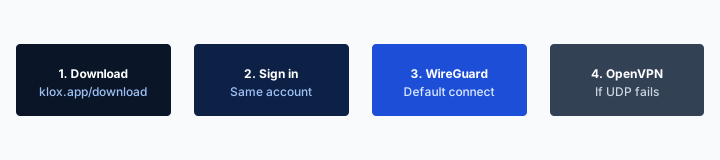
- 1Download the app from klox.app/download — not a random APK site.
- 2Sign in with the account you paid for.
- 3Press WireGuard. Wait for the connected state.
- 4If it fails, try OpenVPN. Still failing: note the network (hotel, campus, home) before you write support.
First successful connect
| Situation | What you think happened | What actually happened | This page? |
|---|---|---|---|
| Windows reinstall on the SAME disk | Hardware swap | Apps gone on the platter that stayed | Windows-reinstall article |
| Linux reinstall on the SAME disk | Hardware swap | Packages gone on the platter that stayed | Linux-reinstall article |
| Replacing the home router | New box deleted Klox | App still installed; SSID changed | Replacing-router article |
| Selling a phone you own | Trade-in logged the VPN out | Outbound; disconnect first | Selling-phone article |
| You cloned the SSD in YOUR PC | Clone minted a new Klox seat | Binary may survive; adapters can break; old disk can still boot | Yes |
| You put a blank SSD in YOUR PC | New disk reinstalled Klox | Empty OS; matching installer; old SSD may still sit | Yes |
| Old SSD in a USB caddy | Backup is offline | If it boots, it can still handshake | Yes, old seat |
| PC you do not own | A blog ranked privacy | Stop | No. Do not clone it. |
You cloned or replaced the SSD in a PC you still own. Get the matching installer from /download if the client is gone. Remove the old disk's seat in the live app. Do not clone a machine you do not own.
— KloxVPN consumer notes
Cloudflare Learning: What is a VPN?
Same chassis, different disk
Selling is outbound. A router swap leaves the .exe sitting. An OS reinstall on the same platter is a software wipe. This URL is a disk you ran on hardware you kept. Do not paste one checklist into all four days.
A clone is not a Klox logout button
The old stick may still handshake if it boots. The account may still show a device row until you remove it in the live app. Prefer looking. Pulling an NVMe is not a VPN feature.
Clone versus a blank SSD you then install onto
People say I replaced the SSD and mean two different jobs. A clone copies the old disk onto the new one. Yesterday's Windows or Linux can boot. Klox may still sit in the tray. Shortcuts may still work. That is not a reason to download a second installer so two privileged copies fight. Look first. If the client launches, sign in if the token died. Allow the adapter if Windows asks again. Then check the live app for a leftover row from the old stick.
A blank SSD is closer to the reinstall essays, with one extra object. You install Windows or Linux onto empty flash. Apps are gone. Adapters are gone. Packages are gone. Matching file from /download. The extra object is the old SSD. It did not evaporate because you seated a new drive. It is in a drawer, in a USB enclosure you bought to copy files off, or still in the second slot. If that disk boots, it is a radio. Treat it as one.
I will not pick your cloning tool. Vendor migration apps, Clonezilla, a shop bench image: they are storage. They are not Klox. A clone that fails to boot is a firmware and installer problem. Our Connect button will not repair a missing EFI partition. Get a disk that actually boots. Then type our URL if the client is missing. A cracked clone plus a forum VPN EXE is two problems, and I will not debug the pair.
Keep-my-files on the old disk, then a clone, then a blank replacement in the same week is how people file three tickets. Split the jobs. Disk copy is the cloner. Empty OS is Microsoft or the distro. Binary is /download. Seat is the live app. Do not interleave Connect with a sector copy as a personality. One product at a time.
A clone can still have yesterday's Klox
If the tray icon is still there, skip to sign-in, the adapter prompt, and the leftover slot. If Program Files or /usr is empty of Klox, you are on the installer checklist. Look before you download twice.
A blank disk forgot the binary; /download is the next job
Empty Windows wants AMD64 or ARM64. Empty Linux wants the matching .deb or .rpm. The old SSD in a caddy is a separate leftover. Do not treat the caddy as proof the new disk already has the app.
Pick AMD64, ARM64, or the matching Linux package after the swap
A blank SSD returns you to first-run chrome. Browser bookmarks are gone unless you signed into a profile. The old Klox shortcut is gone. Open a browser you trust. Type klox.app/download. Do not search Klox VPN installer and click the first ad. Ads impersonate download pages. Bookmark download after the first honest visit. A clone that still has a browser profile can still land you on a bookmark. Type the URL anyway if you are not sure the bookmark still points at us.
Windows 10 and Windows 11 both exist. Pick the architecture. AMD64 for Intel and AMD CPUs. ARM64 for ARM processors: Snapdragon, some Surface models, Copilot+ boxes. Settings, System, About, System type. ARM-based processor means ARM. x64-based processor means AMD64. Wrong arch fails to install or fails to launch. That story in full is VPN on Windows ARM: Pick the ARM64 Installer, Not AMD64. Here the disk-swap line is: the new stick forgot which file you used last year, and a clone of an Intel laptop does not turn the chassis into ARM. Look again. Do not grab last year's USB stick with a renamed .exe because the filename felt lucky. Renaming the file does not change the binary.
Linux after a blank SSD is four files. Klox-linux-amd64.deb and Klox-linux-amd64.rpm for 64-bit Intel and AMD. Klox-linux-arm.deb and Klox-linux-arm.rpm for ARM. Debian, Ubuntu, and cousins take .deb. Fedora, RHEL-class, and cousins take .rpm. uname -m is the boring check. x86_64 means amd64 packages. aarch64 or arm64 means ARM packages. The VPN After a Linux Reinstall: Same PC, Empty Disk, Matching Package article owns empty root as a wipe on the same platter. This page exists so you remember why you are doing that download again: the platter is new. Do not grab Klox-linux-arm.deb because you just read ARM in a forum about phones. You are on a PC until you are not.
Right-click the Windows .exe. Run as administrator. Follow the wizard. Launch. Sign into the same email you already paid on. A second account is how you lose the year you already bought and then hit a seat error on the old login you forgot. System requirements on that page: 2 GB RAM, 100 MB disk, internet, administrator privileges. Trust it. I will not invent a Store tile because a blank Windows would have preferred one. SmartScreen may appear on a publisher you have not seen after a clone that wiped SmartScreen's cache. That is not automatically malware. It is also not automatically fine. The test is the URL you typed. klox.app/download. More info. Run anyway only if you typed that URL.

Windows About still decides the .exe
ARM-based processor: Windows ARM file. x64-based processor: AMD64 file. Do this after the swap, not from memory of last year's USB. A clone of the old disk does not change the CPU. Compatibility mode does not fix the arch.
Linux wants Klox-linux-amd64.deb or the ARM cousin
uname -m after the new disk boots. Debian-class takes .deb. Fedora and RHEL-class take .rpm. Renaming Klox-linux-amd64.deb to Klox-linux-arm.deb does not change the binary. There is not a Flatpak or Snap on that page.
The old SSD is a leftover peer if it still boots
Timeout is the boring failure on a same-disk wipe. You reinstalled Windows. You did not disconnect first. The account still shows this laptop for a while. After an SSD swap the failure is louder. You now have two pieces of flash that can boot the same hostname. The new NVMe in the bay. The old SATA stick in a USB enclosure you bought to copy photos. You install, you connect, and you are at five, or you think you were robbed of a slot. You were not robbed. You left a corpse that still has a power LED. Remove it in the live app. I will not invent a web portal URL for that tap. Confirm the client you already signed into. If the row is gone on its own, good. If it sits, disconnect that device from a logged-in client. A label is not a logout. Kick is a logout of that seat. It is still not a disk wipe. Pulling the USB cable is not a logout either if the handshake already happened.
I will not print a minutes-and-seconds figure for when a dead peer drops. Networks fail closed, fail open, retry. Prefer in-app disconnect before a clone you plan, so you are not guessing. If you already swapped, open Klox on the disk that now lives in the bay, or on a phone that still has the app, and remove the leftover row. Change the password if you are not sure who held the old SSD during the shop window. Password reset is not this article's novel. It is the obvious next move when a drive sat on a bench.
Family math lives in the five-device article. I will not rebuild the household spreadsheet. PC you rebuilt plus phone is the common kit for this URL. Add the old SSD if you still boot it for files. After a clean remove, you are back to the ones that are actually tunneled. Ghost sessions are how people think a disk upgrade uses extra licenses. There are no extra licenses. There are leftover peers. Five means five connected at once. You can install in more places.
Yearly from $2.83 a month does not buy a sixth seat while a USB caddy retries a name the server still holds. Seven-day first purchase if you only bought to try a tunnel and you are inside the clock. Refunds: /refund. An SSD swap is not a refund reason by itself. An SSD swap is not a first-purchase coupon. If you already had a year, a faster disk does not restart that clock.
USB enclosure plus new NVMe is two radios
Old name plus new handshake is one chassis wearing two labels until you remove the old one, or until you stop booting the caddy with auto-connect on. Then this PC is one seat. Count the phone separately if it is tunneled.
Look in the live app, not at an invented URL
Device list lives in the client you already use. Remove the leftover row there. I will not mint a portal path. A screenshot from a farm is not our admin. Unplugging the caddy without a disconnect can leave the peer sitting.
The virtual adapter or tun may die even when a clone looks fine
A clone can copy Program Files and still leave Windows unhappy with the virtual NIC. Hardware IDs shift. Driver store gets confused. First Connect after a clone will ask again. Allow it. Cancel is how people decide the new SSD hated VPNs. The product did not hate them. They denied the NIC. A blank disk is simpler: the installer adds the adapter from scratch. Allow it there too.
I will not invent a TAP versus Wintun picker. The Download page does not offer that as a consumer protocol. Protocols remain WireGuard, OpenVPN, OpenConnect, and Shadowsocks. WireGuard first. OpenVPN when UDP is rude. Do not add a VPN in Windows Settings and pick IKEv2. That built-in row is not Klox. Two tunnels is how you get none. The Windows VPN Setup Checklist (2026) owns that order once the binary actually runs. This page exists so you remember the adapter can die in a clone that still shows a tray icon.
Linux clones can leave a stale tun, a leftover WireGuard config in the old home, or a NetworkManager connection that points at nothing. If you kept /home on the clone, look before you install a second package. If you blanked the disk, install the matching .deb or .rpm and let the client create the interface. Do not paste a .conf you exported last year into NetworkManager and then file a ticket that the GUI leak toggle is missing. A raw config is a tunnel. It is not automatically those extras.
Another VPN leftover can own the NIC if you installed a trial from a banner during first-run Windows on the blank SSD. Uninstall that. Then ours. Two privileged adapters fighting is a support ticket that starts with I swapped the disk and nothing works. Split the jobs. Disk is the cloner or the OS installer. Binary is /download. Adapter is Allow. Protocol is WireGuard unless the cafe is rude. Windows Firewall stays on. The VPN and Windows Firewall: Do They Work Together? is the shield-plus-tunnel coexistence. Turning the shield off to make VPN work is how a new disk becomes a hobbyist lab.
Cancel on the adapter prompt is how Connect fails after a clone
No adapter, no tunnel. Run the installer as administrator if Windows never asked. Then Connect. Approve the sheet. First handshake on a network you already trust. A pretty clone wallpaper is not proof the NIC survived.
IKEv2 in Settings is not a Klox protocol
Klox ships WireGuard, OpenVPN, OpenConnect, and Shadowsocks. A built-in Windows VPN row is a different product. Do not stack it under our tray icon and then ask why both look disconnected. A Linux NetworkManager import of a random .conf is the same mistake with a different logo.
Boot order, BitLocker, and firmware are not VPN features
UEFI can still prefer the old disk. You seated a new NVMe. You left the old SATA connected so you could copy files. The machine boots the old one. You install Klox on what you think is the new stick. You are installing on the corpse. Then you disconnect the old drive, boot the empty new one, and decide VPNs vanish when you upgrade storage. They did not vanish. You never installed on the disk that now boots. Check the firmware boot menu. One disk in the bay while you confirm. Then the installer.
BitLocker, device encryption, and a Microsoft account sign-in during OOBE are Windows. A tunnel does not unlock BitLocker. A clone that asks for a recovery key is Microsoft plus the cloner, not a Klox setting. Complete their flow on a network you already trust. Then type our URL. Do not interleave Connect with a BitLocker prompt as a personality. Linux LUKS is the distro. A forgotten passphrase is not a protocol switch. Our disconnect will not help. Get a volume that mounts, then install Klox.
I will not write a product-key novel. Digital licenses tied to the motherboard often come back after a disk swap on the same chassis. That is Microsoft. The motherboard did not leave. The SSD did. If activation failed, that is still Microsoft. Our Connect button will not help. A cloned Windows that thinks it is a new PC may nag. That nag is not a fifth device. Do not buy a second year because activation looked yellow.
A shop that cloned without asking can leave auto-connect on. The bench image boots. The tunnel comes up on their network. That is a seat you did not mean. Change the password if the drive left your sight. Remove leftover rows in the live app. I will not coach a firmware password bypass. I will not coach skipping BitLocker. Those are Windows and the OEM. Farms skip that sentence because the keyword is clone. A clone is a copy of a disk. It is not a cloak.
UEFI can still boot the old disk you forgot
One drive in the bay while you confirm which Windows or Linux you actually live on. Then /download if that disk is missing Klox. Two drives plus auto-connect is how you get two seats and the wrong tray.
A shop clone is not a Klox logout
If the stick sat on a bench, change the password. Remove leftover rows in the live app. BitLocker recovery is Microsoft. LUKS is the distro. Connect will not unlock either.
Do not clone or replace the SSD in a PC you do not own
This checklist is for a machine on your desk that is yours to open. Work laptop. School image. A friend's PC you are upgrading without asking. A machine you found. Stop. I will not coach cloning a disk that is not yours. I will not coach bypassing BitLocker to copy a stranger's NVMe. I will not coach skipping a work or school account. I will not coach a VPN as a cloak for that. If it is employer property, IT owns the storage swap. If it is a school device, the AUP still exists. If it is not yours, it is not yours.
Stolen-laptop work, when it is your laptop that left, is kick the seat and change the password. Find My Device or BitLocker if you already had them. That is not a clone of a disk you cannot hold. You should not write disk copy in your head when the chassis belongs to someone else. I will not invent a portal URL that pretends to wipe a stranger's SSD.
I am not a lawyer. This is not legal advice. It is a product boundary. Klox is a tunnel you paid for on seats you are allowed to run. It is not a toolkit for imaging a PC. Cafe Wi-Fi still wants a hop on machines you actually use. That hop is not a reason to clone a stranger's ThinkPad onto a stick you bought.
If you are helping a parent upgrade their own laptop, they should be present. You are not their attacker. You are reading the cloner docs together, then Microsoft's or the distro's installer if the clone failed. That is the allowed version of help. Then type klox.app/download on a network you already trust. Count this PC as one seat. Do not create a second Klox login because the new NVMe felt new.
Work laptop, school image, borrowed machine
Not this checklist. Work: IT. School: AUP and maybe a firmware lock forever. Borrowed: ask, uninstall when you leave. Do not install Klox as a workaround. Do not clone it because a blog ranked privacy.
A disk from a machine that left is kick plus password, not this page
You do not have the chassis. You cannot clone a stolen laptop from a VPN. Remove the seat in the live app on another device. Change the password. Use the OEM lock. Do not expect a disk wipe from Klox.
First Connect on a network you already trust, then the 2026 checklist
First handshake should happen on home Wi-Fi or Ethernet in the kitchen. Confirm WireGuard comes up. Open a boring site. Then pack. A hotel splash plus a first-ever adapter prompt on a disk you just seated is how people decide the SSD hated VPNs. The product did not hate them. The garden raced the tunnel. A clone that first boots at the cafe is the same bad rehearsal with yesterday's wallpaper.
Once the binary actually runs, the order is the Windows VPN Setup Checklist (2026): official file, adapter prompt, WireGuard first, OpenVPN if the network is rude, firewall on, hotel portal before panic, this PC is one of five. I will not reprint that list so two URLs compete. This page exists so you remember why you are doing the list again: the platter changed, or the clone broke the NIC, or the old stick is still peered. Linux after a blank disk still wants the matching package. Point at the VPN After a Linux Reinstall: Same PC, Empty Disk, Matching Package URL for apt and dnf leftovers. Stay here for the caddy.
Smart Connect, if the app shows the row, means connect on untrusted Wi-Fi. A cafe SSID is untrusted. A house SSID you run can be marked however the app lets you. I will not invent a toggle named On Demand. If the row is missing, you have a Connect button. Use the button after the splash, same as any other day. A new NVMe does not mint a special auto-connect. A clone may have copied last month's trusted-network flag. Confirm the name still exists. The router essay owns a new SSID. This essay owns a new disk under an SSID you already had.
Do not skip because the app felt slow once. Switch protocol. WireGuard first. OpenVPN when UDP is rude. If both fail on a network you trust, wait. A cafe is not the spare tire for a rude first handshake. A rude first handshake is a reason to stay in the kitchen until a boring site loads through the hop. Cookies on klox.app remain at /cookie. An SSD swap is not a cookie. A leftover seat on a USB caddy is not a cookie. Do not file a cookie ticket because a cloned PC still showed a peer. That peer is this article. Nord's Windows download ranking is not your disk. Download the matching installer if the client is gone. Count the seats. Leave machines you do not own alone.
Kitchen first, cafe second
Confirm a boring site through the hop at home. Then travel. A splash plus a fresh adapter prompt on a disk you just seated is a bad first rehearsal. The 2026 checklist owns the portal pause.
Seven days is not a hardware coupon
First purchase, seven days, /refund. Not an SSD-upgrade gift. If you already had a year, a faster disk does not restart that clock. Same email. Same five seats. The old caddy is not a sixth license.
Key Takeaways
A cloned or replaced SSD in a PC you still own is the matching installer from /download if the client died, administrator or package manager, adapter Allow, then the live app for any leftover slot. Prefer disconnect before a clone you plan. The old stick in a USB caddy is a radio if it boots. Microsoft or the distro owns the empty OS. The cloner owns the sector copy. Klox does not. AMD64 versus ARM64 still matters after a blank Windows disk. Klox-linux-amd64.deb and the ARM cousins still matter after a blank Linux disk. The 2026 checklist owns the taps once the binary runs.
This is not a Windows reinstall on the same platter, not a Linux wipe on the same platter, not a new router, not selling day. Do not clone a PC you do not own. Do not treat pulling an NVMe as a logout. Laptop you rebuilt plus phone is still the household math. Five means five. Two disks can be two seats.
Yearly from $2.83 a month on the seats that remain. Seven-day first purchase if you are inside the clock. No city count. No portal URL. Cookie policy at /cookie. If you wanted an OS reinstall on the disk that stayed, those articles are next door. If you wanted ARM, that picker is next door too. If you wanted a hop on the chassis you kept after the bay changed, install the matching file if it is gone, approve the adapter, and remove the corpse if the old SSD still sits.
Related Resources
Reinstall Klox on the PC after you swapped the SSD
KloxVPN is WireGuard, OpenVPN, OpenConnect, and Shadowsocks, five devices, yearly from $2.83 a month, 7-day first-purchase money-back. After a clone or a blank SSD in a PC you still own, get the matching Windows or Linux file from /download if the client is gone. Remove leftover slots in the live app.
Download KloxVPNFrequently Asked Questions
KloxVPN Team
Experts in VPN infrastructure, network security, and online privacy. The KloxVPN team has been building and operating VPN services since 2019, providing consumer and white-label VPN solutions to thousands of users worldwide.