You replaced the home router. Same street. Same ISP account, most weeks. A new plastic box on the shelf. The sticker still says the vendor. The old SSID is gone, or it is a ghost in every phone's saved list. Either the five devices join the new name and the tunnel still means what you meant, or they sit on cellular while the laptop keeps offering a network that no longer exists. Ranked listicles will mash this week into moving house, guest Wi-Fi, and a closet VPN until the affiliate cookie expires. This page is smaller. You did not change addresses. You changed the box.
This is not VPN After Moving House: New ISP, New Router, Same Five Seats. That URL is cardboard, a new last mile, often a new ISP, two buildings with power. Stay there if the bill changed cities. This is not VPN on a Home Guest SSID: A Cafe You Happen to Run. Isolation, visitors, Smart Connect treating Guest like a shop. This is not Router VPN vs Per-Device Apps. Closet hop versus five apps as a lifestyle. This is not Do You Need a VPN on Home Wi-Fi?. That is the standing thesis on a LAN you already live on. Here the plot is a new radio in the same kitchen.
HTTPS already encrypts the page on most of the sites you actually use. The lock in the browser is real. A VPN still wraps the path from a device to a server you picked. Wikipedia's VPN page is the noun. RFC 8446 is TLS 1.3 on the website. It is not a tunnel and it is not a forget-network checklist. Encrypted Client Hello exists in the industry and is uneven. Do not pretend the lock hid the graph. Do not pretend a new SSID hid the graph from the same ISP. The last mile still sits on the path until you wrap it.
KloxVPN is WireGuard, OpenVPN, OpenConnect, and Shadowsocks, five devices, yearly from $2.83 a month, 7-day money-back on first purchase. The laptop is one seat when the tunnel is up. Phone plus laptop is two. A tablet still hunting the old name will not help you. Download is the apps. There is not a replacement-router SKU. There is not a firmware coupon. Pricing is the live number. Smart Connect, if the app shows the row, means connect on untrusted Wi-Fi. The old home SSID was yours. The new one is a new string. Mark it however the app lets you. Cookies on this site live at /cookie. I will not invent a city count as a reason the closet is special. I will not invent a consumer router firmware SKU. I will not invent a custom DNS picker so this article matches a competitor screenshot. Features lists DNS through the VPN tunnel, IPv6 leak protection, and WebRTC leak blocking. Trust those sentences after Connect is up.
I have a bias. Forget the old SSID. Rejoin. Confirm tunnel DNS. Test IPv6 if the new box hands v6 the old one did not. Do not flash a leased ISP gateway against the lease. Do not clone the moving-house essay onto a swap in the same hallway. Count seats while every phone is still hunting a name that died.
Related reading: IPv6 Leak in Plain English: Two Addresses, One Laptop and What is a VPN?. Android VPN setup and iOS VPN setup.
Looking for a reliable VPN?
KloxVPN — from $2.83/month. Apps for every device.
Same house, new box
A move is a new last mile. A guest SSID is isolation you named. A router VPN is a closet hop you hired. Replacing the gateway at the same address is none of those. The street did not change. The account number on the bill often did not change. The radio did. New default name. New password on a sticker. New DHCP pool. Sometimes a v6 prefix the old brick never offered. Your Klox install is still the same binary. The LAN under it is a different AP.
People treat a new router as the same house with a nicer antenna. Same account, same year, not really a network. The phones disagree. They still list the old SSID as saved. They still try it first. They still skip the tunnel because last month that name was trusted. Farms skip that sentence because the keyword is home. Home after a swap is a new string, then a habit you already had, then a test.
I will not walk packet sniffing. The public Wi-Fi how-to already did. I will not pack your chargers. You did not move. I will not sell you a preconfigured box. I will not name a consumer firmware SKU we do not ship. Cloudflare's router explainer is what the new plastic actually is: a forwarder on your LAN. It is not a VPN. It is not Klox.
Klox is a consumer tunnel to an exit you picked. It is not the ISP's activation disc. It is not the mesh kit in the hallway. It will not inherit a trusted-network flag from the old SSID unless you told the app the new name is also yours. Treat the first handshake on the new radio as a first handshake, not as a continuation of last month's living room.
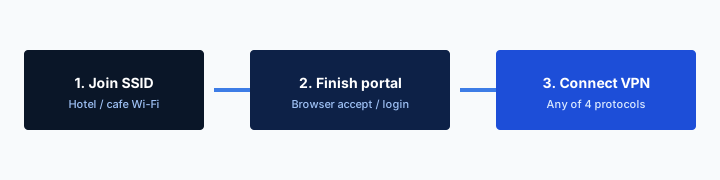
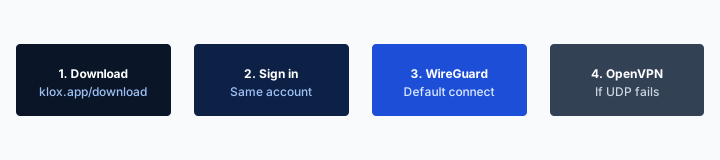
- 1Join the SSID. Do not start the VPN yet.
- 2Open a browser and finish the captive portal.
- 3Open Klox. Connect WireGuard.
- 4If the handshake dies, switch to OpenVPN. Then work.
Do this in order
| Moment | What changed | VPN habit | This page? |
|---|---|---|---|
| Same house, same router | Nothing last-mile | Home-Wi-Fi thesis: want versus need | No, that article |
| Same house, new router | SSID, DHCP, maybe IPv6 | Forget old name, rejoin, leak test | Yes |
| New house or new ISP | Last mile, often the box too | Moving-house article | No, that article |
| Guest SSID you just named | Isolation, visitors | Guest-SSID habit | No, that article |
| Router-VPN on a box you own | Whole LAN hop | Router versus per-device | No, that article |
| Old SSID still in device memory | Saved radio name | Forget it on every seat | This page |
| New box hands IPv6, old did not | Dual-stack old | Test IPv6 leak protection | This page |
Same street. New box. Forget the old SSID. Rejoin. Confirm tunnel DNS. Test old IPv6.
— KloxVPN consumer notes
Cloudflare Learning: What is a VPN?
Wikipedia: Virtual private network
Same apps, new radio
The binary on the laptop did not move. The access point did. Treat Connect on the new SSID as day one, not as a continuation of the old sticker name.
Farms mash every home keyword
Need a VPN at home, moving, guest Wi-Fi, new router: one ranking, one cookie. A swap in the same hallway is a new string and a test. Treat the ranking as a specimen, not a wizard.
Forget the old SSID
The old name is still in every device that ever joined it. Phones offer it first. Laptops auto-join a neighbor if the password was reused. Tablets sit in a saved-network list until you prune them. Forget it on purpose. Windows, macOS, iOS, Android: open the known-networks list and delete the dead string. Then join the new one from the sticker, or from the ISP app, or from the sheet that came in the box.
If you leave the old name saved, two ugly things happen. The device hunts a radio that is off, fails, and looks like the internet is dead. Or a neighbor still uses a similar default name and you join their LAN because the password was the vendor default you never changed last year. Finish whatever splash they have. Then leave. Do not treat the first Wi-Fi name that sorts to the top as the house.
I will not paste OS click-paths that rot next autumn. Search the settings app for known networks, saved networks, or Wi-Fi. Delete the old SSID. Confirm the new one. Then open Klox. Then Connect. WireGuard first.
A VPN does not forget networks for you. Smart Connect does not delete a saved SSID. The OS list is furniture. You own the broom. Do this on all five seats, not only on the laptop you used to email the ISP. The phone in a kid's bag still has the old name. That is how people invent a curse about the new box blocking VPNs. The phone never joined it.
Delete it, then join the sticker
Do not rename in your head. Delete the old string. Join the new one from the label on the bottom of the box, or from the ISP app. Guessing is how you land on a neighbor.
Every seat, not one laptop
Five devices each need the new Wi-Fi. A forgotten tablet on the old name is not tunneled. It is also not on the new LAN. Forget, join, Connect, in that order.
New DHCP, leftover IPv6
A new gateway hands out new leases. New private IPv4 range, often. New DNS the ISP stuffed in the WAN settings, often. Sometimes a v6 prefix the old box never delegated. Dual-stack shows up because the wizard left IPv6 on. A v4-only tunnel without a block can leave the v6 path on the NIC. Features lists IPv6 leak protection as a block. Test it. Do not declare WireGuard dead because a test page showed a v6 you did not know you had.
The IPv6 Leak in Plain English: Two Addresses, One Laptop article owns the physics. This page exists so you do not skip the test after a swap. Baseline with the VPN off so you know what this box looks like in the clear. Then Connect. Then the same tools. A pass is this browser, this network, this moment. It is not a character reference for the old gateway.
Default DNS on a new gateway is the ISP's resolver until you change it, and a consumer VPN that actually connected still wants DNS inside the tunnel. Features lists DNS through the VPN tunnel. I will not invent a custom DNS picker in the Klox app so this article matches a competitor screenshot. Trust that sentence after Connect is up. Do not spend swap day hunting a lab row.
WebRTC can still offer a local candidate if a browser is rude. Features lists WebRTC leak blocking. Run the Leak Test After You Connect a VPN once the new SSID is real. IP, DNS, WebRTC, IPv6. Do the check on the laptop and on a phone. Swap week is when people only test Chrome on the machine they used to read the ISP email. The tablet on the counter is a different stack.
v6 showed up because the wizard left it on
Old brick was v4-only. New box delegates a prefix. Dual-stack is default on a lot of replacements. Test IPv6 on purpose. The leak article owns the clicks.
Tunnel DNS is not the gateway sticker
ISP resolver on the WAN is expected until Connect. After Connect, names should follow the tunnel. If they do not, you are not testing leaks. You are testing a client that did not take the route.
Smart Connect still thinks the old name is home
Smart Connect, if the app shows the row, means connect on untrusted Wi-Fi. The old home SSID was probably marked trusted, or excluded, because you lived on it. The new SSID is a new name. If you wanted the tunnel on house Wi-Fi, confirm the new name is in the habit you meant. If you wanted the tunnel only on cafes, confirm the new name is not treated like a shop just because it still says the vendor on the sticker.
Always-on on a phone does not know you swapped hardware. It will try to hold a peer on the new radio the same way it did on the old one, once the phone actually joins. That is usually what you wanted. It is also how a tablet that never joined the new name still looks idle while you think the house is covered.
Windows and macOS trusted-network lists are OS furniture, not Klox SKUs. If the laptop auto-joins a leftover mesh node you unplugged, you joined a radio that is gone. If it auto-joins a neighbor, you joined a LAN you do not run. Finish whatever splash they have. Then tunnel, or leave.
If the Smart Connect row is missing in the app, you have a Connect button. Use the button after you have a real route. Do not perform a portal ritual that is not there. Load a plain site. If it hangs on the ISP welcome page, you are still in their garden. Complete it. Then Connect. WireGuard first. OpenVPN when that welcome page hates UDP.
New name, old habit
The trusted or untrusted flag lived on the old SSID string. Re-teach the app. Do not assume last month's living-room exception followed the plastic.
Ask which SSID is actually yours
Vendor-default names in an apartment stack look alike. Confirm the sticker, or the ISP app. A neighbor's mesh with a similar name is still their LAN.
This is not a router-VPN project
Putting Klox on the new gateway is a lifestyle choice the Router VPN vs Per-Device Apps article already owns. This page will not clone it. Swap week only adds: the new box is often an ISP-rented gateway. If the lease says you may not alter the firmware, you may not alter the firmware. Put the apps on the devices you carry. I will not coach flashing OpenWrt, DD-WRT, or a vendor GPL drop onto a modem the ISP still owns.
Change the Wi-Fi password. Change the admin password. Turn on WPA2 or WPA3 as the box offers it. Guest isolation if you wanted isolation. Those are owner jobs when the lease lets you into the admin page. They are not a VPN. A VPN is not a firmware update.
If you needed a router hop for bulbs, buy or bring a box you own and put the ISP modem in bridge if they allow that. If they do not allow that, you do not have a router-VPN project. You have five app seats. Do not spend the afternoon of a swap inventing a whole-house hop for a TV that still has no client. I will not invent tvOS. I will not invent a streaming unlock because the living room got a new antenna.
IoT you dumped on Guest because a blog said to still cannot run our app. The camera can wait, or it can sit on Guest without a consumer VPN, which is how most bulbs live anyway. Helpers assembling the shelf do not need your Klox login. Isolation first. Their app, their account, if they even needed a hop.
I will not coach flashing leased gear
No OpenWrt on an ISP modem you do not own. No recovering a brick the carrier will bill you for. Per-device apps from /download. A router you own is a different purchase and a different article.
Sticker passwords are not a personality
Change Wi-Fi and admin passwords on a gateway you are allowed to administer. That is hygiene. It does not replace a tunnel. It also does not require a custom firmware image we do not sell.
Five devices each need the new Wi-Fi
Klox is five simultaneous connections. Install can be more. Connect cannot. A swap does not grow the plan. It also does not shrink it. What it does is leave three phones on the old name and two on the new one, so you think the house is half-tunneled when half the house is still hunting a ghost.
Walk the list. Laptop. Phone. Partner phone. Tablet. The desktop that never sleeps. Forget old SSID. Join new SSID. Open the app. Connect if that is the habit you wanted at home. Sleep is not disconnect. A lid on the desk can keep a peer. Open the app and look. Remove retired devices in the account UI when the old phone is actually in a drawer. I will not invent a portal URL. Use the account page you already use.
A router you left holding a tunnel, if you ever ran one, still counts as one seat until it loses power or you disconnect it. The new box is not automatically that seat. Do not assume a mesh node inherited the old handshake. It did not.
Phone plus laptop at the kitchen table is two. That is the usual first night after a swap. Do not tunnel every gadget you have not named yet. Five is enough for a household that actually carries computers. It is not a seating chart for bulbs.
Ghost names steal evenings
A tablet offering the old SSID looks like a dead internet. Forget the name. Join the new one. Then worry about Connect. Order matters.
The plan did not change because the plastic did
Yearly from $2.83 a month is still five seats. A new gateway is not a sixth. Disconnect what is not in this bag, or live with the error when the sixth handshake tries.
Leak test after the first handshake
Connected is a UI state. The new box has not agreed until you check. After the first handshake on the new SSID, run the after-connect checklist: IP, DNS, WebRTC, IPv6. Baseline with the VPN off so you know what this house looks like in the clear. Then connect. Then the same tools.
If the address did not change after Connect, stop. You are not testing leaks. You are testing a client that did not take the route. Reconnect. Try OpenVPN if WireGuard is stuck on an ISP welcome page. Complete the garden first. Then continue.
IPv6 is louder on a lot of replacement gateways than on the brick you threw in a drawer. Dual-stack shows up because the wizard left it on. A v4-only path without a block can leave v6 on the NIC. Test it. Do not file a ticket that the new router broke VPN because a test page showed a prefix you did not have last month.
Do the check on more than one browser if you can stand it. WebRTC in a second window can still offer a candidate. That is why the checklist exists. I will not paste adapter checkboxes so this URL competes with the test how-to. This page exists so you do not skip the test because the street did not change.
Baseline on this radio
VPN off, What is my IP, write it down. That is this box. Then Connect. The address should move. The old screenshot from last year is not a baseline.
Welcome page before protocol panic
If nothing loads, you are in the ISP garden. Complete it. Then WireGuard. OpenVPN if UDP is rude. Switching protocols while the splash is unfinished wastes twenty minutes.
Yearly price, seven days, cookies
If you bought Klox only because a home-VPN farm said a new router requires a new brand, the consumer window is seven days on first purchase. Live page: /refund. Renewals are not that window. Store purchases follow the store. I would rather you keep the year if the habit already existed on the old box. Yearly from $2.83 a month is not a hardware tax. A new SSID is not a new SKU.
Cookies on this site live at /cookie. The new router's portal cookies are the ISP's. Do not mix those desks when you are hunting a privacy page at midnight. Our cookie URL is /cookie. It is not a policy about the gateway sticker.
WireGuard first on the new radio. OpenVPN when the ISP's welcome page or a rude AP hates UDP. One change, test a site, stop. If both fail, it is the garden, the kill switch, or a client that is still aimed at a network that does not exist. Cellular on a phone is a valid first-night skip while the technician is still in the hallway.
Do not buy a month of a farm brand because a best VPN for home list told you a swap requires a reset, then also keep Klox, then refund neither. Pick one tunnel. Five devices is enough. You do not need a city count to sit in a kitchen that still has the old box in a bag.
First purchase, not a router coupon
The seven-day window is so you can try the apps. It is not a gift because the plastic changed. If you already used a first purchase on the old box, you already used the window.
Our cookie page is /cookie
Site cookies: /cookie. ISP gateway cookies: theirs. A tunnel does not delete those. It also does not require a second privacy URL with a different slug.
Key Takeaways
You replaced the home router at the same address. That is a new radio, not a new Klox product and not a reprint of the moving-house essay. Forget the old SSID. Rejoin. Confirm Smart Connect still means what you meant. Leak-test IP, DNS, WebRTC, and IPv6 on this box. HTTPS already locked the page. The ISP still sees the hop unless that hop is a VPN. Do not flash a leased gateway. Guest isolation is a different URL. A closet hop is a different URL.
Laptop is one of five. Phone plus laptop is two. A tablet still hunting the dead name is not tunneled. Five devices each need the new Wi-Fi. WireGuard first. OpenVPN when the welcome page is rude. Seven days if you bought only because a farm told you a new box needs a new brand. Yearly from $2.83 a month. No city count. No custom DNS picker. No consumer firmware SKU. Cookies at /cookie.
If you wanted cardboard and a new last mile, that essay is next door. If you wanted visitors on Guest, that habit exists. If you wanted a closet box, that is router versus apps. If you wanted want versus need on a house you already live in, that thesis exists. If you wanted a tunnel you will actually use the week the sticker changed, download the apps, teach them the new SSID, and prove the hop before you recycle the old brick.
Related Resources
Forget the old SSID. Teach the apps the new one.
KloxVPN is WireGuard, OpenVPN, OpenConnect, and Shadowsocks, five devices, yearly from $2.83 a month, 7-day first-purchase money-back. Same apps from /download. New box, same house. No replacement-router SKU. Leak-test after the first handshake.
Download KloxVPNFrequently Asked Questions
KloxVPN Team
Experts in VPN infrastructure, network security, and online privacy. The KloxVPN team has been building and operating VPN services since 2019, providing consumer and white-label VPN solutions to thousands of users worldwide.