I installed the Chrome extension, so I am protected. That sentence is the product people want. It is often false. The Klox download page says the quiet part: browser-only traffic. That Chrome is wrapped. Desktop Slack is not. The mail app is not. Firefox is not. Safari is not. Edge is not, unless you installed something else there. A green toggle in one window is not a NIC.
This is not VPN Browser Extension vs App: Which to Use. That piece is the feature compare: scope tables, when to pick which, mobile has no extension story. I will point at it. I will not rewrite the matrix. This page is the honesty pass. What still leaves in the clear. When the leftover is acceptable. When you need the system app from download. WebRTC can still volunteer an address; the WebRTC and a VPN, in Plain English article is the call stack. HTTPS still locked page bodies; VPN vs HTTPS in Plain English: Two Locks, Two Hops is that split. I will borrow those leftovers. I will not clone those URLs.
A VPN in the system-app sense wraps a path from the device to a server you picked. Wikipedia's VPN page is the noun. The Chrome item is a proxy-shaped product for that browser. Do not invent WireGuard inside the extension. Do not invent OpenVPN inside the extension. Those protocols live on the apps. RFC 8446 is TLS 1.3 on the website. It is not a tunnel and it is not a Chrome proxy. The cafe can still see hops from Slack while Chrome looks 'on VPN.' Split the windows.
KloxVPN is WireGuard, OpenVPN, OpenConnect, and Shadowsocks on the apps, five devices, yearly from $2.83 a month, 7-day money-back on first purchase. The Chrome extension is listed on download with a Chrome Web Store button: KloxVPN Secure Proxy. Tagline in the grid is quick browser protection. Feature line is browser-only traffic. I will not claim the extension is a free extra seat. If a session counts toward the five, sales can confirm. The seat you should budget is the system app. Cookies: /cookie.
I have a bias. Use the extension when you only needed that Chrome. Use the app when anything else talks. Do not let a store listing talk you into a cape. Farms will. This URL will not.
If you already read the compare post and still installed only the tile, this page is the second chance. Name the leftover. Slack. Mail. The other browser. OS updates. Then decide. A leftover you can say out loud is a product choice. A leftover you discover on cafe Wi-Fi after mail has already fetched is a leak you did not budget. Yearly from $2.83 a month is cheap enough that the app should be the default for travel. The extension stays for the locked-down Chrome and for the day you only needed a tab.
Related reading: White-Label VPN and Chrome Web Store and What is a VPN?. Android VPN setup and iOS VPN setup.
Looking for a reliable VPN?
KloxVPN — from $2.83/month. Apps for every device.
Browser-only is the product
The download grid is honest if you read the fourth feature on Chrome: browser-only traffic. One-click connect. Works with Chrome. Lightweight. That is the SKU. It is not 'the laptop is covered.' It is not 'every Chromium fork.' It is Chrome, that profile, that extension, traffic the browser actually sends through the proxy the extension set.
People hear VPN and picture the phone app: one Connect, the whole radio. Extensions are not that picture. They sit in the browser process. They can set a proxy. They can claim a tunnel for tabs. They cannot reach into Slack's electron net stack unless Slack is a tab, which desktop Slack is not. They cannot wrap the updater. They cannot wrap a second browser you opened because a site hated Chrome.
I will not write a protocol decoder for the store listing. WireGuard, OpenVPN, OpenConnect, and Shadowsocks are app sentences. The extension is proxy-shaped. If a future build changes that, the download page will change. Until then, treat the tagline as the spec. Browser-only. Full stop.
The compare article will sell you a table of extension versus app. Useful. This page exists because people read the table, install the lighter thing, and then answer 'are you on a VPN?' with yes while Mail.exe fetches in the clear. Honesty is the leftover after the table.
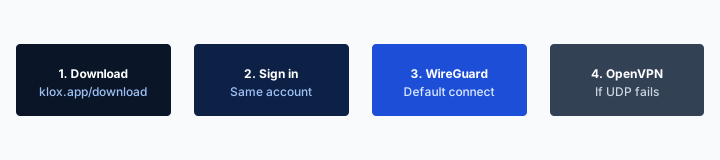
- 1Download the app from klox.app/download — not a random APK site.
- 2Sign in with the account you paid for.
- 3Press WireGuard. Wait for the connected state.
- 4If it fails, try OpenVPN. Still failing: note the network (hotel, campus, home) before you write support.
First successful connect
| Traffic | In the extension hop? | Use instead |
|---|---|---|
| Tabs in that Chrome | Yes, if the extension is on | Extension is enough for this row |
| Desktop Slack / Teams / Discord app | No | System app |
| Mail app, Outlook, Apple Mail | No | System app |
| Firefox, Safari, Edge, another Chrome profile | No | System app, or an extension in that browser if it exists |
| OS updates, cloud sync, games | No | System app |
| Chrome WebRTC STUN old | Maybe not; test | App WebRTC leak blocking, plus the WebRTC article |
Browser-only traffic means that Chrome. It does not mean the laptop.
— KloxVPN consumer notes
Cloudflare Learning: What is a VPN?
What this post is not
Not the extension-versus-app feature compare. Not the WebRTC call-stack explainer. Not VPN versus HTTPS. Those three related slugs already did their jobs. This is the sentence people get wrong after they install.
Tagline is the spec
Download lists browser-only traffic on the Chrome card. I will not upgrade that line into a system VPN because a farm screenshot looked greener.
What still leaves in the clear
Desktop Slack. Desktop Teams. Discord as an app. Mail clients. The other browser. Background sync. App-store updates. A game launcher. A code editor fetching packages. A password-manager desktop helper. Anything that did not go through that Chrome process. On cafe Wi-Fi, those sockets still look like cafe sockets. HTTPS may still lock the payload. The cafe still gets the hop map for those apps. The extension did not buy you that map.
People mash 'I have a VPN' with 'I have an extension.' Then they join hotel Wi-Fi, open Slack, and feel clever. Slack did not talk to the extension. The how-to public-Wi-Fi article still wants a system tunnel before mail and chat. That advice did not expire because you added a Chrome tile.
A second Chrome profile can be a second story. Extensions are per profile. Work profile without the add-on is clear. Guest Chrome is clear. Incognito may disable extensions unless you allowed it. Check the puzzle-piece menu. Do not assume the toggle you saw in personal Chrome followed you into the window you actually use for banking.
I still want the extension for a locked-down PC where you cannot install a system app. Shared machine, no admin, you only needed to search. That leftover is named. Mail stays in a web tab in that same Chrome, or you skip mail. The moment you open the desktop client, you left the product.
Cloud sync is the quiet one. OneDrive, Dropbox, Google Drive as a desktop helper, iCloud on a Mac: those are not tabs. They talk while you are looking at Chrome feeling protected. On a cafe AP that is a hop map you donated without opening a window you thought about. The same is true for a password-manager helper that is not the web vault. If the process is not Chrome, the extension is not in the path. Say that twice if you have to. Then install the app or close the helpers for the hour.
Slack is the example that sticks
Desktop Slack is not a Chrome tab. The extension does not wrap it. If work chat matters on cafe Wi-Fi, install the system app. I will keep saying Slack until it sticks.
Other browsers are other products
Firefox did not inherit your Chrome proxy. Safari did not. Edge did not. One store listing, one browser. The app covers the NIC instead.
WebRTC still has a mouth
WebRTC is how a tab makes a call. STUN can ask the LAN for a public IP while you believe the extension hid you. That surprise is documented in the WebRTC plain-English piece. Klox apps list WebRTC leak blocking on the features page. I will not invent that the Chrome extension clones that control. Test if you care. Do not treat a green proxy icon as a STUN mute.
The compare article already warned that extensions can leak WebRTC if they only set a proxy. I am repeating it because honesty posts exist for repetition. A test page can show your home IP in a candidate list while tabs load through the proxy. People screenshot that and declare the store listing a scam. Different mechanism. Different leftover. Read the WebRTC URL. Then decide if the leftover bothers you enough to install the app.
HTTPS versus VPN is the other mash. RFC 8446 locked the page. The extension, when it is working, changed the hop for that tab. Both can be true. Neither wraps Slack. The HTTPS article is the lock. This article is the window. Keep the drawers labeled.
If you never open a page that runs the script, you may never see a WebRTC leftover. Trackers and test pages do run the script. Cafe days are when people test. Test after the extension is on, then test after the system app is on. Expect different pictures. That difference is the point of this URL.

A test page is not the tunnel lying
STUN volunteered a candidate. The tab may still have used the proxy for HTTPS. Split the screenshot before you refund. Then read the WebRTC post if the candidate still bothers you.
Do not invent app features in Chrome
IPv6 leak protection, kill switch, WireGuard: app sentences. If the extension UI does not show them, they are not there. Download the app for those.
When the extension is enough
You only browse in that Chrome. Mail is a tab, not an app. Chat is a tab. You are on a machine that will not let you install a system VPN. School image, work laptop with no admin, a library PC you should not install anything on anyway. Wait. Library PCs: do not install random extensions on a profile the next patron inherits. That leftover belongs to the library habit. On your own locked-down work laptop, an extension you control is a narrower leftover.
Quick hop for a site that only needed a different egress IP in that tab. You understand it is that tab. You will not open banking in the mail app during the same session and call it protected. You will not join a cafe and leave Slack on.
Lightweight is real. No TUN adapter prompt. No always-on fight with a printer. Split tunnel, if you even wanted it, is 'this browser versus the universe,' which is a blunt split you can reason about. The app's split tunnel, if the row exists, is a different UI. Do not mash them.
I use the extension when I am already in Chrome and I only needed the tab path. I use the app when I leave the house with a laptop that runs more than Chrome. Both can live on the same machine. Both can confuse you if both are on and you cannot tell which hop a packet used. Prefer one primary. Use the other as an exception you can name.
No admin, Chrome only
The store listing exists for that chair. Browser-only is still honest. Skip desktop mail. Skip Slack. Or accept those sockets as clear.
A named leftover is allowed
Enough means you can say what is not covered. If you cannot list Slack and the other browser, it is not enough. Install the app.
When you need the system app
Cafe Wi-Fi, hotel Wi-Fi, airport, any LAN you do not run, and more than one process talking. That is the app. Kill switch lives there, if your build shows it. Smart Connect on untrusted Wi-Fi lives there. WireGuard first, OpenVPN when the AP is rude: app sentences. Five-device seating is about connected apps, not about how many Chrome profiles you opened.
Phones do not get this extension story. iOS and Android are apps. If your life is a phone plus a laptop, the laptop's Chrome tile does not cover the phone. Two seats if both apps are up. The extension on the laptop does not replace the laptop app if Slack is open. Count processes, not icons.
Remote work that is Slack plus a browser plus a mail client is the app. A 'quick extension' is how you encrypt the LMS tab and donate the hop for the standup. I would rather you download the app once than collect green toggles.
If both are installed, and the app is connected, the extension is often redundant. Redundant can fight. If a site misbehaves, disable one, not both at random, not three settings from a farm GIF. One change, test a site, stop.
Hotel and airport radios still hate UDP. That fight is an app fight: WireGuard, then OpenVPN, often TCP. The extension cannot protocol-hop because I did not invent protocols inside Chrome. If the add-on fails on a rude portal, you still have the splash-page sequence from the cafe habit, and you still have the system client. Do not sit in a lounge debugging a proxy icon while the app would have shaken hands in ten seconds. Download it before you fly. The travel checklist exists for that. This page will not pack your bag. It will say the tile is not the bag.
Public Wi-Fi wants the NIC
The public-Wi-Fi guide still wants a system tunnel before mail and chat. An extension is not that tunnel. Cafe habit, hotel habit, library habit: those assume an app on a machine you own.
Phone plus laptop is still two apps
Chrome on the laptop does not wrap the phone. Install the mobile app. Five devices. Two of them are the travel kit. The extension is not a third kit item that covers either.
Seats, and what I will not invent
Klox consumer is five simultaneous devices. Install is free of the counter. Connect is not. The system app is the seat I want you to budget. I will not invent that the Chrome extension is a free extra connection on top of five. I will not invent that it does not count. If you need the accounting for a mixed setup, ask sales. Consumer default: assume anything that holds a live session can cost a seat, and keep the five for apps you can name.
Ghost devices are still how you hit the cap. A tablet at home, a TV, a router. Adding an extension does not magically create a sixth. Removing an extension does not magically free a phone. Open the device list in the portal. Do not debug Chrome when the error is the couch.
Yearly from $2.83 a month does not get cheaper because you only installed an add-on. It does not get more expensive. The 7-day window is still first purchase if you bought a year, then realized you only wanted a proxy in one browser and you resent the rest. Refunds: /refund. Store purchases follow the store. The Chrome Web Store has its own listing and its own complaint path. Use ours for the account. Use Google's for the add-on listing.
I would rather you keep the year and install the Windows or Mac app. The extension can stay as a narrow tool. Seats stay honest. Farms will imply unlimited browser hops. We will not.
Budget the system app
Five seats are for connected apps. Do not plan a household around a maybe on the extension. If the mixed count matters, ask. Do not guess in a blog comment.
Seven days if you only wanted a tile
If the whole product for you was a Chrome proxy and you dislike the honesty, use the first-purchase window. If you will travel with a laptop that runs Slack, keep the year and install the app.
Install from download, not a random zip
The live path is download, Chrome card, Chrome Web Store button. The store URL we ship is https://chromewebstore.google.com/detail/kloxvpn-secure-proxy/cghijemebcphfkipimjcakacdemajgab. Use that listing. A zip on the same download page exists as a secondary. Prefer the store so updates are Google's problem. Do not sideload a 'Klox' CRX a stranger emailed. Phishing an extension is still phishing. A proxy to a thief is still a proxy.
Chrome 88+ is the min line on the card as of this writing. If the store says otherwise, the store wins. Pin the extension if you want to see the icon. Open the details. If it asks for every site, that is how a proxy works. If a listing asks for things that look like a password manager, walk away. Ours is a hop for tabs, not a vault.
Work Chrome may block store installs. Then you do not have this product on that image. Use the system app if policy allows. Use cellular. Do not break MDM to add a proxy. School and work AUPs still apply. This is not a bypass guide.
After install, connect, load a boring site, then optionally a leak test if you care. WebRTC article for the candidate list. HTTPS article if you still think the lock was the tunnel. Then go do the thing you opened Chrome for. Fiddling with cities in an extension is how you get slow and still leave Slack clear.
Store URL, not a hallway APK
Chrome Web Store listing above. Download page is the index. Random GitHub zips are how you install someone else's proxy. Do not.
Policy can refuse the add-on
Managed Chrome will ignore you. That is the image doing its job. The system app may also be blocked. Cellular or accept the LAN. I will not help you fight MDM.
Honesty versus farms
Farm copy will say a browser extension is a VPN, full stop. Sometimes they bury 'browser only' under a fold. Sometimes they show a laptop silhouette. The silhouette is a lie if Slack is open. Competitor extension pages are useful specimens. Nord and friends will describe their own add-on. Read their leftover sentences. Then read ours. Browser-only traffic is the line I want in the same paragraph as the store button.
I will not rank city counts. I will not promise streaming catalogs I did not promise on the app either. I will not say the extension is safer than the app. Safer at what. Safer at not needing admin. Worse at covering the NIC. Pick the job.
Klox apps remain WireGuard, OpenVPN, OpenConnect, and Shadowsocks, five devices, yearly from $2.83 a month, 7-day first-purchase money-back. Smart Connect and kill switch are app conversations. Cookies on the website: /cookie. Privacy is a different page. The extension does not replace those documents.
If you wanted the matrix, the compare post is next door. If you wanted STUN English, WebRTC. If you wanted the lock versus the hop, HTTPS. If you wanted a tile that only does what it says, download the extension from the store URL, and download the app when the leftover list includes Slack. That is the whole honesty.
A green toggle is not a NIC
Icons lie by omission. The omission is every process that is not that Chrome. Say the omission out loud or install the app.
Farms sell completeness
Completeness is the system app, and even that is not phishing insurance. The extension is a smaller product. Smaller is allowed. Silent is not.
Key Takeaways
The Chrome extension is browser-only traffic. That is the download tagline, and it is the spec. Slack, desktop mail, other browsers, and the rest of the NIC do not go through it. WebRTC can still volunteer an address. HTTPS still locked the page. Neither fact turns a proxy icon into a system VPN.
Install from /download or the Chrome Web Store listing. Prefer the store. Do not invent WireGuard inside Chrome. WireGuard, OpenVPN, OpenConnect, and Shadowsocks live on the apps. Five devices. Yearly from $2.83 a month. Seven days on first purchase if you bought a cape and received a tile. Cookies at /cookie.
If you wanted a feature matrix, the extension-versus-app post already exists. If you wanted STUN, read WebRTC in plain English. If you wanted the lock, read VPN versus HTTPS. If you wanted the hop that actually covers cafe Slack, download the system app. Practice once at home: extension on, Slack still clear, then app on, Slack inside the hop. That rehearsal is cheaper than a ranked list that called the tile a VPN and stopped typing.
Related Resources
Browser-only means that Chrome. Download the app when it does not.
KloxVPN is WireGuard, OpenVPN, OpenConnect, and Shadowsocks on the apps, five devices, yearly from $2.83 a month, 7-day first-purchase money-back. The Chrome extension is browser-only traffic. Get it from the Chrome Web Store via the download page, and install the system app when Slack and mail still talk.
Download KloxVPNFrequently Asked Questions
KloxVPN Team
Experts in VPN infrastructure, network security, and online privacy. The KloxVPN team has been building and operating VPN services since 2019, providing consumer and white-label VPN solutions to thousands of users worldwide.