A VPN on a kid's tablet is a seat, not a nanny. KloxVPN is a consumer tunnel: WireGuard, OpenVPN, OpenConnect, and Shadowsocks, five devices, yearly from $2.83 a month, 7-day money-back on first purchase. It is not a parental-control product. We do not sell a kids SKU. We do not ship a family dashboard. We do not ship safe search. We do not ship screen time. If a ranked list told you a VPN would keep a child off YouTube, that list sold a cookie. Buy Apple Screen Time, Google Family Link, or a dedicated filter if supervision is the job. Those are different products. Point at them. Do not ask our Connect button to be them.
This is not the Family VPN on Five Devices. That piece is who sits in the five slots. This page is the honesty problem when one of those slots is a child. This is not White-Label VPN and Family Plan Positioning. That is a brand operator writing copy. You are a household. This is not When to Use a VPN Daily: Habits That Help as a personal habit, though the daily question still applies to the adult phones. This is not Do You Need a VPN on Home Wi-Fi?. Home Wi-Fi is a yes-or-no for the hop. A child on that hop is still not a filter.
A VPN wraps the path from a device to a server you picked. Wikipedia's VPN page is the noun. RFC 8446 is TLS 1.3 on the website. It is not a tunnel and it is not a babysitter. HTTPS already encrypted the page on most sites a tablet actually opens. The remainder is the hop: destination IPs, often SNI, DNS if queries are in the clear. A tunnel hides that map from the cafe or the ISP. It does not hide the video from the child. Encrypted Client Hello exists in the industry and is uneven. None of that is Screen Time.
Pricing is the live number. Download is the apps. Smart Connect, if the app shows the row, means connect on untrusted Wi-Fi. A kid iPad that auto-connects still holds a seat. If the row is missing, someone has to press Connect. I will not invent an on-device child profile. Cookies on this site live at /cookie. I have a bias. If you wanted supervision, buy supervision. If you wanted a hop on a tablet that leaves the house, spend one of five seats and say so. If you bought Klox under the other story, use the seven days.
Related reading: What is a VPN? and WireGuard vs OpenVPN.
Looking for a reliable VPN?
KloxVPN — from $2.83/month. Apps for every device.
A tunnel is not a nanny
Supervision is: what apps open, how long, which sites, who can call, whether YouTube is even installed. Apple ships Screen Time for that job on iPhone and iPad. Google ships Family Link for a lot of Android and Chromebook households. Schools ship MDM and filters. Those products break on purpose. A VPN is a path. It encrypts toward a server you chose. It does not read the video. It does not close the app at 21:00. It does not send you a weekly report. If that sentence disappoints you, good. Stop here and buy the OS tools. Then decide whether you still want a hop.
Farms rank best VPN for kids because parents search that string. The pages mash encryption, 'safe browsing,' and a family plan into one cape. Some consumer brands do ship a content filter as an extra. Klox does not. I will not invent a SafeKids toggle so we look complete in a comparison table. Completeness would be a lie. The lie is how chargebacks start.
You can still put Klox on a tablet a child uses. The reason is the same as an adult laptop in a cafe: you do not want that LAN to see the hop. School Wi-Fi, grandma's house, a hotel room on a family trip. The tablet is one of five seats while the session is up. The child can still open anything the OS and the school allow. A tunnel can even make some school filters angrier, because the filter wanted to see destinations and now it sees a VPN. That is a school policy problem. I am not the school. I will not tell you to evade a filter. I will tell you a consumer VPN is the wrong tool if evasion was the search.
I have watched adults install a VPN, skip Screen Time, and then write that the product failed when a cartoon autoplayed something they hated. The product did not fail. The purchase did. This article exists so the next purchase is named.
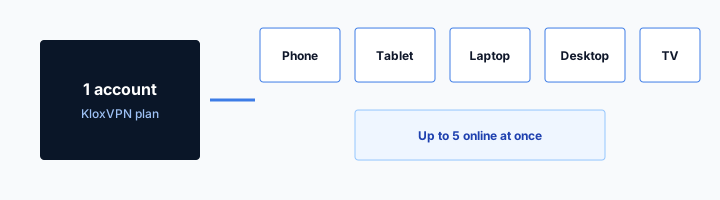
- 1Skim the seating / order diagram.
- 2Do the numbered steps once on your real network.
- 3Use the FAQ if a sentence was too long.
- 4Follow one related article — not ten tabs.
How to read this page
| Job | Does Klox do it? | What actually does it | Seat cost |
|---|---|---|---|
| Hide destinations from cafe or hotel Wi-Fi | Yes, if connected | The tunnel on that tablet | 1 of 5 while connected |
| Block YouTube or a site category | No | Screen Time, Family Link, school filter, a dedicated nanny app | 0 from us; those are other products |
| Cap hours at 21:00 | No | OS screen time, Family Link limits | 0 from us |
| Safe search as a product feature | No | The search engine and the OS, if you set them | 0 from us |
| Family dashboard of every child's taps | No | Apple, Google, or a supervision vendor | We do not ship this screen |
A tunnel hides a hop. It does not raise a child.
— KloxVPN consumer notes
Cloudflare Learning: What is a VPN?
Wikipedia: Virtual private network
SafetyDetectives: best VPNs (competitor specimen for kids lists)
If you wanted a filter, stop reading the farm
Buy Screen Time or Family Link first. Add a dedicated filter if you still want one. Then, if cafe hops still bother you, come back for a seat. Order matters. Reverse it and you will hate the tunnel for a job it refused.
If you wanted a hop, say hop
Family trip. Hotel splash. Grandma's open Wi-Fi. The tablet leaves the house. One seat. Same habit as an adult: portal first, then WireGuard. The child does not need a story about nannies to justify a hop.
Seats versus supervision
Five simultaneous connections. A kid iPad connected is one. An adult phone is one. A homework laptop is one. The TV is one if you connected an app you control. A router is one and then covers a house, which is the seating-chart article. Install is free of the counter. Connect is not. Sleep is not disconnect. Auto-connect on a tablet on the couch is how you discover the cap at a hotel desk.
Supervision does not free a seat. Screen Time can lock the iPad and the Klox session can still be up. Family Link can limit apps and the tunnel can still hold. The reverse is also true: you can disconnect Klox and the child still has YouTube if the OS allows it. Do not use 'I turned the VPN off' as a bedtime. Bedtime is Screen Time. Off is a hop you stopped paying for.
Shared households fight about the fifth seat. I would rather you write names on paper than invent a kids plan we do not sell. Two adults who commute plus one homework laptop plus one kid tablet is four if all four hold a session. Fine. Add a travel stick and a home router and you are over. Disconnect furniture. The child is not the villain in that math. The forgotten tablet is.
Smart Connect, if the row exists, will treat cafe Wi-Fi as untrusted and connect. On a kid tablet that is either what you wanted or a seat you did not mean to spend every time they join the library SSID. If the row is missing, the child has to press Connect, which means the child can also not press Connect. That is not a parental control. That is a button. Plan for the button.
Connected is the word that costs money
Installed on eight gadgets, connected on five. Legal. Connected on six is not. When a sixth tries, you get an error or a kicked session. Teach the house the error. It is not 'the VPN is down.' It is 'we overbooked the car.'
Supervision lives in another Settings app
iOS Settings, Screen Time. Android, Family Link. School MDM, the school's portal. Klox Settings is protocol, kill switch, maybe Smart Connect. If you cannot find a bedtime slider, it is because we did not put one there.
Shared Apple ID is a mess
A lot of households still share one Apple ID between a parent and a kid iPad. Purchases are easy. Everything else is ugly. iCloud, Find My, app settings, and sometimes a VPN login cached in a password manager all collapse into one identity. If the child can open the App Store as you, they can also install and uninstall. If they can see your Keychain, they can see more than a tunnel password.
I am not going to write a full Apple-ID architecture. Apple wants a child account under Family Sharing for a reason. Use that if you can. A shared ID plus a consumer VPN is not a family plan. It is one login on two pieces of glass. When you rotate the Klox password because a device was lost, you rotate it for everyone on that ID. When the child signs out of iCloud to 'fix YouTube,' they may sign your mail out too. That is not a Klox defect.
Do not type the Klox password into a school form or a tablet 'parent gate' that is not our app. Do not store it on a sticky note on the kid case. The portal email is the recovery path. Protect that mailbox. Two-factor on the mailbox is a different article and still true here. A tunnel does not lock the inbox that can reset the tunnel.
If the kid iPad uses a managed Apple ID from a school, you may not be allowed to install Klox at all. That is the school image. I will not tell you to sideload around it. Home tablet versus school tablet is the next section. Shared ID is the home mess. Fix the ID before you add a fifth seat you will resent.

Family Sharing is Apple's product, not ours
Child accounts, Ask to Buy, Screen Time across devices: Apple's house. We do not mirror that UI. We offer five sessions on one Klox account. One adult should own that account. The child uses a device, not the billing identity, if you can keep those apart.
Password reuse on the tablet is still reuse
A VPN does not replace unique passwords. A child who types the same word into games and mail is the same risk with or without WireGuard. I said this in the home-Wi-Fi piece. It is still true on a pink case.
School tablet versus home tablet
A school tablet is often locked. MDM. A filter. A profile that blocks unknown VPNs. If Klox will not install, that is the profile. If it installs and will not handshake, that may be the filter or a UDP allergy. OpenVPN on TCP is the spare tire on rude networks. It is not a hall pass. If the school forbids personal VPNs, that is their network. I am not your lawyer. I am not the district. I will not invent a policy that says you must tunnel at school. I will not invent a policy that says you must not. Read their acceptable-use page.
A home tablet is yours. Home Wi-Fi may not need a tunnel every hour. The home-Wi-Fi essay is the yes-or-no. A child on home Wi-Fi still has YouTube if you left YouTube installed. Connecting Klox at the kitchen table does not change the cartoon. It changes whether your ISP sees the name of the cartoon's CDN as clearly. Some parents want that. Some do not. Neither choice is a bedtime.
Travel tablets are the honest Klox case. Hotel room number, then tunnel. Cafe splash, then tunnel. Same habit as the adult laptop. The child does not need a different protocol. WireGuard first. OpenVPN when the hotel hates UDP. Pause the kill switch through the portal. The tablet is still one seat. The school tablet in the backpack, if it is holding a session from home, is still a seat. Turn it off or disconnect before you spend the fifth on a lobby laptop.
Do not put Klox on a school device to 'protect them at school' if the school already filters and forbids extra tunnels. You will get a detention conversation and a ticket we cannot resolve. Protect the hop on the device you own, on networks you chose to join.
If the school image blocks the app, stop
That is MDM. Home tablet for the hop. School tablet for school. Mixing those jobs is how you spend a Sunday on a profile you cannot delete.
Travel is the clean reason
Hotel, cafe, airport, grandma. Portal, then WireGuard. One seat. No nanny story required. The hotel habit and the cafe habit are the timing. This page is the seating and the honesty.
What still gets through
YouTube. TikTok if it is installed. A browser. A game chat. An ad in a free app. HTTPS pages the child is allowed to open. A VPN does not stop those. RFC 8446 still encrypts the site. The child still sees the site. The cafe sees less of the map if the tunnel is up. You, the parent, see nothing new in a Klox dashboard, because there is no Klox dashboard of their taps.
Malware still installs if they sideload and the OS allows it. Phishing still works if they type a password into a fake page. A tunnel does not scan the attachment. I said this in the cafe piece and it is still true on a kid tablet. Encryption is not authentication of the cartoon site. It is not a virus product. It is not a teacher.
A kill switch on the tablet fail-closes that tablet if the tunnel dies. That can look like 'the internet is broken' to a child, which is a support night for you. It is not a content block. When the tunnel is down and the switch is off, the tablet is on the LAN in the clear, still able to open whatever the OS allows. Fail-closed is a leak tool. Do not sell it to yourself as a bedtime.
Smart Connect, if present, will connect on untrusted Wi-Fi. It will not refuse a site. It will not phone you. If you need a phone call when they open an app, that is Family Link or Screen Time notifications, or a human in the room. I will not invent a push alert for 'child watched a video.' We do not have that event.
The video still plays
If the app is installed and the OS allows it, the tunnel carries it. That is the product working. If you did not want the video, uninstall the app or set Screen Time. Do not file a ticket that WireGuard failed.
The cafe still sees a VPN blob
With a tunnel: SSID use, volume, a VPN endpoint. Without: IPs, often names, DNS. Neither view is a parental report. If you wanted a report, you bought the wrong noun.
When the kid hits the cap
The sixth connect fails. Someone is kicked. The homework laptop cannot join because the iPad on the couch is still peered. This is the seating-chart fight with a smaller cast. Disconnect the tablet. Or disconnect a ghost phone. Or take the tablet off auto-connect so home Wi-Fi does not keep a session. Do not buy a second Klox account 'for the kids.' We did not design a kids line. Two accounts is two bills and a mess when someone shares a password anyway.
A child who learns they can hold a seat has learned a lever. That is not malice. That is a button that says Connected. If you need the laptop more than the tablet, you have to be the person who disconnects the tablet. There is no parent override screen in our app. There is the portal device list and the app on the glass. Use them. Remove retired iPads when you hand the old one down. Hand-me-downs that still hold a session are how families invent a curse.
I would rather you keep the kid tablet off the VPN at home if home Wi-Fi is a skip you already chose, and connect it on trips. That saves a seat for the adults who leave the house every day. It is also honest: you did not need a hop on the kitchen SSID. You needed a hop at the hotel. The daily-use essay is the adult version of that judgment. Apply it to the tablet without dressing it up as safety theater.
If five is too small because every human has two gadgets and you refuse a router, you are over the product. Unlimited-device brands exist with other tradeoffs. Read those homepages. Do not ask us to pretend five is unlimited for a child. Five is five.
Couch tablet is the usual thief
Auto-connect, lid closed, still peered. Open the app. Disconnect. Mark home trusted if you want the habit only on cafes. Smart Connect, if you have it, is untrusted Wi-Fi. Home marked trusted should not hold a tunnel. If you never marked home, the couch is in the five.
Do not open a second account as a kids plan
That is two logins, two renewals, and a password on a sticky note. One account, five seats, a paper chart. If that cannot work, the product is the wrong size. Say so. Use the seven days if you just bought it.
What to buy instead
Buy Apple Screen Time if the glass is Apple. Downtime, app limits, communication limits, content restrictions. That is Apple's list. I will not paste their help article into ours. Open Settings. Buy Google Family Link if the glass is Android and you want a parent app. Location, app approvals, bedtime. That is Google's list. Buy a dedicated filter or nanny app if you still want category blocks after the OS tools. Qustodio, Net Nanny, and the rest are other companies. I am not ranking them. I am naming the aisle.
Buy a school-issued workflow if the tablet is the school's. Their filter, their MDM, their ticket. Do not mix a consumer VPN into that aisle unless the school said you may.
Buy Klox if you also want a hop on devices you own, on networks you do not run, and you can live with five seats and no supervision UI. WireGuard first. OpenVPN when the network is rude. Yearly from $2.83 a month. That is the product. It sits next to Screen Time. It does not replace it. A household can own both. A household that owns only the tunnel and expects bedtime will be angry. I would like you not to be angry at a Connect button for a job we never shipped.
White-label operators sometimes want a 'family plan' sentence in their store. That is the positioning essay. You are not that operator. You are a parent with a cart. Do not copy their SKU names onto our pricing page. Our pricing page is five devices. See it. If the number is wrong for your house, leave.
OS tools first, tunnel second
Screen Time or Family Link this afternoon. Klox if you still want the hop. Reverse the order and you will spend the afternoon looking for a filter we do not have. The seven-day window is not a parenting class.
We will not ship a fake kids row
No Safe Search in our settings. No child PIN. No weekly report. If a competitor shows those, they built a different pile. Compare honestly or do not compare. Farms will not help you do that.
Honest CTA and seven days
If you read this far and you still want a tunnel on a kid tablet for hotels and cafes, see pricing. Five devices. Yearly from $2.83 a month. 7-day money-back on first purchase. Download the apps. Install on the tablet you own. Count the seat. Set Screen Time or Family Link in the other Settings app. Do not wait for us to merge those screens.
If you read this far and you wanted a nanny, do not buy Klox for that job. Use the OS. Use a filter vendor. If you already bought under the farm story, the consumer window is seven days on first purchase. Live page: /refund. Renewals are not that window. Processing is typically several business days to the original method. Store purchases follow the store. Use the window. Do not chargeback a Connect button for missing bedtime. Chargebacks are a different mess.
I would rather you keep the year if adults in the house will use cafes and hotels anyway. The kid tablet is then an optional extra seat, not the reason you paid. If the kid tablet was the whole reason and you now know it was the wrong noun, refund. That is the adult move. Resentment is how people leave a subscription running and then lie to the next farm quiz.
No city count. No SOC 2 story for a tablet. No dedicated-IP consumer SKU. No kids SKU. Cookies for this site: /cookie. WireGuard, OpenVPN, OpenConnect, and Shadowsocks. Five seats. A hop. Not a nanny.
First purchase, not a free week of parenting
The window is so you can try the apps. It is not a trial of Screen Time. If you already used a first purchase, you already used the window. The OS tools are still free in Settings.
Pricing is the honest next click
See the number. See five devices. If that is the household you have, buy it for the hop. If you needed a dashboard of a child's taps, you are on the wrong URL. Leave before the card, or refund inside seven days if the card already went.
Key Takeaways
KloxVPN is a tunnel, not a nanny. A kid iPad that is connected is one of five seats. It does not block YouTube. It does not cap hours. It does not offer safe search or a family dashboard. Apple Screen Time and Google Family Link are the supervision aisle. Buy them if that was the job.
Shared Apple IDs make the mess worse. School tablets are often the school's. Travel is the clean reason for a hop: portal, then WireGuard, then OpenVPN if UDP is rude. Smart Connect, if the row exists, spends a seat on untrusted Wi-Fi. The couch tablet is the usual thief. Yearly from $2.83 a month. Seven days on first purchase if you bought the wrong noun. Cookies: /cookie.
If you wanted a seating chart, a white-label family sentence, a daily-use habit, or home Wi-Fi yes-or-no, those URLs are next door. If you wanted a hop on glass you own, see pricing, count to five, and keep bedtime in the other Settings app.
Related Resources
Five seats. No nanny. See the number.
KloxVPN is WireGuard, OpenVPN, OpenConnect, and Shadowsocks, five devices, yearly from $2.83 a month, 7-day first-purchase money-back. Not Screen Time. Not Family Link. A kid tablet is one seat if you connect it. See pricing if the hop is still the job.
See KloxVPN pricingFrequently Asked Questions
KloxVPN Team
Experts in VPN infrastructure, network security, and online privacy. The KloxVPN team has been building and operating VPN services since 2019, providing consumer and white-label VPN solutions to thousands of users worldwide.